25
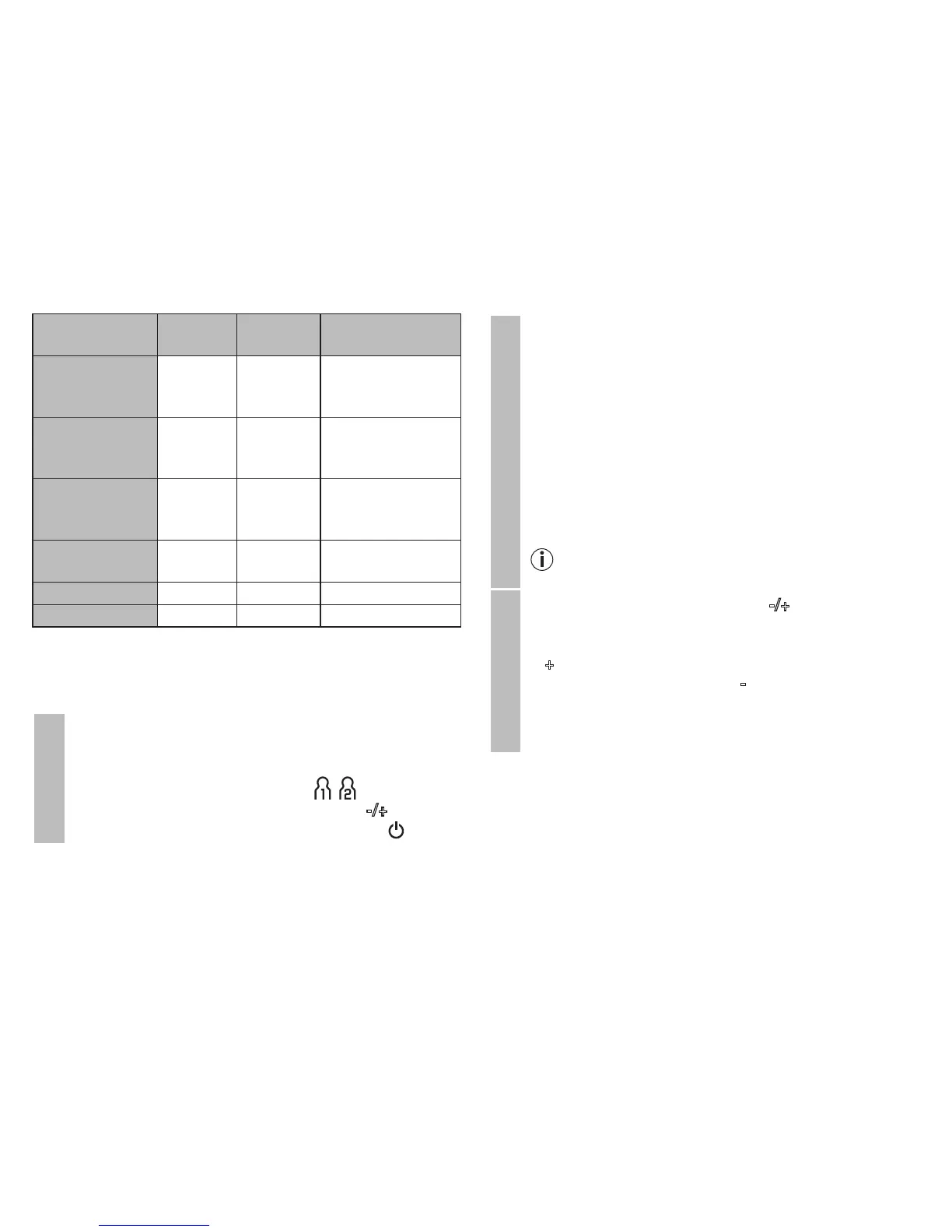
Blood pressure
value category
Systole
(in mmHg)
Diastole
(in mmHg)
Action
Setting 3:
severe
hypertension
≥ 180 ≥ 110
seek medical at-
tention
Setting 2:
moderate
hypertension
160 – 179 100 – 109
seek medical at-
tention
Setting 1:
mild
hypertension
140 – 159 90 – 99
regular monitoring
by doctor
High normal 130 – 139 85 – 89
regular monitoring
by doctor
Normal 120 – 129 80 – 84 self-monitoring
Optimal < 120 < 80 self-monitoring
Source: WHO, 1999 (World Health Organization)
7. Saving, displaying and deleting measured
values
User memory
The results of every successful measurement are stored
together with the date and time. If there are more than 60
measurements, the oldest measurements are lost.
•
Select the desired user memory ( ) by pressing
the SET button and the function buttons -/+. Confirm
your selection with the START/STOP button .
Average values
•
Press the memory button M. The average value of all
saved measured values in this user memory is dis-
played first AL.
•
If you press the memory button M again, the average
value of the morning measurements for the last 7 days
will be displayed (morning: 5.00 a.m. – 8.59 a.m., dis-
play A ).
•
If you press the memory button M again, the average
value of the evening measurements for the last 7 days
will be displayed (evening: 6.00 p.m. – 7.59 p.m., dis-
play P ).
If there is no measurement in the memory, the de-
vice displays - - - .
Individual measured
•
If you press the function buttons -/+, the most recent
individual measured values are displayed in turn with
the date and time. By pressing the function button
+ the most recent measurements are displayed; by
pressing the function button -, the oldest are dis-
played.


 To Next Page