EasyManua.ls Logo

Beurer BY90 - User Manual

Beurer BY90
34 pages
Print Icon
To Next Page IconTo Next Page
Loading...
ENGLISH
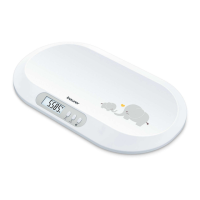
Baby Scale
Instruction manual ..........................................................2
ESPAÑOL
Báscula para bebés
Manual de instrucciones ..............................................12
FRANÇAIS
Pèse-bébé
Mode d’emploi ...............................................................23
BY90
READ THIS MANUAL COMPLETELY AND CAREFULLY
BEFORE USING THIS PRODUCT
Keep this manual in a safe location for future reference
LEA TODO ESTE MANUAL CON ATENCIÓN
ANTES DE USAR ESTE PRODUCTO
Conserve este manual en un lugar seguro para consultarlo en el futuro
LISEZ CE MODE D’EMPLOI COMPLÈTEMENT ET ATTENTIVEMENT AVANT
D’UTILISER CE PRODUIT
Conservez ce manuel en lieu sûr pour le consulter ultérieurement
Distributed by/Distribuido por/
Distribué par :
Beurer North America LP,
1 Oakwood Boulevard,
Suite 255
Hollywood, FL 33020
www.beurer.com
¿Preguntas o comentarios?
Llame a nuestro servicio al cliente en Estados Unidos gratis al
teléfono 1-800-536-0366.
Questions ou commentaires?
Appelez gratuitement notre service clientèle situé aux États-
Unis au 1-800-536-0366.
Questions or comments?
Call our US-based customer service toll free at 1-800-536-0366.

Questions and Answers

  • M
    Mrs. Lisa BrownAug 2, 2025
    What to do if my Beurer BY90 Scales displays an incorrect weight?
    • D
      Deanna PerkinsAug 2, 2025
      An incorrect weight displayed on your Beurer Scales might be caused by a few things. Ensure the scale is on a flat, non-carpeted surface. Also, re-tare the scale. If you are weighing a baby, try to calm the baby so that it stops wriggling. Finally, the scale might have an incorrect zero point, so switch the baby scale off and on again, wait until the scale displays „0.00 lb“ and repeat the measurement.
  • G
    Gina ChaneyAug 18, 2025
    Why is my Beurer Scales not connecting via Bluetooth?
    • M
      Michael IrwinAug 18, 2025
      A Bluetooth connection with your Beurer Scales might fail for several reasons: the device may be out of range (Bluetooth range is about 50 feet, reduced by walls), Bluetooth may be switched off on the scale (press the Bluetooth Button until the icon appears in the LCD Display), there may be no connection to the app (close the app completely, switch Bluetooth off and on, power the device off and on, remove and reinsert the batteries), the batteries may be depleted (replace them), or the scale hasn't been paired with the app (pair the scale with the app. Measurements completed before pairing cannot be transferred).

Summary

Important Safety Notes and Symbols

Signs and Symbols

Identifies safety and property damage messages, designating hazard levels.

Important Information and Usage Guidance

Safety Notes

Critical safety instructions and precautions for product use.

Battery Handling Safety

Battery Handling Precautions

Key warnings and cautions for safe battery installation and use.

Product Overview and Controls

Initial Setup and Use

Operating the Scale

Step-by-step guide for weighing, using hold function, and app connection.

Technical Specifications and Troubleshooting

Troubleshooting Guide

Common display errors and their solutions for user assistance.

Beurer BY90 Specifications

General IconGeneral
BrandBeurer
ModelBY90
CategoryScales
LanguageEnglish

Related product manuals