Beurer GL42 mg/dL 23
2
After displaying the average value for 90 days “after meals”
•
the average for the last seven days of values highlighted
as “general”
•
the symbol
•
the unit of measurement for blood glucose values and
•
“ ”
are shown on the display.
mg/dLMem
Press “+” [2] repeatedly to display the average value from the last 14, 30 and 90 days for
values highlighted as “general” .
3
You can cancel the process at any time. To do so, press the On/O button or wait until the
device switches itself o automatically after two minutes.
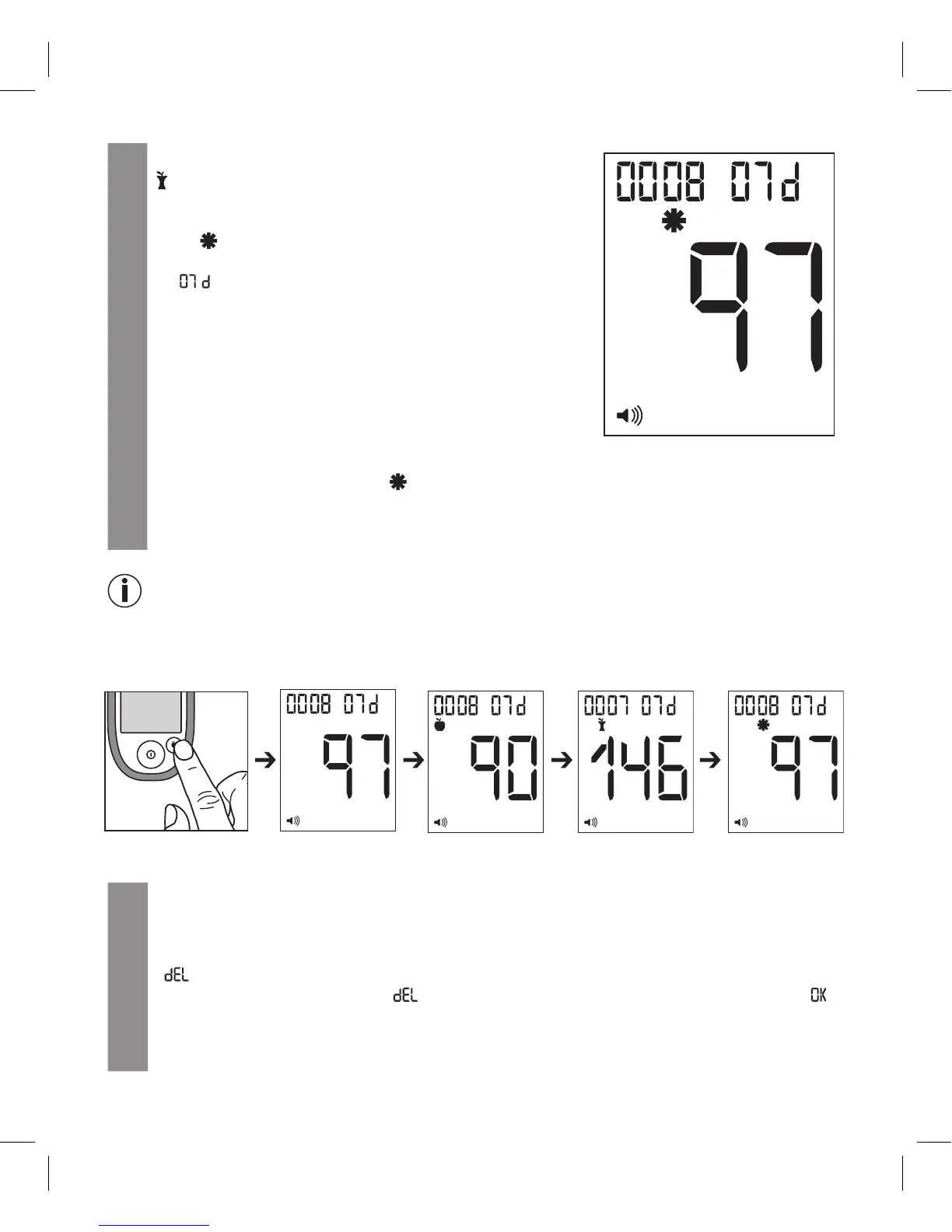
Note: Speed function
You are in the measurements memory. By pressing the highlight button [4], you can switch to the
dierent 7-day average values. In this way, you can get to the desired average value more quickly.
For example:
7.4 Deleting individual measured values from the memory
1
Press the buttons as described in 7.1 until the value appears that you would like to delete.
2
Press the On/O button, keep it pressed and also press down the “-” button for approx.
2seconds.
“ ”, “
Mem
” and the number of the value to be deleted flash.
Press the On/O button again. “ ”, the number of the value to be deleted, “
Mem
” and “ ”
are displayed.
If you do not wish to delete the value, briefly press the “+” or “–” button. You are taken back
to the memory area.
mg/dLMem
mg/dLMemmg/dLMem mg/dLMem



 To Next Page