A 1 – Application
8
4. Application example
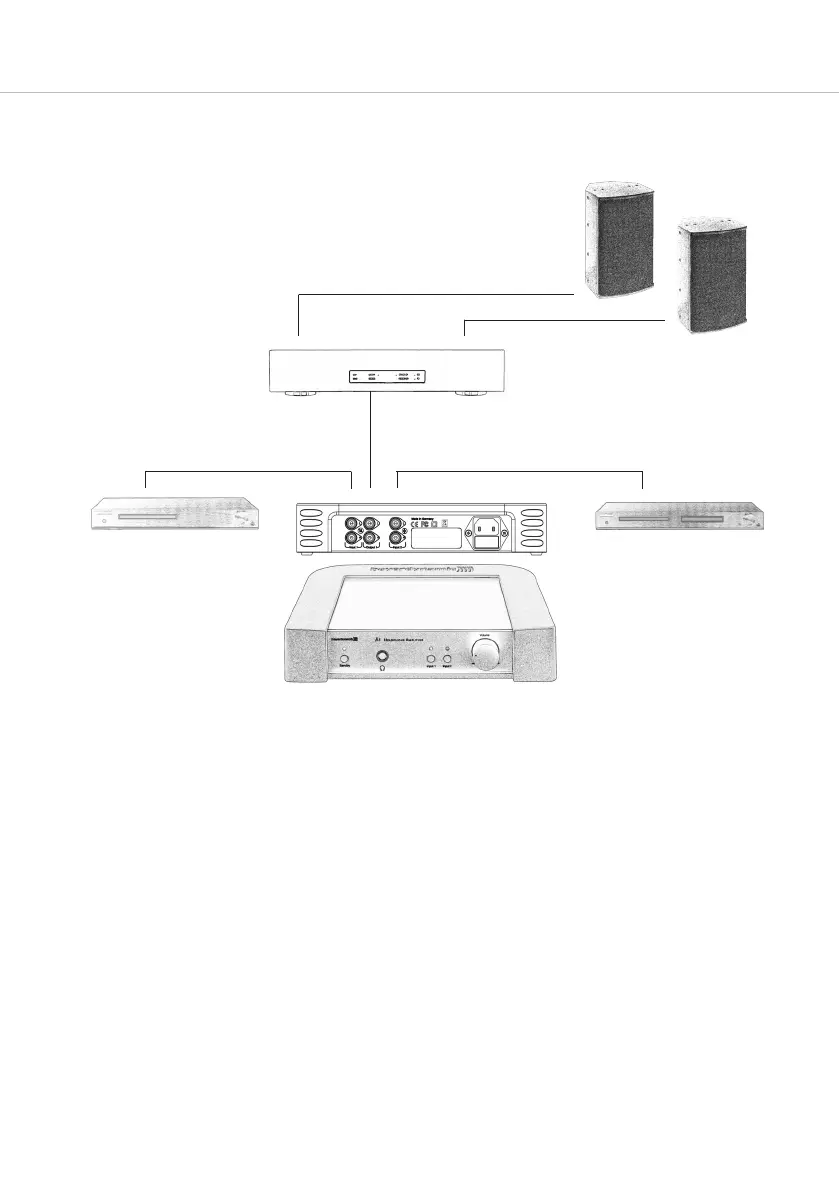
A 1 with CD player and DVD player
• Connect a CD player to the input 2 of the A 1 and a DVD player to the input 1 to which you would like to
listen to alternatively with your hi-fi system (e.g. home cinema).
• To listen to the sound via headphones you can use the buttons to select the sound source (input 1 = CD player
or input 2 = DVD player). This means the A 1 provides either the audio signal of the CD player or DVD player.
• The signal of the DVD player is also permanently present at the output socket . This means you can listen to
the looped through audio signal via your hi-fi system, even when the A 1 is turned off.
• An intelligent, microprocessor-controlled relay allows noiseless switching between the two different sound sources
and avoids unpleasant noise when turning the A 1 on or off.
DVD player
Loudspeaker
Input 2
Stereo in
Stereo out Stereo out
Output
Input 1
Output
amplifier
CD player
A1



 To Next Page