Amiron wireless – Auriculares
74
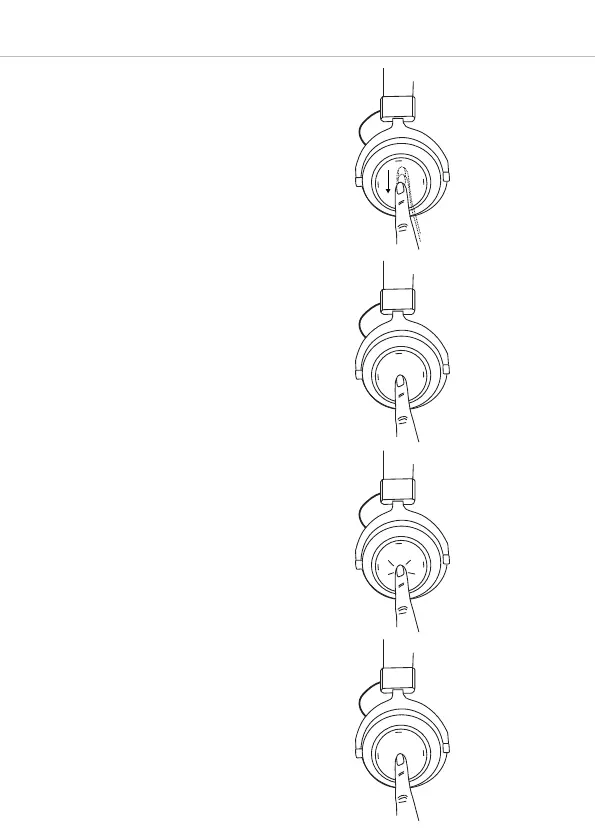
• Reducir el volumen:
Deslice el dedo hacia abajo en el panel
táctil 1. Si desliza el dedo hacia abajo
y lo mantiene ahí, el volumen bajará
paulatinamente hasta llegar al mínimo.
Cuando se llegue al mínimo sonará una
señal acústica.
Abrir el asistente personal
• Para abrir el asistente personal de su
smartphone o tableta (Siri, Google As-
sistant etc.):
Mantenga pulsado durante 2 segundos
aprox. el centro del panel táctil 1.
Control de llamadas
Las siguientes funciones sirven para con-
trolar las llamadas.
• Responder/colgar una llamada:
Toque 2 veces breve y rápidamente el
panel táctil 1.
• Rechazar llamada:
Mantenga pulsado durante 2 segundos
aprox. el centro del panel táctil 1.
2 seg.
2 veces
2 seg.












 To Next Page