beyerdynamic MIY app
Blue BYRD ANC (2nd generation) 9/14
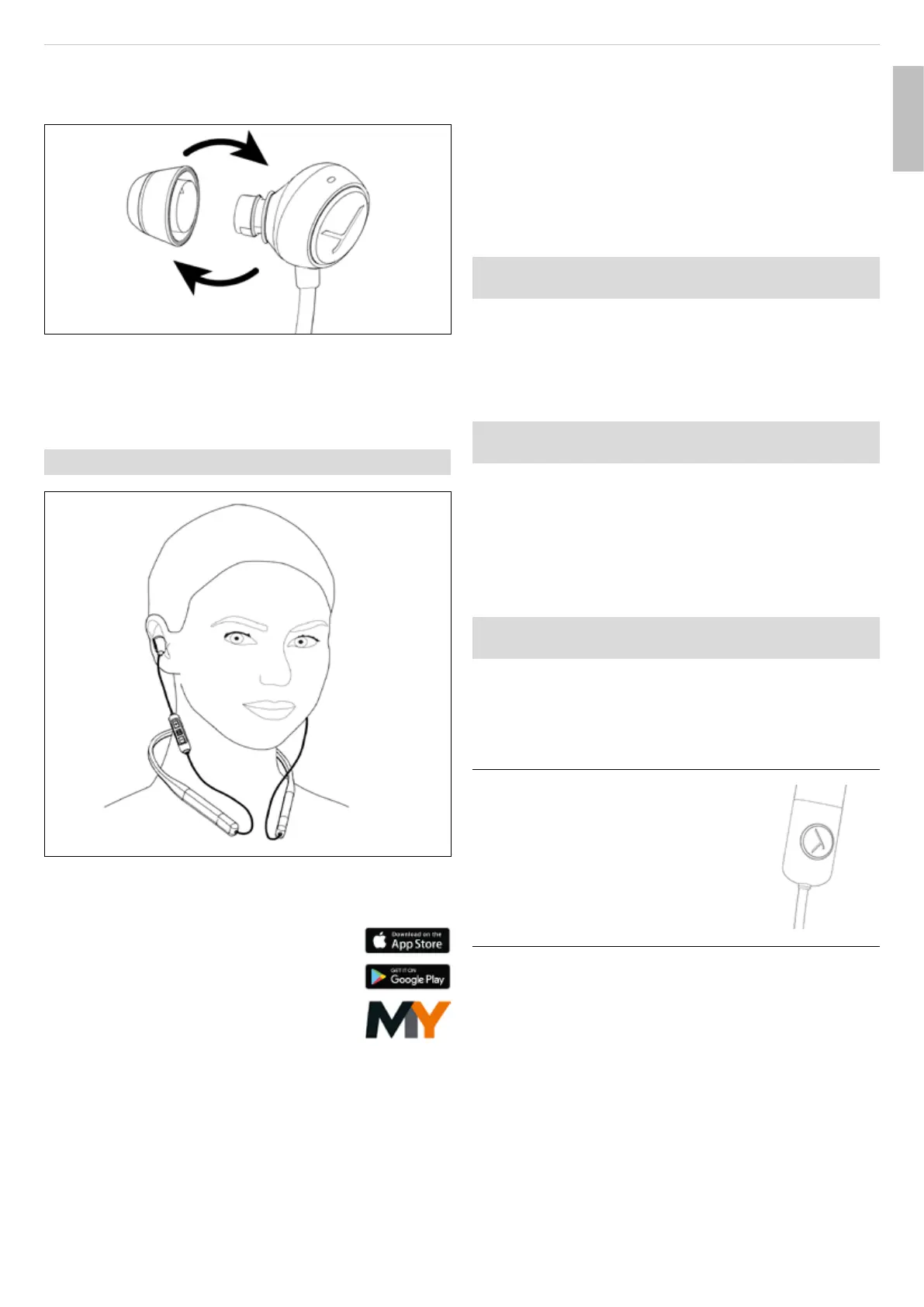
1. If an eaip is already fitted, carefully remove it from
the earphones.
2. Attach the new eaip to the earphone.
1.
2.
Inseing and wearing the earphones
► Place the neckband around the neck and inse the
earphones into the le and right ear according to their
markings.
The earphones should fit comfoably and securely.
BEYERDYNAMIC MIY APP
The beyerdynamic MIY app is conantly
evolving to cuomise your BlueBYRD ANC
to your own needs with useful functions
such as MOSAYC sound personalisation,
tracking atiics of your daily liening
habits and other settings. If you use
MOSAYC sound personalisation, your
BlueBYRD ANC will sound even better.
SOFTWARE UPDATE
► Soware updates are easily available via the MIY app.
COMPATIBILITY WITH PLAYBACK
DEVICES
The in-ear headphones are compatible with Bluetooth®
playback devices that suppo the following profiles:
• A2DP (for audio transmission)
• HFP (for phone operation)
• HSP (voice output)
• AVRCP (for control signal transmission)
All associated functions are only available if they are
suppoed by the playback device.
SUPPORTED AUDIO CODECS
Within the A2DP profile, the in-ear headphones suppo
the audio codecs SBC, AAC and aptX™ Adaptive. The be
audio quality is oered by aptX™ Adaptive.
Please note that only the codecs available in the
playback device can be used for audio transmission.
The playback device and in-ear headphones
automatically agree on the be mutually available
codec in the following order:
1. aptX™ Adaptive
2. aptX™
3. AAC
4. SBC
Mo playback devices do not show which codec is acti-
vely in use.
OPERATION
Switching on and o
Switching on:
► Press the On/O button for 2s.
Switching o:
► Press the On/O button for 4s.
Pairing with a playback device
Before you can use the in-ear headphones for the
fir time, you mu pair them with your mobile phone
or another Bluetooth®-enabled device. The pairing
procedure may dier depending on the playback device.
► Please refer to the corresponding operating
inructions of the playback device.
English


 To Next Page
 Loading...