english
MMX 300 – Headset
7
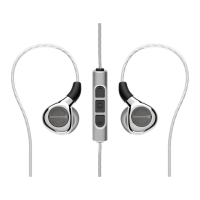
• The remote control integrated in the cable is provided with a mute switch to
mute the microphone, a volume control and a button for accepting calls,
media control and temporary mute.
• Mute disabled:
Slide the mute switch upwards (red marking not visible).
• Mute enabled:
Slide the mute switch downwards (red marking visible).
Mute switch
Button for accepting calls,
media control and temporary
mute
Volume
control
Remote control
Maintenance
• As with any equipment which will be used in close proximity to sensitive areas
of the body, it is essential that the ear pads and headband are kept clean. Use
a damp cloth for cleaning using warm water only taking care not to allow any
water drops into the transducers.
• For cleaning the pop shield remove it from the microphone and wash it
under clear running water. If necessary you can use a mild cleansing agent
(e.g. washing-up liquid). Make sure that the pop shield is completely dry
before you replace it onto the microphone.


 To Next Page