Function introduction:
1.
Charging: Referring to Figure 2, on the left side of the frame, you can see the charging hole
of battery; connect the charger to start charging; when the battery capacity is displayed to
be full, and the charger indicator light changes from red to yellow-green, it means the
battery is fully charged.
2.
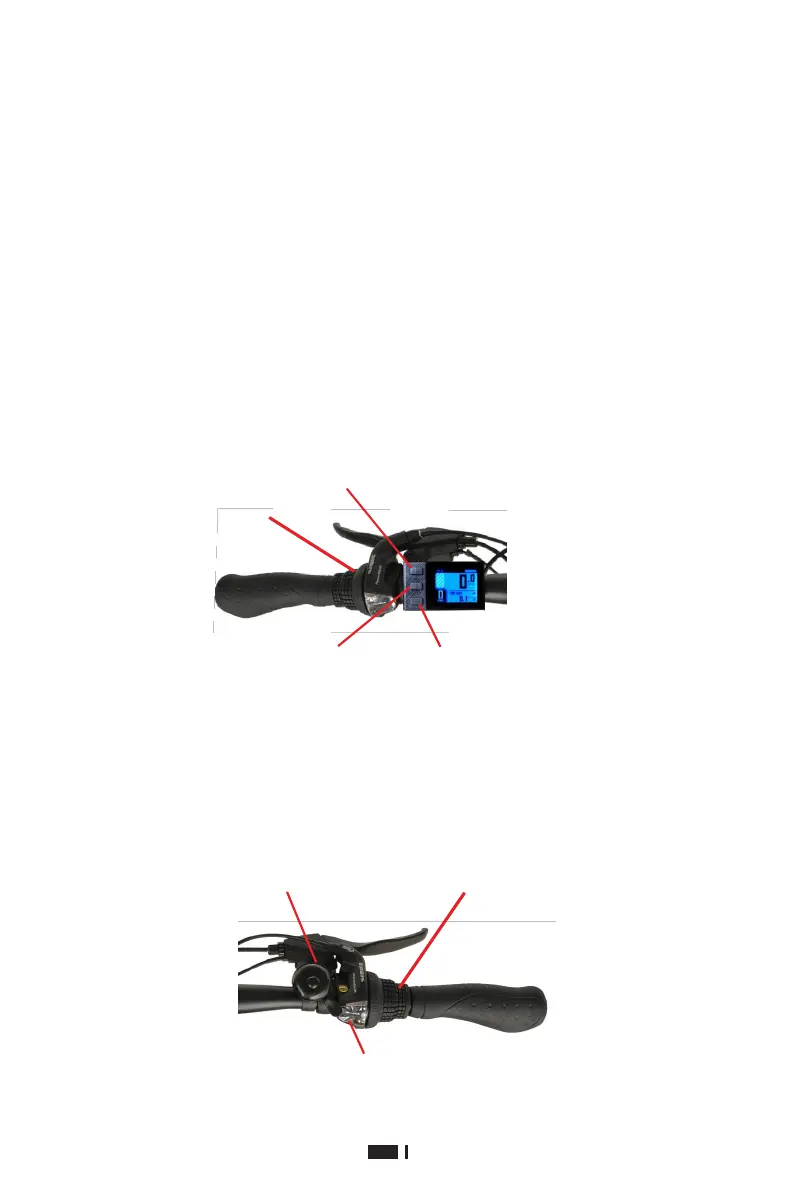
Turn on: Referring to Figure 3, press and hold the "i" key to turn on/off the power.
3.
Battery indicator: The instrument panel lights up after power-on. The battery is displayed in
four grids, corresponding to high, medium and low battery.
4.Headlight: Referring to Figure 3, press and hold the "+" key to turn on/off the headlight.
5.Start-up model: power riding. Step on the vehicle sprocket, and start the electric power
automatically after a certain speed is gained. If no power is needed, turn off the power or
the battery.
6.Speed change: Referring to Figure 4, turn the speed change shifter while the vehicle is
moving to achieve speed change from gear 1 to gear 7.
"+" is an upshift key; press and
hold this key to turn on the
headlight
Press and hold the "i"
key to turn on/off the
power
"-" is an downshift
key; press and hold
this key to power the
driving
Figure 3 (left handlebar)
Mechanical bel
Right variable speed shifter
Speedstage indicationwindow
Figure 4 (right handlebar)



 To Next Page