OK
@$R
LCRRSLMQ
OK
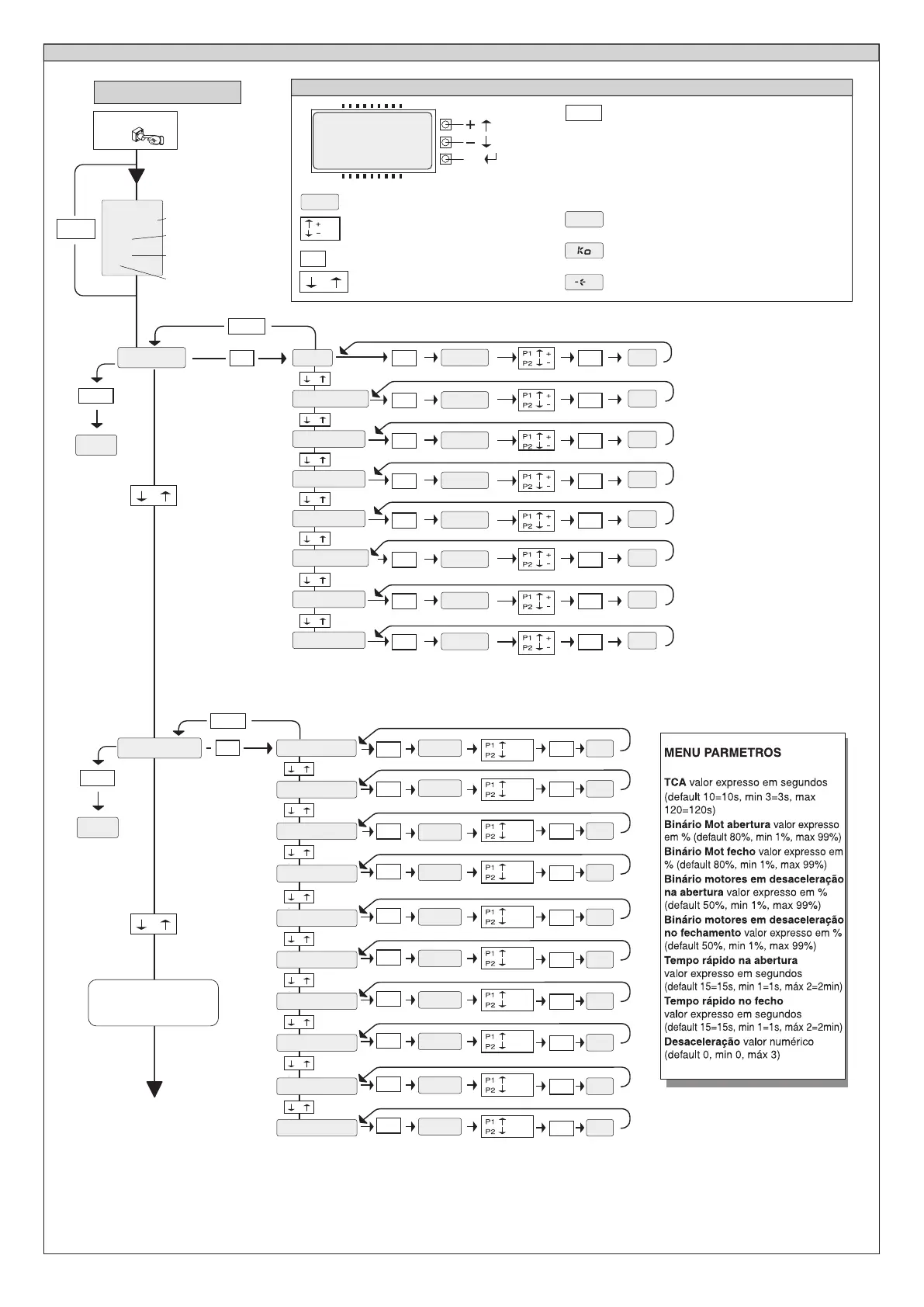
Fig. A
Pressionar
ACESSO AOS MENUS
-
Deslocação menu
(+ = precedente - = sucessivo)
LEGENDA
[
.P%
OK
+ -
+
/ON
/OFF
Incremento/diminuição dos
parâmetros ou comutação ON/OFF
Pressionar tecla OK (Enter/confirmação)
Valor predefinido
Mensagem Progra
mação em curso
Mensagem KO! (erro valor ou função)
Mensagem "Aguardar" (introduzir valor ou função)
Pressionar simultaneamente as teclas + e -.
Pressionando-se ao mesmo tempo as teclas +
e – pode-se sair do menu em que se está a
operar e voltar para o precedente; se isto
acontece no nível principal do menu sai-se da
programação e desliga-se o visor.
As modificações efectuadas são confirmadas
só se em seguida pressiona-se OK.
Versão software central
No manobras totais (em centenas)
No manobras desde última
manutenção (em centenas)
No radiocomandos armazenados
.P+
*M%'A
OK
+ -
MENU SEGUENTI
FIG. B
OK
-
+
-
+
-
+
-
+
-
+
-
+
-
+
-
+
-
+
-
+
.P%
[]
OK OK
RA
OK OK
[]
.P%
A.
OK OK
[]
.P%
AAF
-
+
OK
RA
ON
OFF
[M$$]
.P%
OK
OK
.11'
ON
OFF
[M$$]
.P%
OK
OK
@J'+.
ON
OFF
[M$$]
.P%
OK
OK
R#QR.FMR
ON
OFF
[M$$]
.P%
OK
-
+
OK
AFP?NGB?
ON
OFF
[M$$]
.P%
OK
OK
.P#**
ON
OFF
[M$$]
.P%
OK
OK
1AAF
ON
OFF
[M$$]
.P%
OK
OK
S M K M N P C Q
ON
OFF
[M$$]
.P%
OK
-
+
OK
.PM%PB'M
ON
OFF
[ML ]
.P%
OK
-
+
OK
AMB$'11M
ON
OFF
[M$$]
.P%
OK
-
+
OK OK
[]
.P%
RT#*LMPK.
OK OK
[]
.P%
RT#*LMPKAF
-
+
OK OK
[ ]
.P%
T#*P**
-
+
OK OK
[]
.P%
A.P**
-
+
OK OK
[]
.P%
AAFP**
+-
$',#
+-
$',#
+
-
OK




 To Next Page