Device Menu Screen
Getting The Most Out Of Your BG Sockets
Setting Timers
Set a Delay
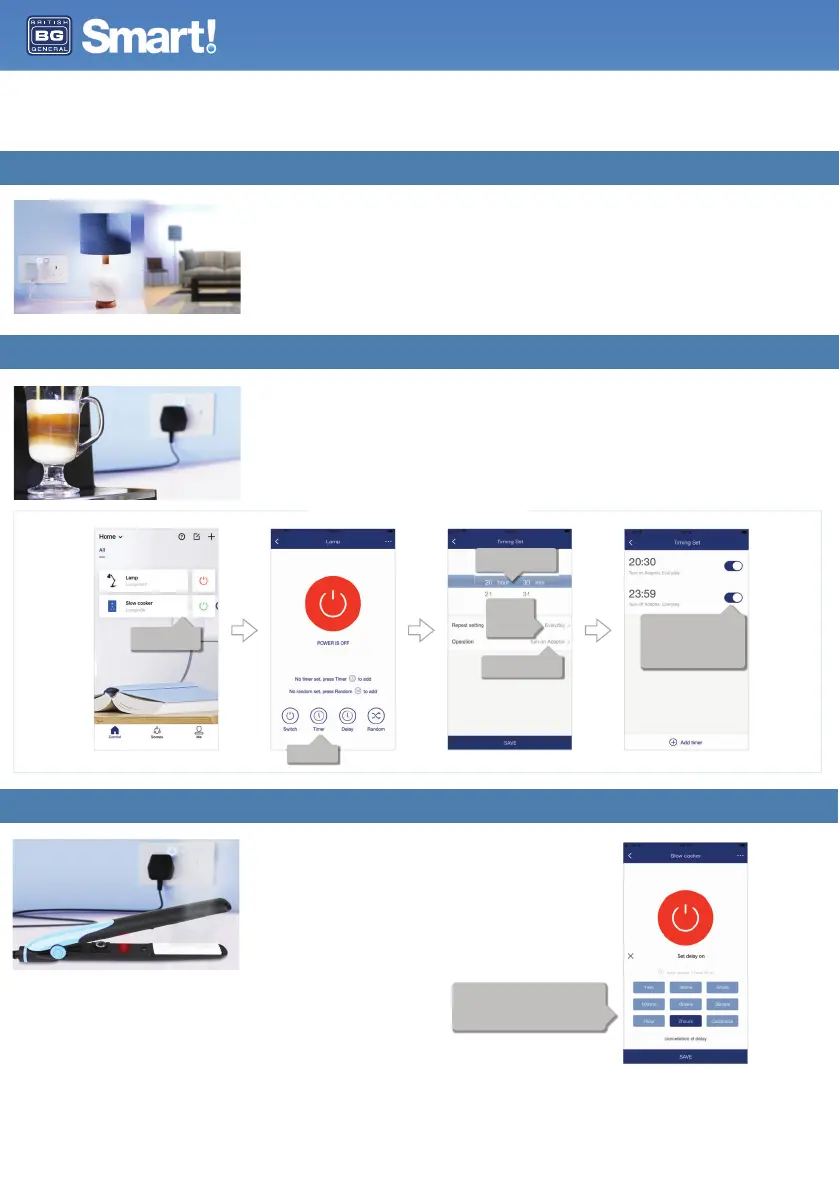
Set up timers so your device will turn on and off at specific times. Get your morning coffee
ready for when you get up in the morning, save energy by turning sockets off whilst you’re at
work, turn the lamp on or off at a certain time of day, or set the slow cooker to come on at
lunch time so your food is ready to eat when you get home!
Smart sockets do more than enable you to turn sockets on and off with an App – you can
set timers, configure scenes, set a parental lock, control these with your voice and sync up
with other smart devices in your home using IFTTT.
Set a delay time for your sockets to turn on or off after a set length
of time. Ideal for sockets where you plug in devices like hair
straighteners or heaters for added safety, and for charging your
mobile phone so this turns off once it has reached a full charge.
Select Timer
Select the device you
want to set a timer for.
Choose how
often you want
the timer to
operate.
Choose the time you want
the timer to function.
Choose to turn on or turn
off.
Create more than one timer to suit
your requirements.
The toggle buttons mean you can
turn these on or off whilst
retaining your timer settings when
not in use.
Delays can be set for devices to turn on or turn off.
In the device menu, choose the amount of time you
want to pass before the delay operates.
You can select one of the pre-set options, or create
your own custom timescale.
Installation and User Guide
User Guide


 To Next Page