Installation and User Guide
If you're an iOS device user, you can control your devices using your iPhone, iPad or Apple Watch.
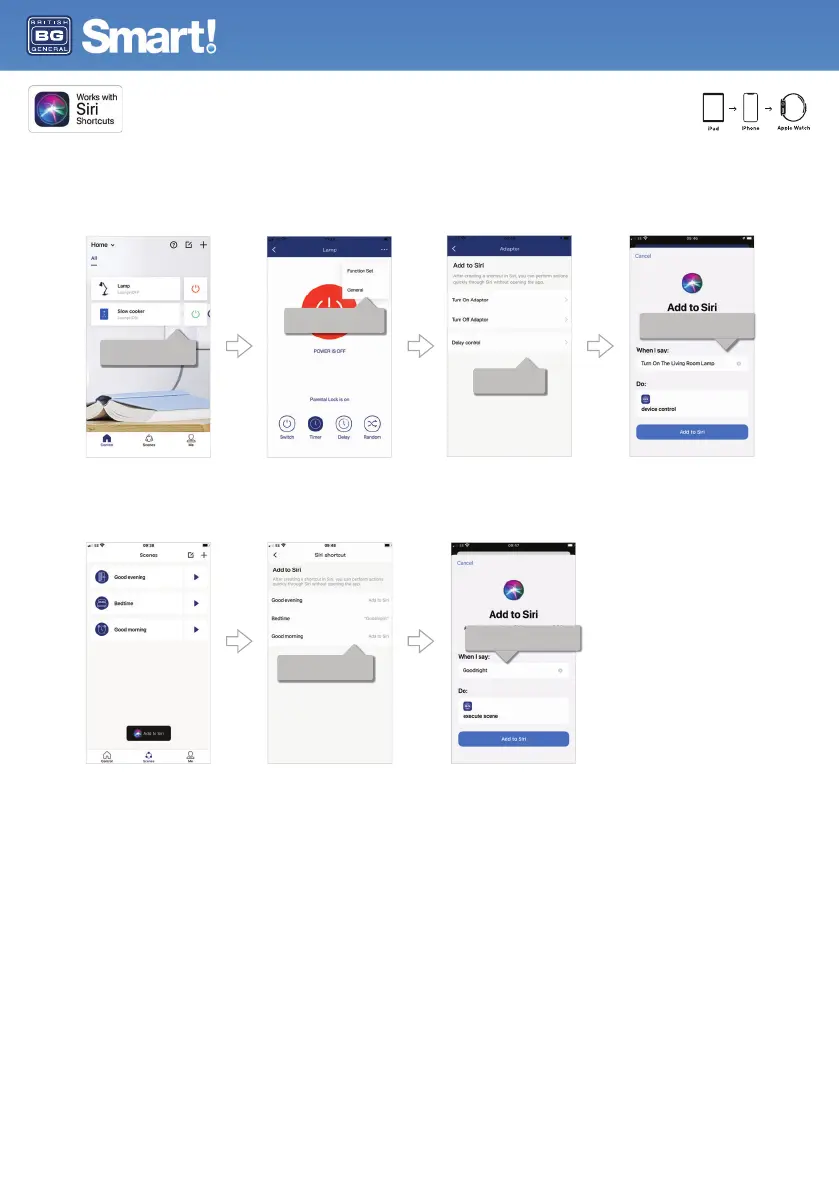
To control an individual device:
1. Select the device from the home screen.
2. Press on the ... menu in the top right corner and select 'General'.
3. Select 'Add to Siri' and create your Siri shortcut.
Add a scene to make a number of devices change state with one instruction. You will need to create your scene before adding this to Siri.
1. Select 'scenes' at the bottom of the home screen.
2. Select 'Add to Siri'.
3. Choose a pre-configured scene and enter the custom phrase you want to use to activate the scene.
Type in the phrase you want to say to
activate the scene, then 'add to Siri'.
Choose the scene you want
to add to Siri.
Select the operation
(on, off or delay).
Type in the phrase you want to say to
operate the device, and 'add to Siri'.
Select 'general' and then 'add
to Siri' from the general menu.
Select the device you want
to operate.


 To Next Page