Installation and User Guide
SyncEV Charger | EVT77G.202205.NH www.syncev.co.uk
SYNC EV APP
YouwillnowneedtoinformyourcustomertodownloadtheSYNCEVApplication
apps.apple.com/gb/app/sync-ev/id1528884639 play.google.com/store/apps/details?id=syncev.co.uk&hl=en_GB&gl=GB
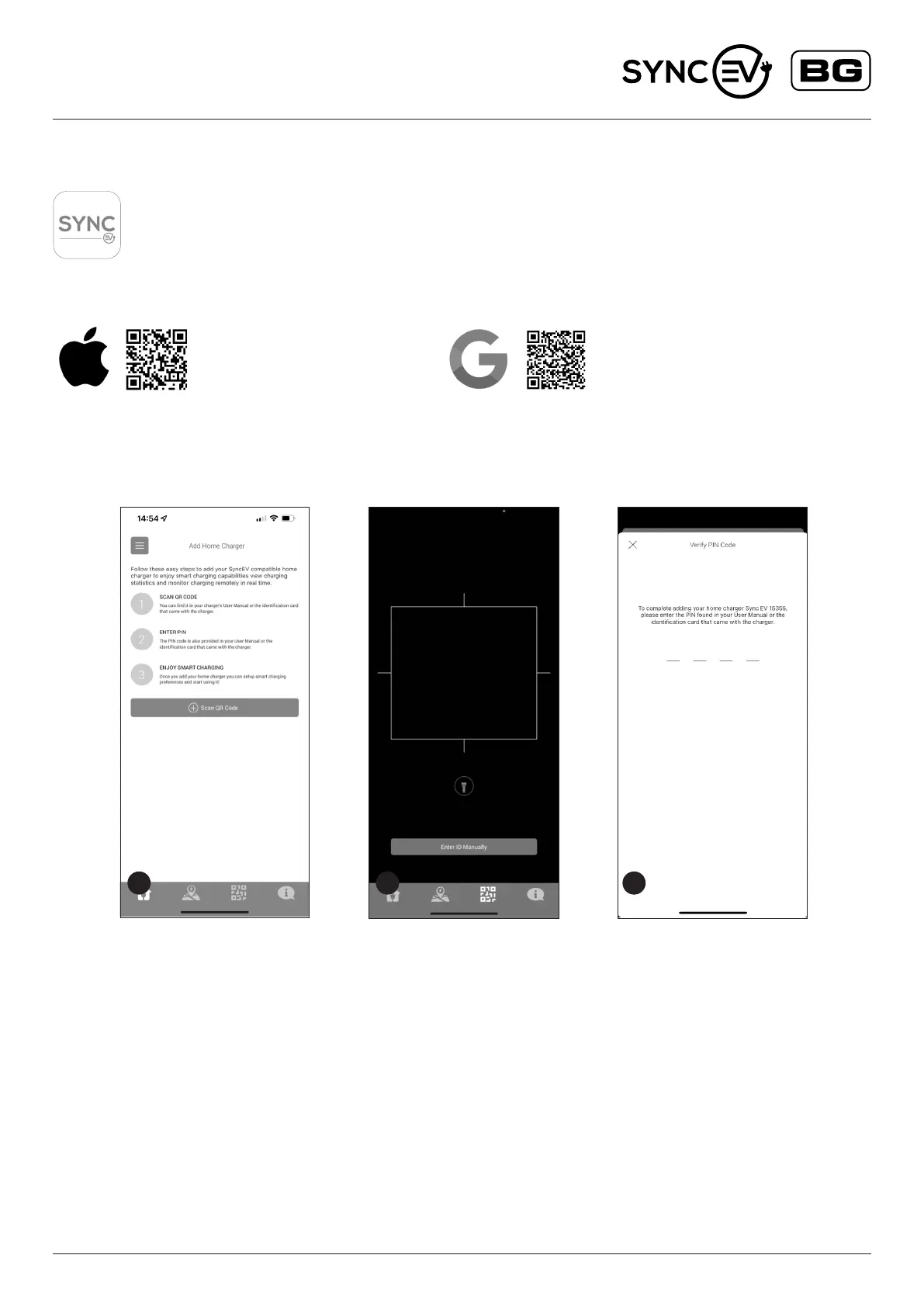
4 5 6
1. Once downloaded, please register an account, the chargers
QR code ID and Pin code can be found on the charge point
identication label on the EV charger and enclosed on the cover
of the installation and user guide.
NOTE: The nal step during the sign up process presents you with
an option to input payment card details for Sync EV future public
charging network. This is not mandatory and it
can be skipped by pressing the “X” in the top left corner.
2. Scan the QR code within the app to register this EV charger
to the customers account.
3. Once scanned, enter the PIN code to conrm set up.
SET UP AND COMMISSIONING


 To Next Page