Installation and User Guide
SyncEV Charger | EVT77G.202205.NH www.syncev.co.uk
WI-FI CONNECTION GUIDE
Thisistheinstallersresponsibilityandmustbedonetocompletetheinstallation.
WerecommendtheWiFirouterissettoonly2.4GHzbandduringsetuptoreducetheriskofpossibleissuesduringsetup.Oncesetup
theroutercanthenberestoredtoboth2.4GHzand5GHzbands.
Upon powering the Sync EV BG charger, the status indicator light will show Yellow. This indicates that the health of the charging unit is good but
there is no connection to the Sync EV Network.
The BG EV Charging installer app can be downloaded via the installer portal on www.syncev.co.uk
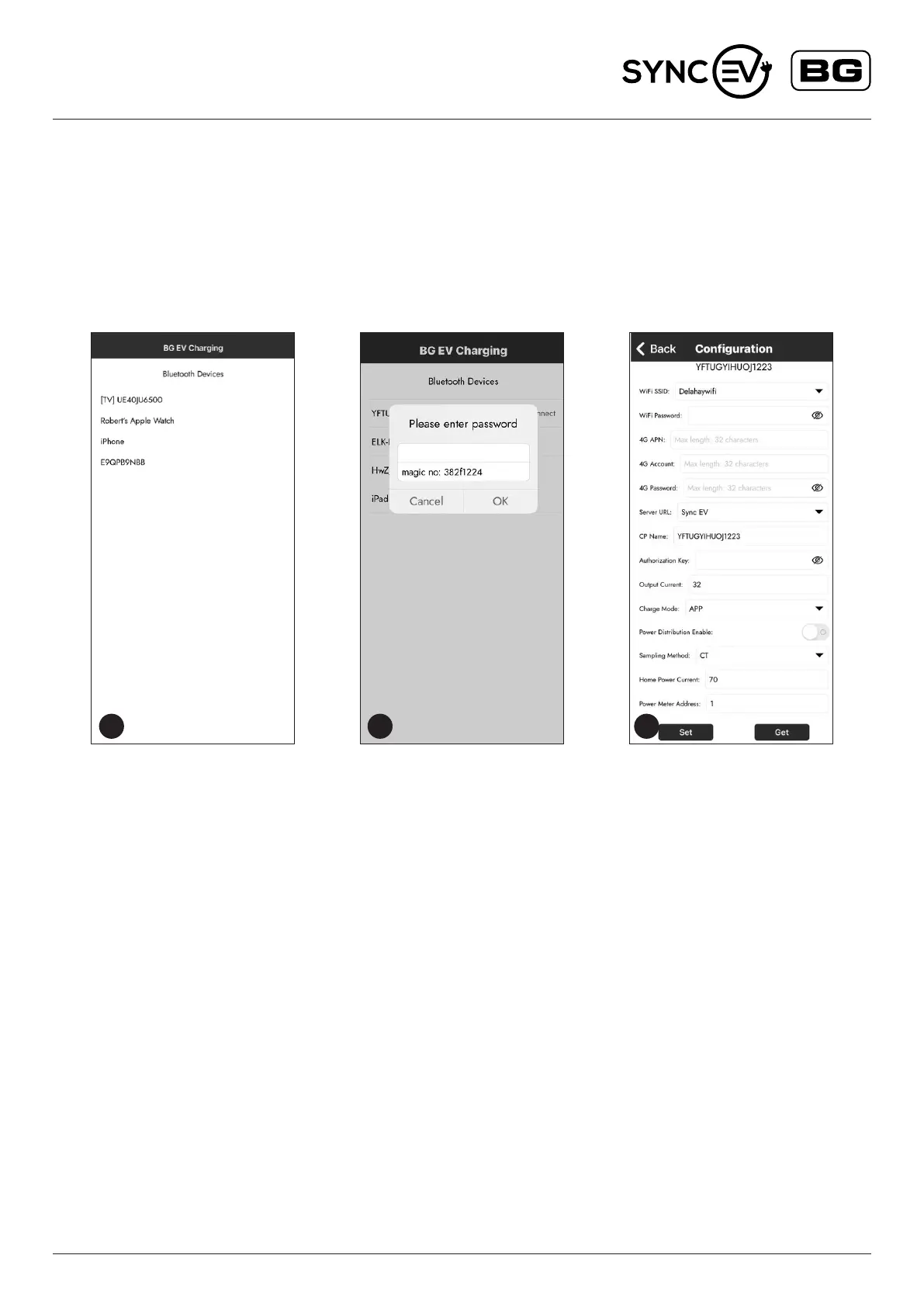
1. Connect to the EV charger through the BG EV installer application.
The app will scan for available Bluetooth devices and select
the one matching the ChargerID Code on the EV charger
identication label.
2. The EV charger will then request the password, The default
password is also on the identication label. We recommend this is
changed during set up and noted on the identication label.
3. Once this is entered the app will then show the full
conguration page.
Scan and select the required WifI SSD, and enter the
correct password. This screen will also allow the conguration of
charge mode and if load balancing (Power distribution)
is required.
For Charge Mode, the default is APP which requires a conrmation
within the SYNC EV app to start charging,
this can be changed to a Plug and Charge function which
will charge without secondary conrmation.
For load balancing, if a CT clamp is tted this should be enabled and
set to the correct home current limit. This should be the same or less
than the main fuse rating. With this setting, the EV charger will reduce
its charging rate to limit the total home load to be under the limit. If the
available current is under the minimum of 6 Amps the EV charger will
pause the charging session.
Whenallthecorrectfunctionsareentered,selectSettoupload
settings.TheEVchargerwillbeeptoconrm.
After 15 seconds, the Yellow Indicator should turn Blue to conrm
connection to network and app server. If the EV charger continues
to show yellow, the charger should be power cycled and reconnected
via the app to check correct settings.
GSMenabledchargingpoints
For detailed information, please visit the installer portal for set up
and conguration of these features.
1 2 3


 To Next Page
 Loading...