1.
POWER button for starting or stopping the system.
2.
Button (+).
3.
Button (-).
4.
Bicycle lights and display panel backlight indicator.
5.
Bicycle instant speed indicator.
6.
System error indicator.
7.
Pedal assistance level indicator.
8.
Battery level indicator.
9.
Bicycle information indicator.
Display panel operation
1.
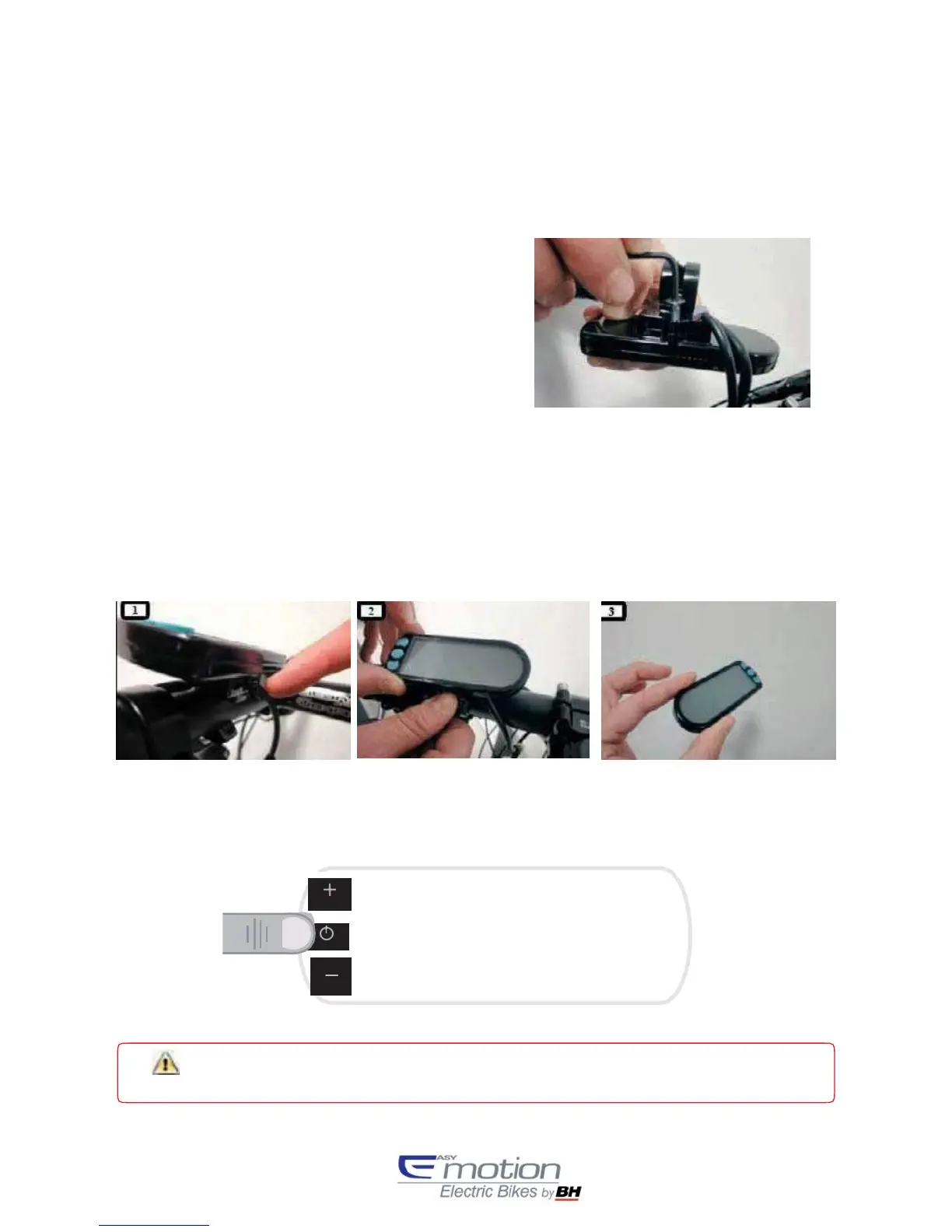
Removable display panel
The user can make the display panel be removable or not,
as easily as inserting or removing a M3 screw, as it is
shown in the image below:
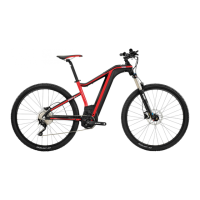
By default, the display panel will be removable. Following next steps, user can remove the display panel with no
effort:
1.
User will push the flap located in the down side of the display panel.
2.
While pushing the flap, the user will slide the display panel towards upside.
3.
The display panel will be removed from the bracket.
2.
Start and stop of the pedal assistance system
The pedal assistance system is activated or deactivated by pressing the SET button for 3 seconds. The bicycle can be
used normally with no assistance like a conventional bicycle.
Wait for 3 seconds after switching on the system before start pedaling. During these 3 seconds,
the
system is starting the torque sensor.


 To Next Page