The menu is the place to
customise your BIBO bar
according to your personal
preferences, making it the
perfect fit for your family, home
and/or oce.
In the menu you will be able to
control the temperature settings,
water dispensing quantity
settings, time and date settings,
language settings, energy saving
settings, safety settings and
ringtone settings.
Additionally the menu contains
your MAXI filter and zapper
settings. There is also an option
to restore your BIBO bar to its
original factory settings (but
please don’t ever restore your
BIBO bar without consulting our
BIBO technical team first).
Using your BIBO bar
MENU OPTIONS AND PERSONAL SETTING
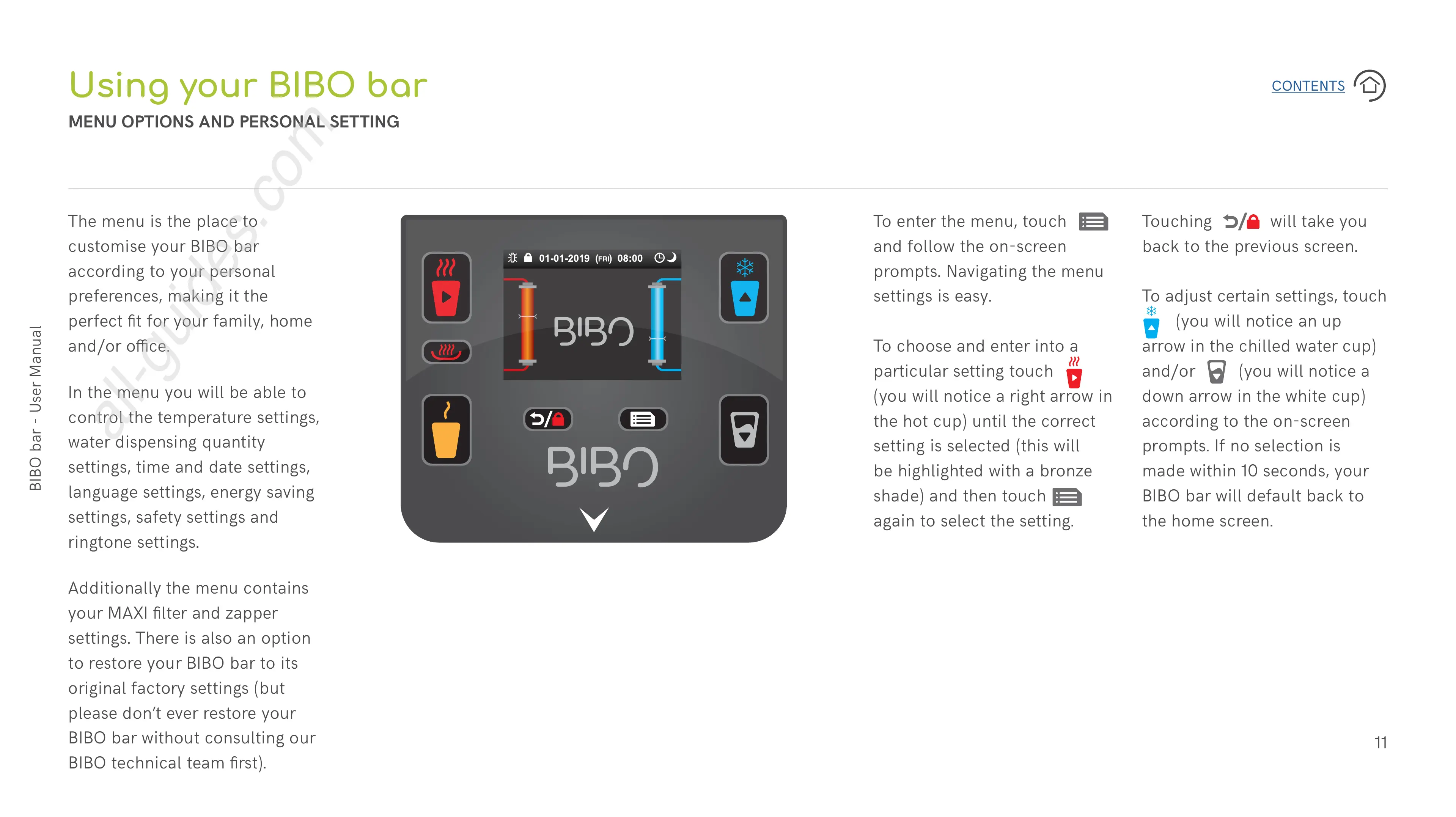
To enter the menu, touch
and follow the on-screen
prompts. Navigating the menu
settings is easy.
To choose and enter into a
particular setting touch
(you will notice a right arrow in
the hot cup) until the correct
setting is selected (this will
be highlighted with a bronze
shade) and then touch
again to select the setting.
Touching will take you
back to the previous screen.
To adjust certain settings, touch
(you will notice an up
arrow in the chilled water cup)
and/or (you will notice a
down arrow in the white cup)
according to the on-screen
prompts. If no selection is
made within 10 seconds, your
BIBO bar will default back to
the home screen.


 To Next Page
 Loading...