TEMPERATURE TIP
When setting your boiling water
temperature remember that
the higher the altitude of your
location, the lower the degree at
which water reaches boiling point.
For example, if you’re by the
coast, your boiling water will be
much hotter than if you up in
the mountains.
In order to make sure that your
BIBO bar dispenses boiling
water and does not turn the
water to steam, select a boiling
temperature according to the
table to the right.
If you’re still not sure what is
the best temperature for your
location, please reach us on
0800 00 BIBO(2426)
or help@bibo.co.za
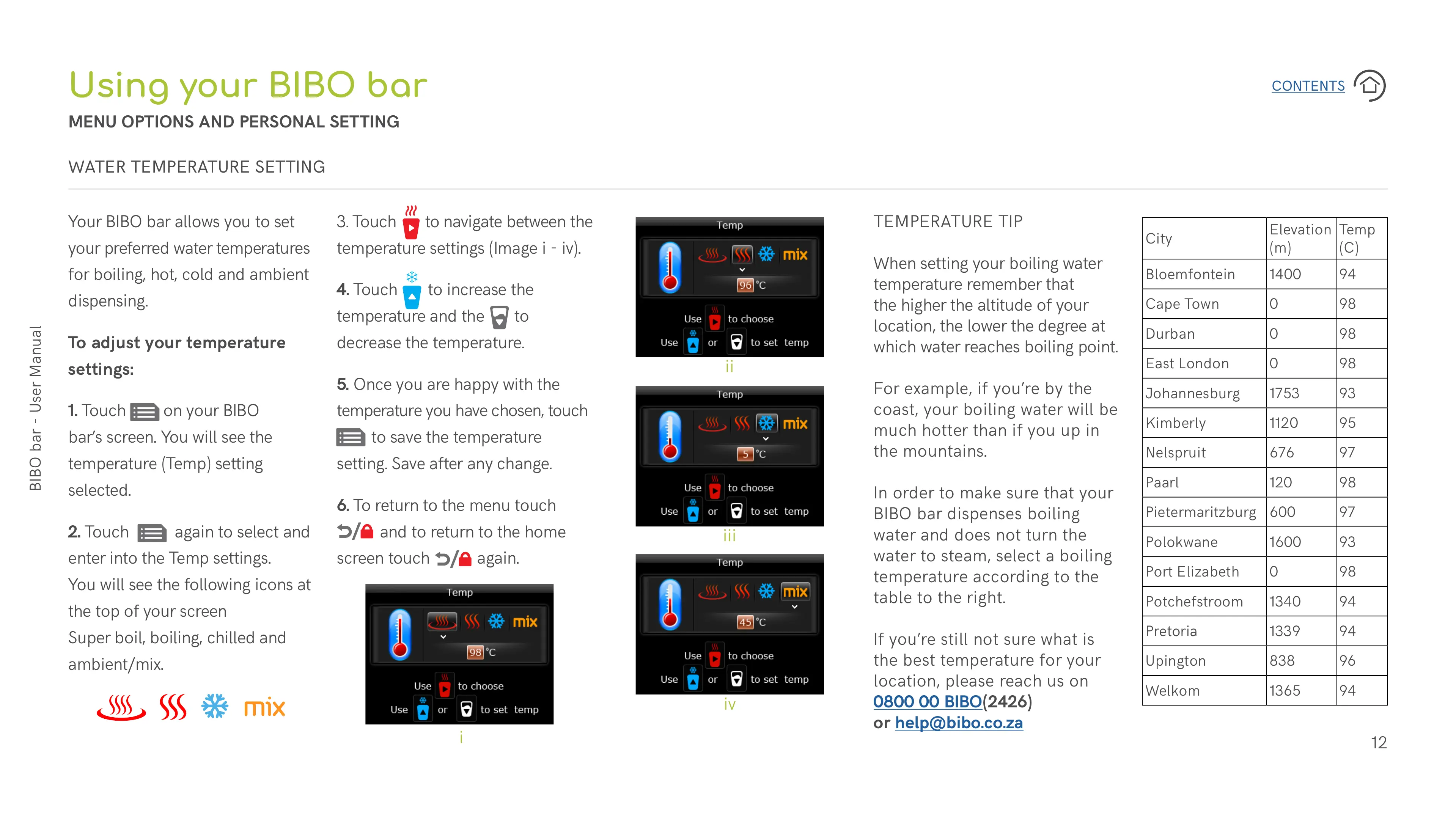
Your BIBO bar allows you to set
your preferred water temperatures
for boiling, hot, cold and ambient
dispensing.
To adjust your temperature
settings:
1. Touch
on your BIBO
bar’s screen. You will see the
temperature (Temp) setting
selected.
2. Touch
again to select and
enter into the Temp settings.
You will see the following icons at
the top of your screen
Super boil, boiling, chilled and
ambient/mix.
Using your BIBO bar
MENU OPTIONS AND PERSONAL SETTING
WATER TEMPERATURE SETTING
3. Touch to navigate between the
temperature settings (Image i - iv).
4. Touch to increase the
temperature and the to
decrease the temperature.
5. Once you are happy with the
temperature you have chosen, touch
to save the temperature
setting. Save after any change.
6. To return to the menu touch
and to return to the home
screen touch again.
City
Elevation
(m)
Temp
(C)
Bloemfontein 1400 94
Cape Town 0 98
Durban 0 98
East London 0 98
Johannesburg 1753 93
Kimberly 1120 95
Nelspruit 676 97
Paarl 120 98
Pietermaritzburg 600 97
Polokwane 1600 93
Port Elizabeth 0 98
Potchefstroom 1340 94
Pretoria 1339 94
Upington 838 96
Welkom 1365 94
i
ii
iii
iv


 To Next Page
 Loading...