1. Touch on your BIBO
bar’s screen.
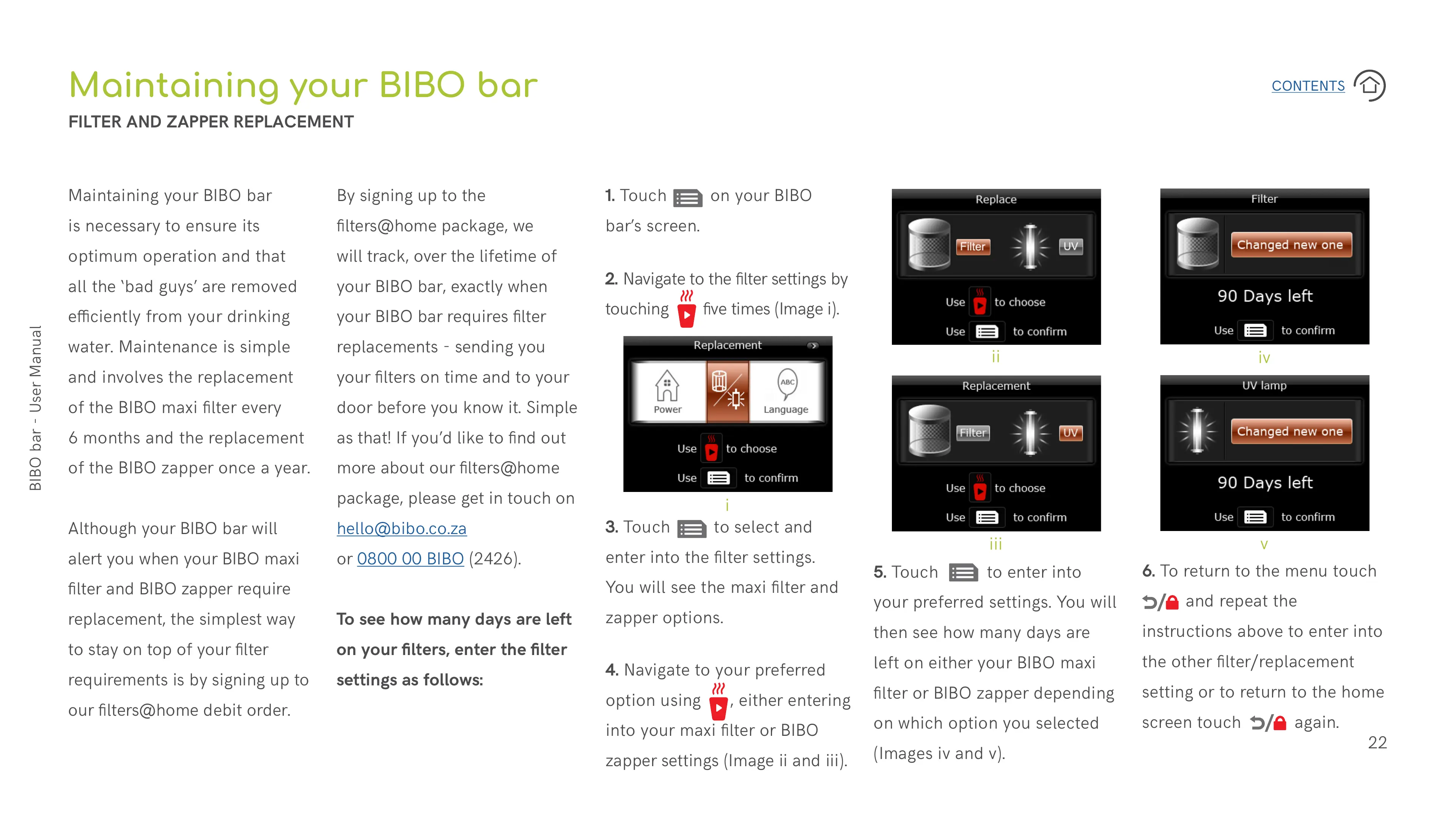
2. Navigate to the filter settings by
touching five times (Image i).
Maintaining your BIBO bar
FILTER AND ZAPPER REPLACEMENT
Maintaining your BIBO bar
is necessary to ensure its
optimum operation and that
all the ‘bad guys’ are removed
eciently from your drinking
water. Maintenance is simple
and involves the replacement
of the BIBO maxi filter every
6 months and the replacement
of the BIBO zapper once a year.
Although your BIBO bar will
alert you when your BIBO maxi
filter and BIBO zapper require
replacement, the simplest way
to stay on top of your filter
requirements is by signing up to
our filters@home debit order.
By signing up to the
filters@home package, we
will track, over the lifetime of
your BIBO bar, exactly when
your BIBO bar requires filter
replacements - sending you
your filters on time and to your
door before you know it. Simple
as that! If you’d like to find out
more about our filters@home
package, please get in touch on
hello@bibo.co.za
or 0800 00 BIBO (2426).
To see how many days are left
on your filters, enter the filter
settings as follows:
3. Touch to select and
enter into the filter settings.
You will see the maxi filter and
zapper options.
4. Navigate to your preferred
option using , either entering
into your maxi filter or BIBO
zapper settings (Image ii and iii).
5. Touch to enter into
your preferred settings. You will
then see how many days are
left on either your BIBO maxi
filter or BIBO zapper depending
on which option you selected
(Images iv and v).
6. To return to the menu touch
and repeat the
instructions above to enter into
the other filter/replacement
setting or to return to the home
screen touch again.
i
ii
iii
iv
v


 To Next Page
 Loading...