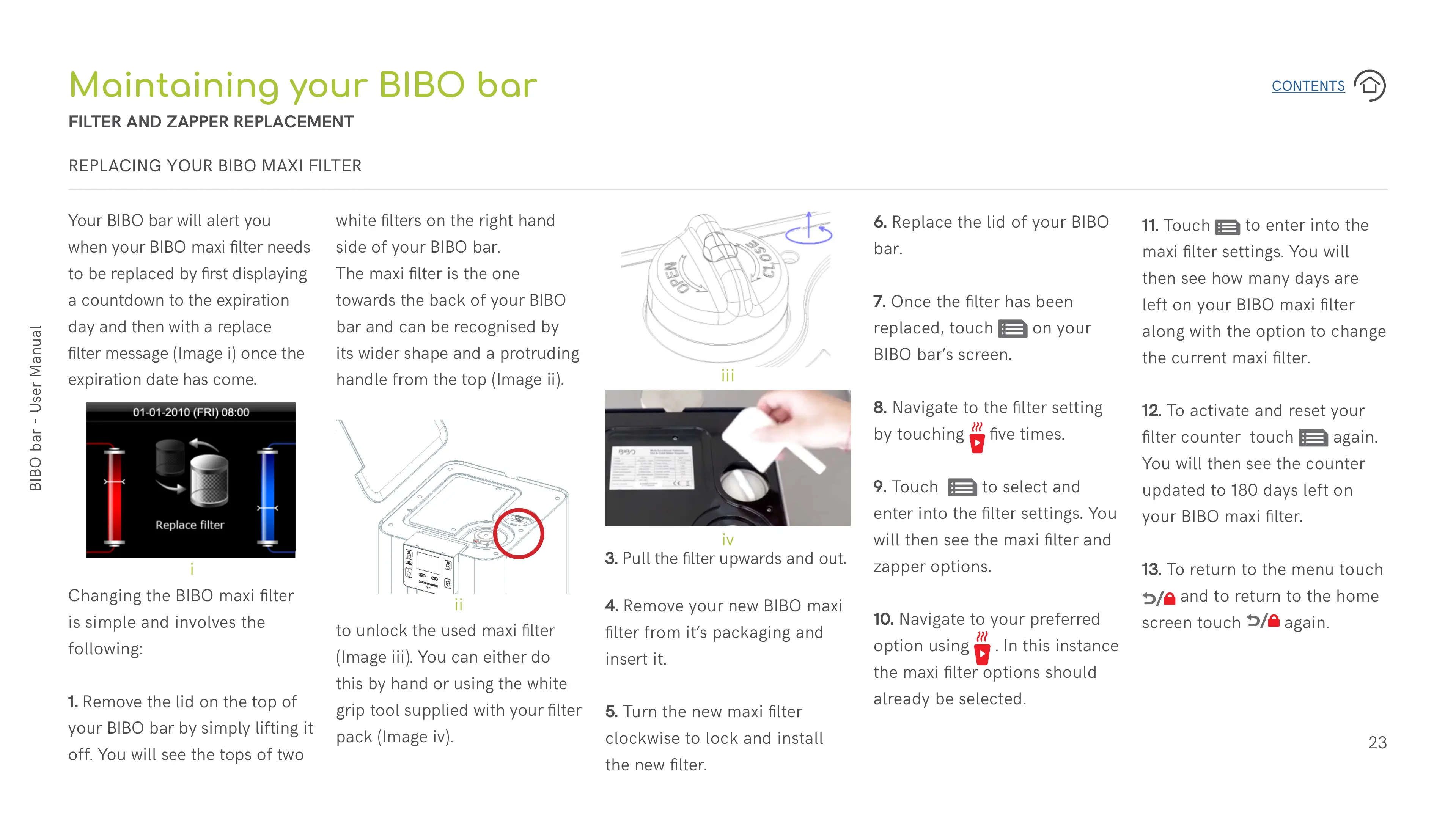
3. Pull the filter upwards and out.
4. Remove your new BIBO maxi
filter from it’s packaging and
insert it.
5. Turn the new maxi filter
clockwise to lock and install
the new filter.
11. Touch
to enter into the
maxi filter settings. You will
then see how many days are
left on your BIBO maxi filter
along with the option to change
the current maxi filter.
12. To activate and reset your
filter counter touch
again.
You will then see the counter
updated to 180 days left on
your BIBO maxi filter.
13. To return to the menu touch
and to return to the home
screen touch
again.
6. Replace the lid of your BIBO
bar.
7. Once the filter has been
replaced, touch
on your
BIBO bar’s screen.
8. Navigate to the filter setting
by touching
five times.
9. Touch
to select and
enter into the filter settings. You
will then see the maxi filter and
zapper options.
10. Navigate to your preferred
option using
. In this instance
the maxi filter options should
already be selected.
REPLACING YOUR BIBO MAXI FILTER
Your BIBO bar will alert you
when your BIBO maxi filter needs
to be replaced by first displaying
a countdown to the expiration
day and then with a replace
filter message (Image i) once the
expiration date has come.
Changing the BIBO maxi filter
is simple and involves the
following:
1. Remove the lid on the top of
your BIBO bar by simply lifting it
off. You will see the tops of two
Maintaining your BIBO bar
FILTER AND ZAPPER REPLACEMENT
white filters on the right hand
side of your BIBO bar.
The maxi filter is the one
towards the back of your BIBO
bar and can be recognised by
its wider shape and a protruding
handle from the top (Image ii).
2. Turn the handle anti-clockwise
to unlock the used maxi filter
(Image iii). You can either do
this by hand or using the white
grip tool supplied with your filter
pack (Image iv).
i
ii
iii
iv


 To Next Page
 Loading...