3 8
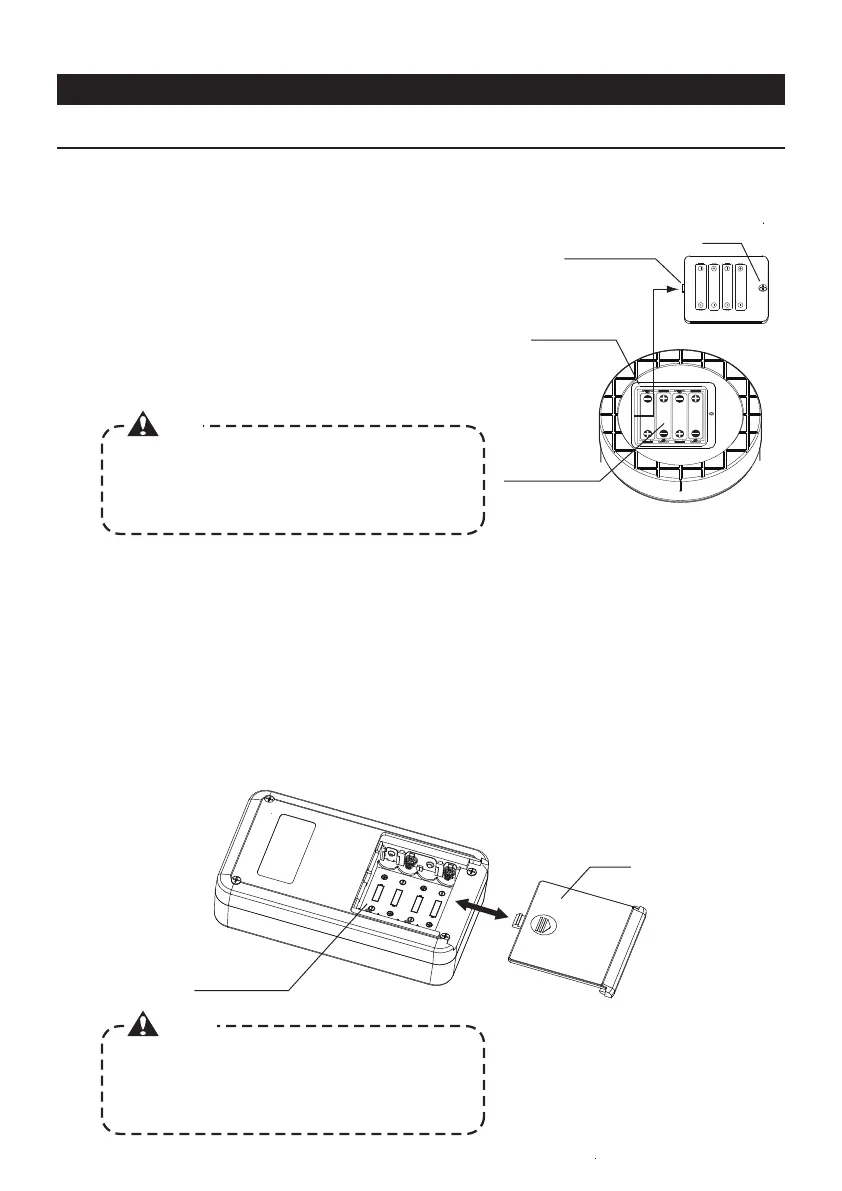
③Insert 4 batteries (LR03: AAA) as indicated in the battery box.
④Slide and fit the cover.
②Slide to remove the cover of the battery box.
①Remove the protective cover.
[BUZZER]
[SET]
[POWER]
INSTALL THE BATTERIES
3.HOW TO INSTALL THE BATTERIES
●Body
②Insert the 4 batteries included (LR03: AAA) in the base of the
batteries box as indicated on the figure on the right.
③After have installed the batteries, insert the projecting part of the
cover into the recess of the batteries box. Then, secure the cover
by tightening the screw.
①
Loose the screw of the cover of the batteries box.
Batteries box
Batteries box
Batteries
LR03 (AAA) x4
Cover
Projecting part
of the cover
Screw
Always check the polarity of the batteries. If the batteries
are inserted with the polarity inverted, the device may not
work and the internal electric circuit may get damaged
making the device not utilizable.
Always check the polarity of the batteries. If the batteries
are inserted with the polarity inverted, the device may not
work and the internal electric circuit may get damaged
making the device not utilizable.
Caution
Caution
●Receiver
When the inclination is within 0.01( HIGH mode)
or within 0.1 (LOW mode), the LED (blue) turns
on and the buzzer emits a sound. It is possible to
turn on/off the buzzer's sound by using the
switch of the device.
5-2.How to turn on/off the buzzer 《Receiver》
5-3.How to reset the device to its default values 《Receiver》
To reset the device to its default values (delivery
condition), push the "SET" switch while turning ON the
power. The internal data are cleared.
OPERATIONS



 To Next Page