WWW.BIGASSFANS.COM © 2020 DELTA T LLC ALL RIGHTS RESERVED.
6
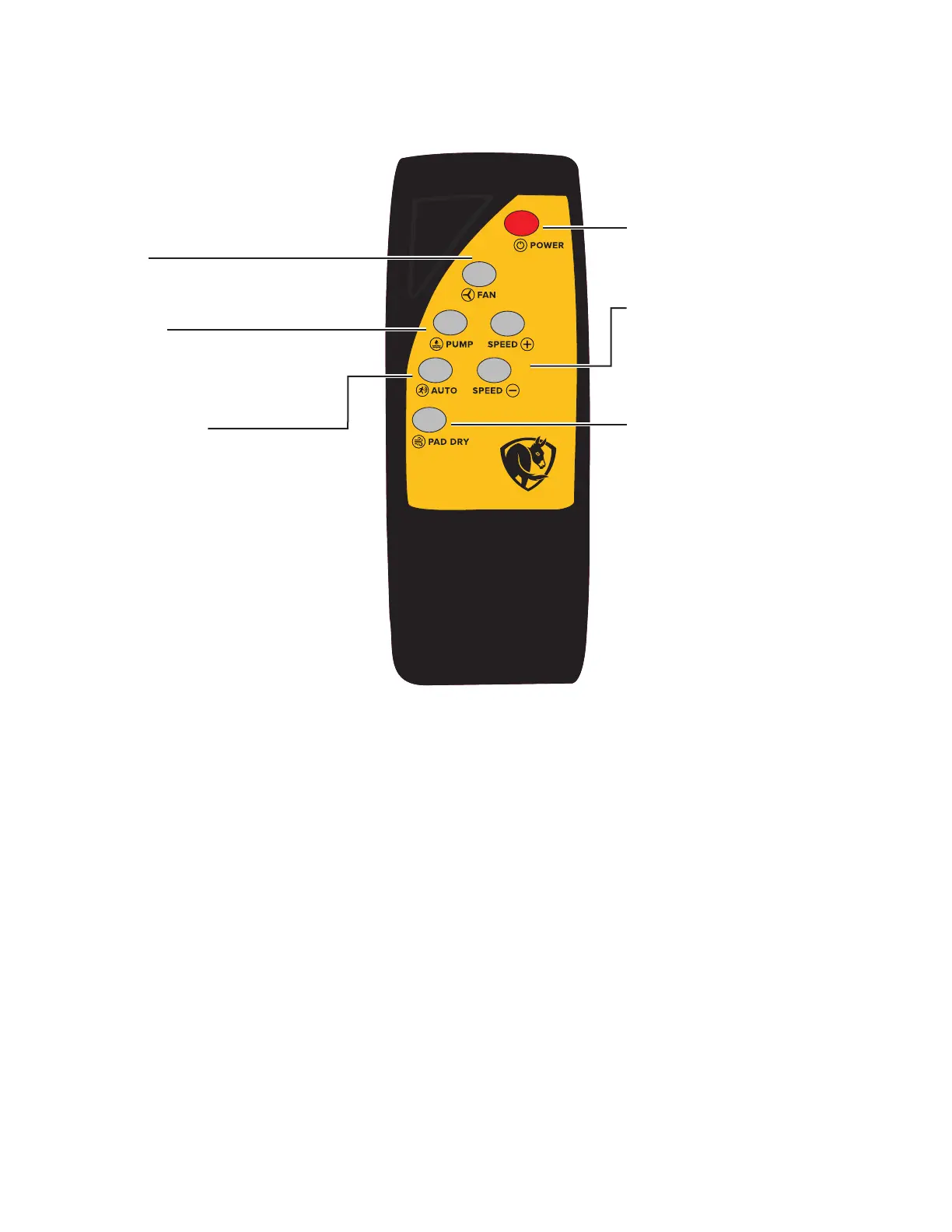
Remote control operation (Cold Front 500)
Fan Speed
• Default speed is 6.
• Press + to increase speed.
• Press - to decrease speed.
Power On/O
Turns cooler on and o.
Fan On/O
Turns fan on and o in Manual mode.
Pump On/O
Turns pump on and o in Manual
mode.
Auto/Manual Mode
Switches cooler between Auto and
Manual mode. In Auto mode:
• Indicator light will be illuminated.
• Cooler will run when motion is
detected.
• When no motion is detected,
cooler will run for 10 minutes, and
then shut down.
Pad Dry
Puts cooler into shutdown mode.
• When pressed, the pump shuts
o and the fan will continue to
run for 15 minutes and then shut
down.
• Works in Auto and Manual
mode.


 To Next Page