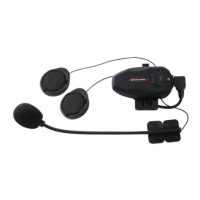
1.PARTS AND ACCESSORIES
2.INSTALLATION
MOUNTING SPEAKERS/MICROPHONE ONTO HELMET
3.SET UP YOUR HOLA
POWER AND LED INDICATOR:
ABOUT PAIRING
Why Pair?
Which Devices to Pair?
How to Pair:
Pairing with a Cell Phone:
Pairing with a GPS:
Pairing with Another HOLA:
Pairing Example:
4.USING YOUR HOLA
VOLUME CONTROL
USING YOUR CELL PHONE
INTERCOM WITH ANOTHER HEADSET:
(VOX VS. MANUAL ACTIVATION)
Voice Activation (VOX) Mode
Manual Activation Mode
Party Occupied
Connection Failed
USING YOUR GPS
RESET/ERASE PAIRING INFORMATION
VOICE NOTIFICATIONS LANGUAGE SELECTION
5.QUICK REFERENCE FOR OPERATIONS
6.VOICE NOTIFICATIONS QUICK REFERENCE
7.BATTERY POWER CAPACITY
8.SPECIFICATIONS
9.NOTES
Table of Contents
1
3
3
9
10
11
11
11
11
11
13
14
17
19
19
21
23
23
28
29
29
30
30
30
31
33
34
35
36



 To Next Page