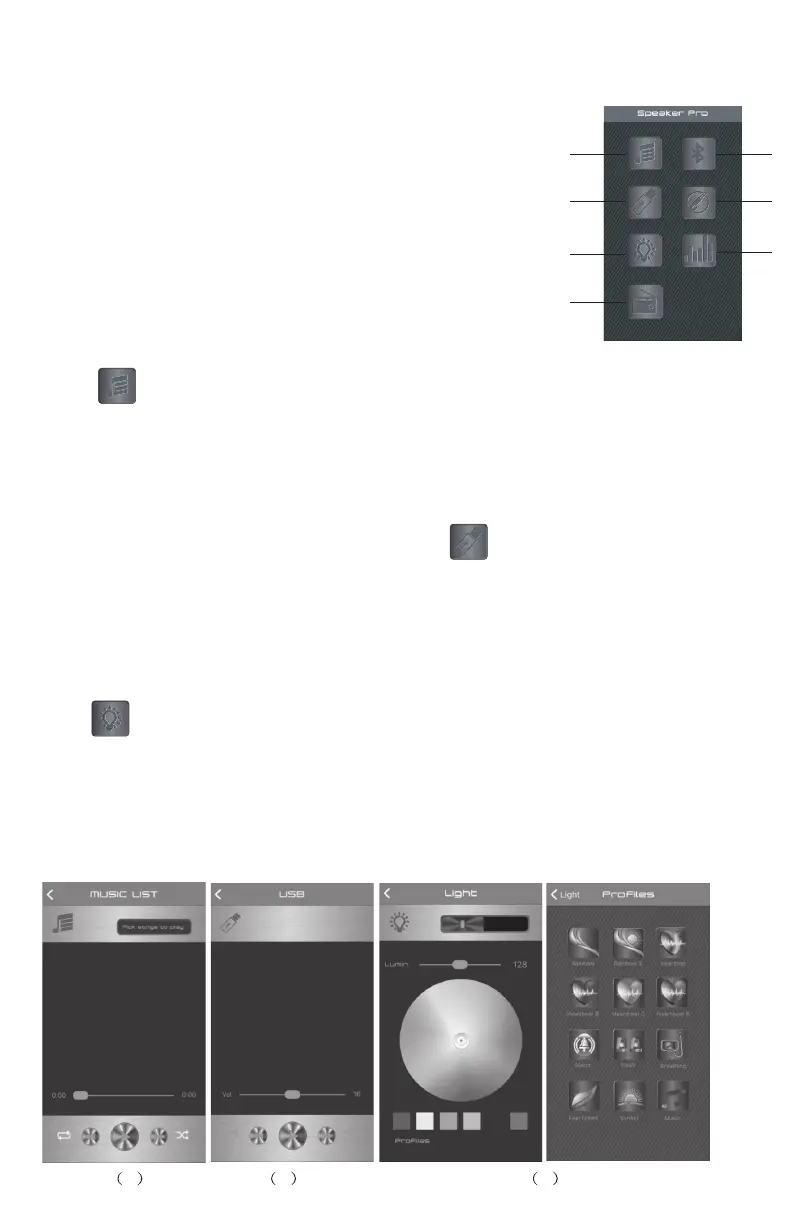
To control the device via your phone, please nd and install the app
“ Speaker Pro “. Open the App “Speaker Pro” on your phone, there are 8
function icons on the main page :
1. Bluetooth Music play
2. USB card play
3. Light control colour, brightness and light ash mode
4. FM Radio
5. Control Bluetooth connect
6. Line In input - mute
7. Equalizer,volume adjustment for
music, Microphone and quitar input.
1
2
3
4
5
6
7
(1) Bluetooth Music play
Press to enter into Bluetooth Music play page, Press “Pick songs to play”
to Pick Song page to choose the song you want to play, press “Done” to return
to Bluetooth Music play page, also you can operate pause, play, backward,
forward& volume adjustment, repeat, random play. Press “Back” to return to
the main page.
(2)USB card play
When inserting a USB into the speaker, press to enter the USB Card play
page. To choose a song and play music on the USB card, press “Play” to enter
into the play control page ,where you can operate pause, play, backward,
forward & volume adjustment. Press “List” to return to USB list page, press
“Back” to return to the main page.
(3) Light control colours, brightness and colour change mode
Press to enter into Light Control page, you can select any colour to show
the light colour on the speaker, as well as adjust the brightness of the light. To
go back to main page, press “ “ in the left corner.
Press “Proles” to enter into Light Eect mode page, you can choose from a
total of 12 pre-set light eect modes. To return to Light Control page, press
“Light” in the left corner.
1 2 3


 To Next Page