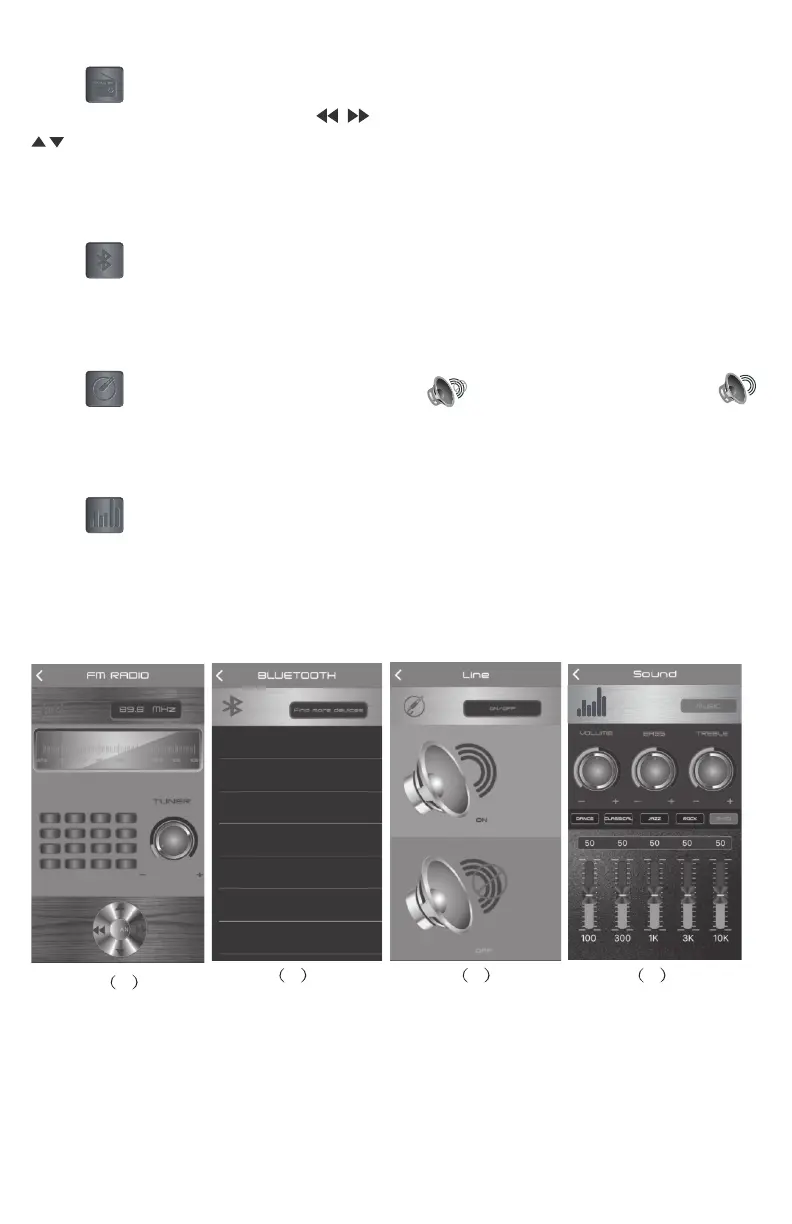
(4) FM Mode
Press to enter into FM radio mode, press SCAN to enter into radio
program automatic scan. Press for radio program manual scan,
Top and bottom trimming, Turn the TUNER button radio station can be
adjusted. Slide around to adjust radio frequency between 87.5MHz~108.0MHz.
(5) Bluetooth connection
Press to enter into Bluetooth Control connection page, then click
“Speaker Pro BLE” to connect to the speaker.
(6)Line In input - mute
Press to enter into Line IN input page, press to mute music, press
insert a line continue play. Press “Back” to main page.
(7) Equalizer regulation
Press to enter into Sound Set page, and then turn volume or bass or treble
to adjust the volume. There are 4 pre-set EQ modes: dance, Classical, Jazz and
Rock.You can also press G-Eq to access the graphic equalier to set up your
preferred equalize specication.
765
4


 To Next Page