4
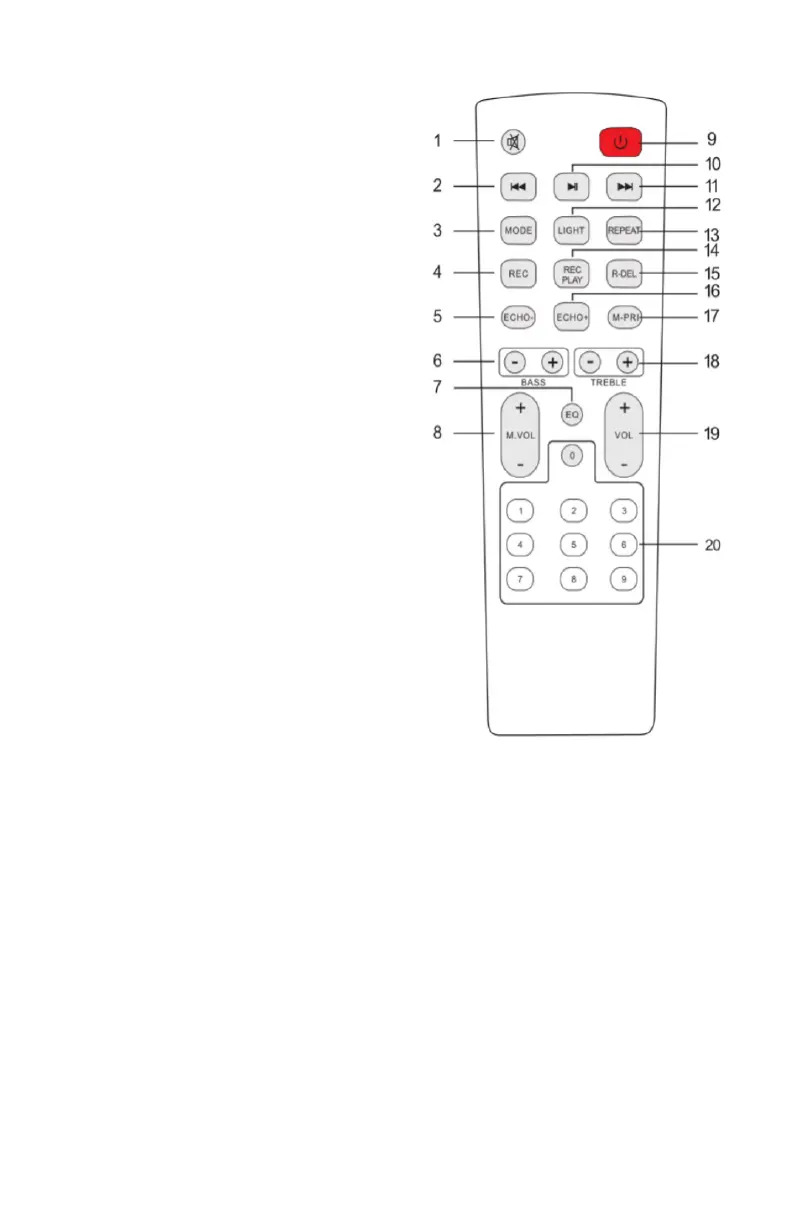
7. EQ function
8. Microphone Volume+/-
9. Stand by
10. Pause&Play
11. Next song
12. Light mode
13. Repeat function
14. Record play
15. Record delete
16. Echo+
17. Microphone priority
18. Treble+/-
19. Main Volume
20. Number buttons- Under USB/Micro-SD mode to
choose songs.
1. Mute- Available to mute in any
mode
2. Previous Song
3. Mode-Press to skip to
Bluetooth®/ FM/ Line In/ USB/
Micro-SD
4.Record function-1.When unit
is working in USB/TF mode,
plug in the wired microphone,
then short press button REC to be-
gin recording.2.Short press button
REC PLAY to stop recording and
replay the recorded le repeatedly.
3.en short press button REC
PLAY or button R-DEL to delete
the recorded le and resume USB/
TF playing.
5. Echo-
6. BASS+/-
REMOTE CONTROL
2 AAA Batteries required. (not included)


 To Next Page