5
BLUETOOTH®
Press MODE or Blue button on the unit or the remote control until
Bluetooth® is selected.
1. Put the cell phone within 30.
2.Activate the Bluetooth® features on your cell phone so that the cell phone
starts to search for the Bluetooth® device.
3. Select the correct model No. from the device found by the cell phone.
4. Shortly press PLAY/PAUSE button to play or pause music. Short press
“ ” or “ ” key to select the previous or next track.
LINE IN MODE:
Press MODE button on the unit or the remote control until LINE is
Selected. Play the music of the device connected to the LINE input.
USB Mode:
1. Aer start up, press MODE to select “USB” and insert the USB device. e
unit will automatically read and play the music in the USB device.
2. Press “ ” key shortly to pause or play.
3. Shortly press “ ” key to the previous song.
4. Shortly press “ ” key to the next song.
TWS CONNECTION:
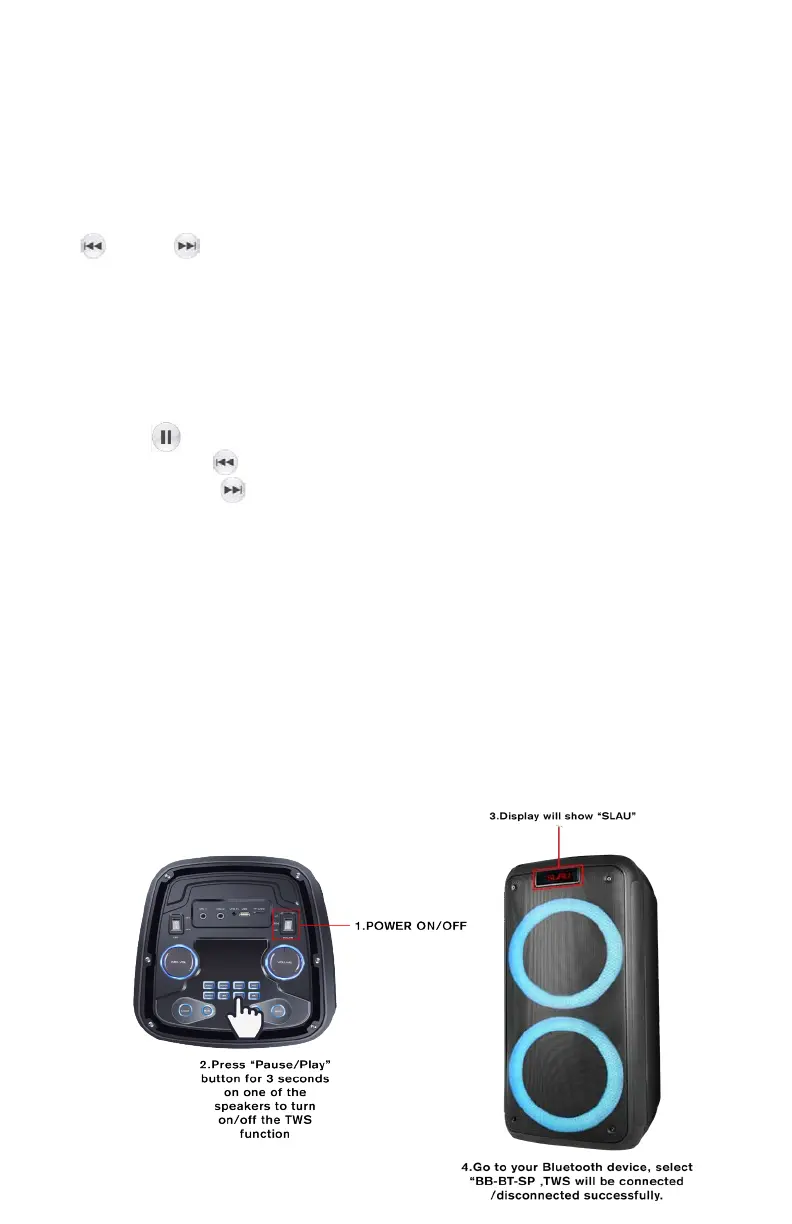
Using TWS ( True Wireless Stereo) : Press the “Pause/Play” button for 3
seconds on one of the speakers to turn on/o the TWS function, display will
show “SLAU” on one of the speakers. Go to your Bluetooth® device, select
“BB-BT-SP , TWS will be connected /disconnected successfully.
Recording Function
1.Cuando la unidad funciona en modo USB / TF, conecte el micrófono con
cable y luego presione brevemente el botón REC para comenzar a grabar.
2. Mantenga presionado el botón REC durante 2 segundos para detener la
grabación y reproducir el archivo grabado repetidamente.
3. Luego mantenga presionado el botón REC durante 2 segundos nueva-
mente para eliminar el archivo grabado y reanudar la reproducción USB / TF.
®


 To Next Page