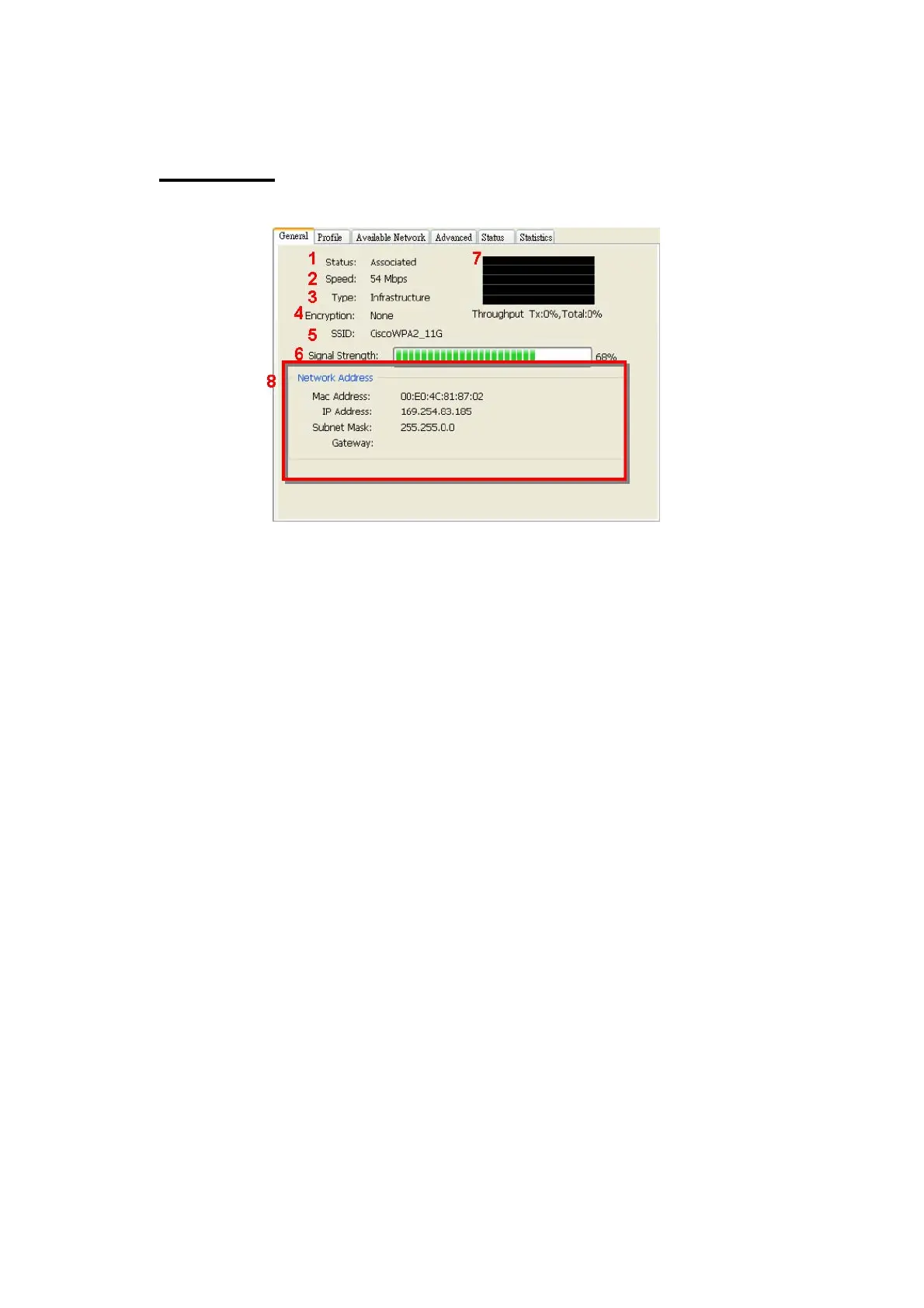
A. General Page
This page represents the general information of this adapter.
1. Status
The status of station connection to AP.
2. Speed
Current transition speed in Mbps (Mega-Bits-Per-Second).
3. Type
Current wireless LAN configuration type.
4. Encryption
Current encryption mode used.
5. SSID
Name of wireless network.
6. Signal Strength
The average signal quality of packets received from wireless network.
We recommend connecting AP with over 70% signal strength.
7. Throughput Diagram
Current throughput, including transmission (Tx) and total traffic (Total).
8. Network Address
Mac Address: six two-digital number of this Wireless LAN USB adaptor
IP Address: assigned network address by DHCP server or
self-definition in four three-digital number format.
■ Subnet Mask: the only valid value is 2555.255.255.0
■ Gateway: It comes from connected AP. Your system can not
connect internet with this field empty.
15



 To Next Page