41
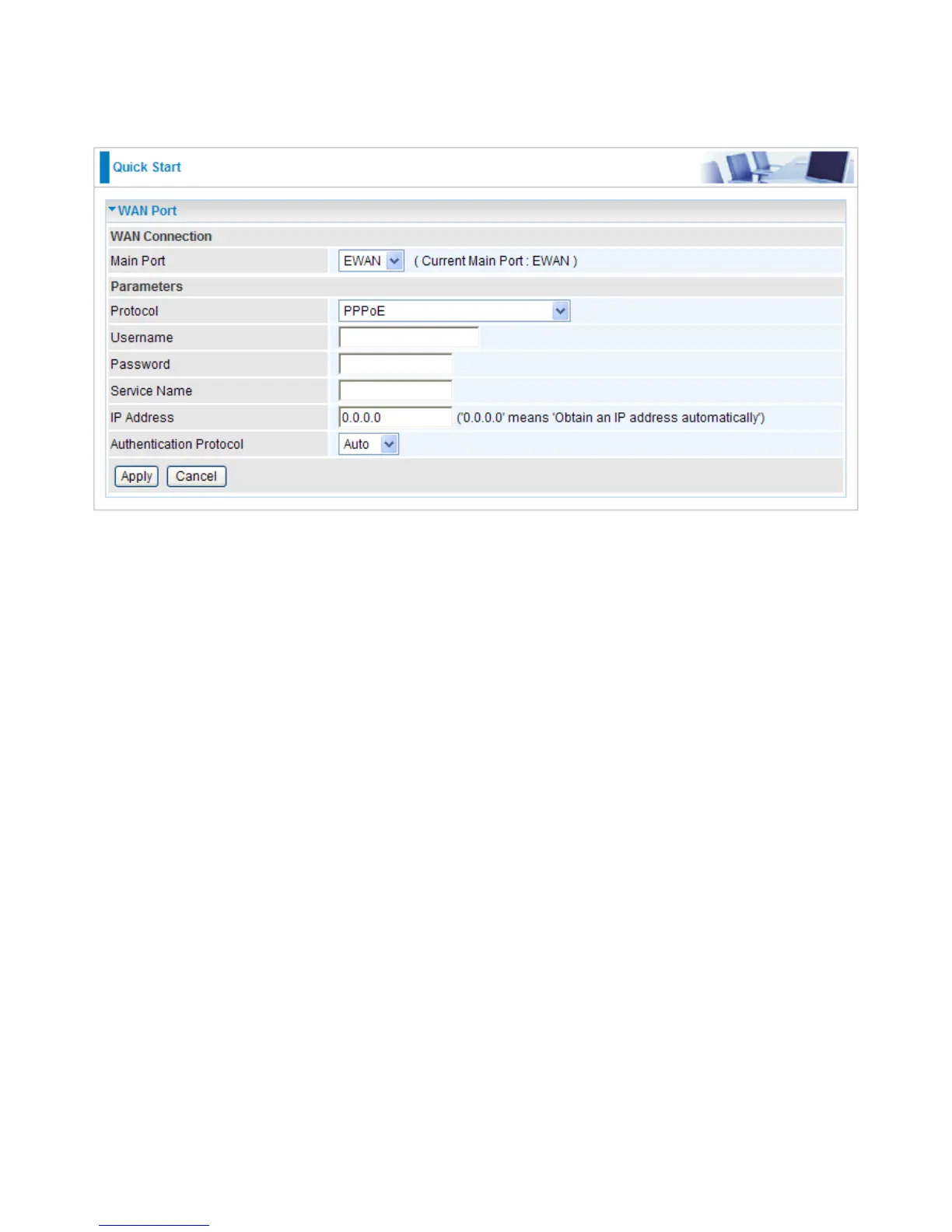
PPPoE Connection (EWAN)
PPPoE (PPP over Ethernet) provides access control in a manner which is similar to dial-up services
using PPP.
Protocol: Select the protocol you will use in the device.
Username: Enter the username provided by your ISP. You can input up to 256 alphanumeric
characters (case sensitive).
Password: Enter the password provided by your ISP. You can input up to 32 alphanumeric
characters (case sensitive).
Service Name: This item is for identication purposes. If it is required, your ISP will provide you
the necessary information. Maximum input is 32 alphanumeric characters.
IP Address: Enter your WAN IP address. Leave the IP address as 0.0.0.0 to enable the device to
automatically obtain an IP address from your ISP.
Auth. Protocol: Default is Auto. Please consult your ISP on whether to use Pap and Chap.
Click Apply to conrm the settings.


 To Next Page