temperature and speed; when it is switched back on, it will maintain the settings made
earlier.
When this function is set, the "Dry" light
on the control panel illuminates; the fan
speed is fixed at the minimum level and
cannot be modified. The appliance does
not cool the room when the dry function
is activated. When this function is used,
continuous drainage must always be
provided to ensure the maximum drying
efficiency. Make sure that the rubber
plug of the bottom drainage hole (9) is
positioned correctly. Undo the ring-nut
of the continuous drainage hole by
turning it anticlockwise, and remove the
plug of the top drainage hole.
Connect always the hose with internal diameter 10 mm and length 30 cm max. (supplied
with some models) to the continuous drainage hole (14); make sure that the connection is
watertight. Check that the drain is at a lower level than the spout and that the hose is placed
with a constant gradient, lower than the spout at all times. If continuous drainage is not
being used, remove the drain hose and fit the plug with its ring-nut.
- Fan
When this function is set, the "Fan" light on the control panel illuminates; the selected
speed (low/med/hi) is changed at every press on the button.
DRAINAGE
In
“Cool”
mode, the appliance vaporises the
condensate automatically. When the unit is
operating in cool mode, make sure that the rubber
plugs that seal the drainage holes (bottom & top)
on the rear are fitted correctly.
When the appliance is operating in
“
Cool” or ”Heat”
mode, there is no need
to connect the continuous condensate
drainage; water will not build up inside
the unit except in particular weather
conditions with a very high humidity
level.
When the container is full, the
display shows the message “
”
and/or “FULL” to indicate this and
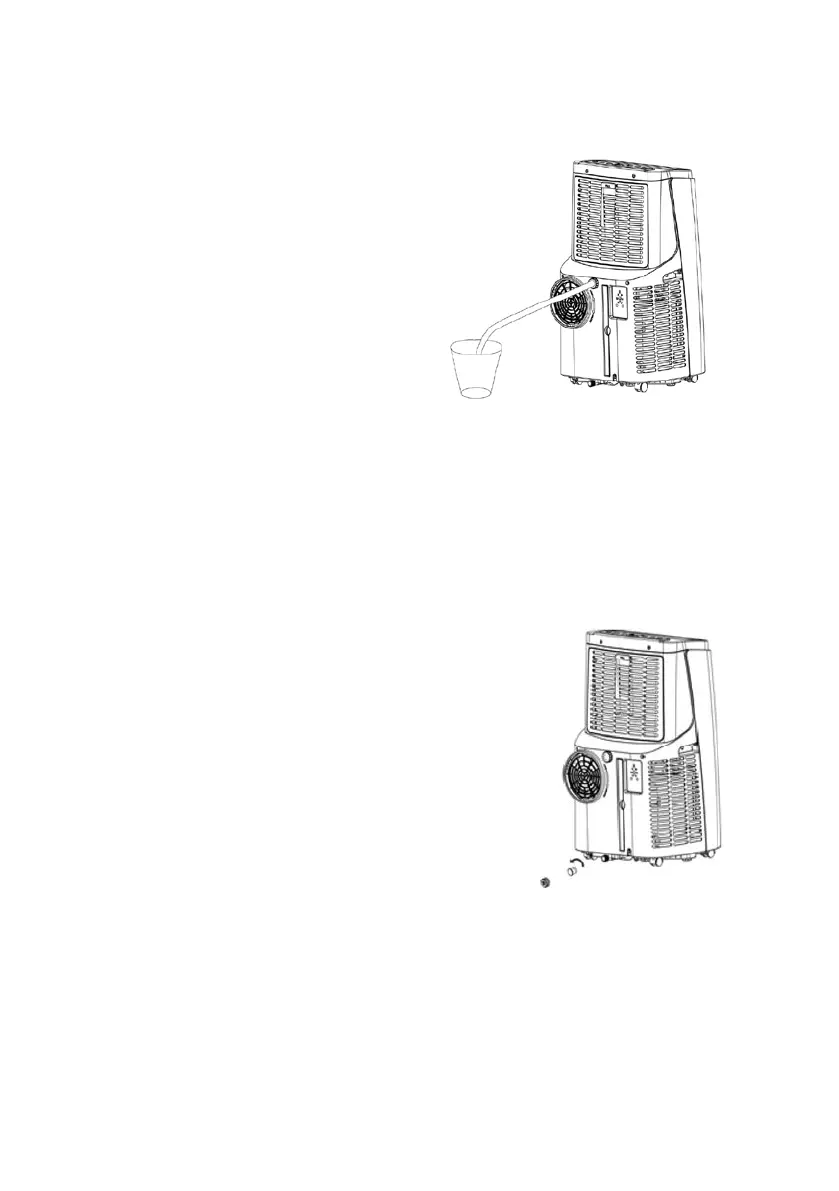
To empty the container, switch off the appliance and remove the plug from the socket.
Place the end of the drain over a container to collect the condensate, undo the ring-nut by
turning it anticlockwise, and remove the plug of the bottom drainage hole.


 To Next Page
 Loading...