NAVIGATION MENU
25 Binatone Help Line: 0845 345 9677 (for UK only. Local Call rate)
¾ Tap OK the selected location will be used as a waypoint/destination.
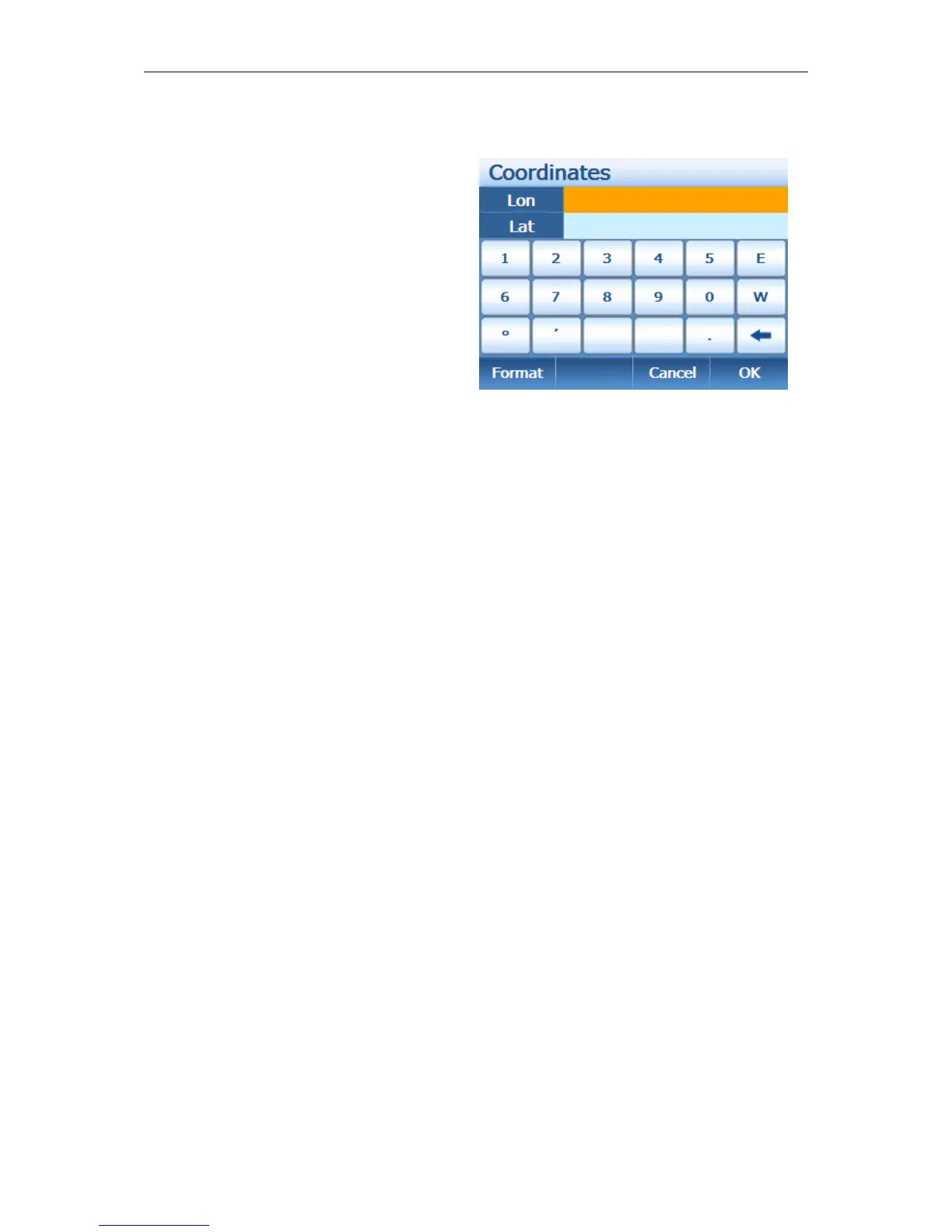
Coordinates
This option allows you to enter the
longitude and latitude co-ordinates of the
location you are looking for. The screen
will change to the Coordinates entry
screen.
You can enter the coordinates in 2 ways,
Degree:Minute or as a decimal. The unit
automatically defaults to Degree:Minute
format.
When entering the Longitude the letters E, W are used to describe the hemisphere, °
is used to indicate the degrees and ‘ is used to indicate the minutes. When entering
the Latitude again the letters this time N, S are used to indicate the hemisphere.
Alternatively you can tap Format this will change the N, S, E and W keys into + and –
were North and East are "+", and South and West are "-".
To delete an incorrect digit use the back arrow found at the bottom right of the
keypad.
To enter a decimal point use the . key.
Once the co-ordinates have been entered correctly tap OK to select the location as a
waypoint/destination or Cancel to exit back to the Search from screen.


 To Next Page