QUICK START GUIDE
5 Binatone Help Line: 0845 345 9677 (for UK only. Local Call rate)
Quick Start Guide
Please make sure that your read all of the information contained within this user
guide before operating this unit.
If you experience any problems, please go through the user guide before contacting
the customer helpline.
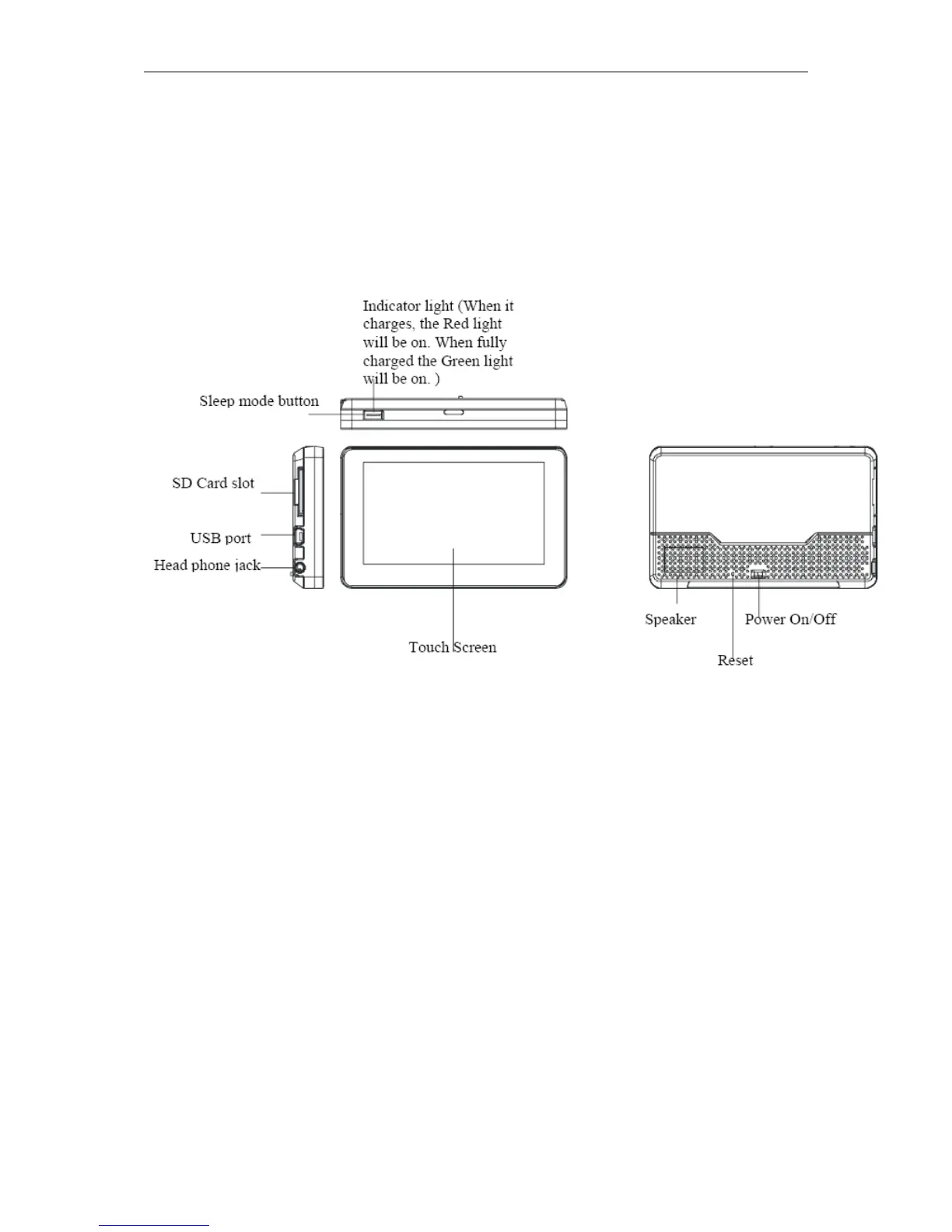
Position of the controls
1. Touch Screen
2. Charge Indicator – Displays the battery charging status.
Red or Orange; charging, Green; fully charged.
3. On/Off Switch – Turn the unit On/Off using this switch, if the unit is not to be
used for long periods of time.
4. Reset – System reset switch.
5. Speaker – For voice guidance instructions.
6. Memory Card Slot – For use with SD type cards. Do not remove memory
card while in use.
7. Headphone Jack – Connects to external headphones.
8. USB connector – For data transfer and charging.
9. Sleep mode Button – Switches the unit In/Out off sleep mode, handy when
stopping for short periods to conserve battery power.


 To Next Page