7
Instructions for Usage
24 Hours
Operation
11. The air cooler will automatically stop
operation and enter into stand - by mode after
max. 24 hours operation. If you need to start it
again, press “ON/OFF” again.
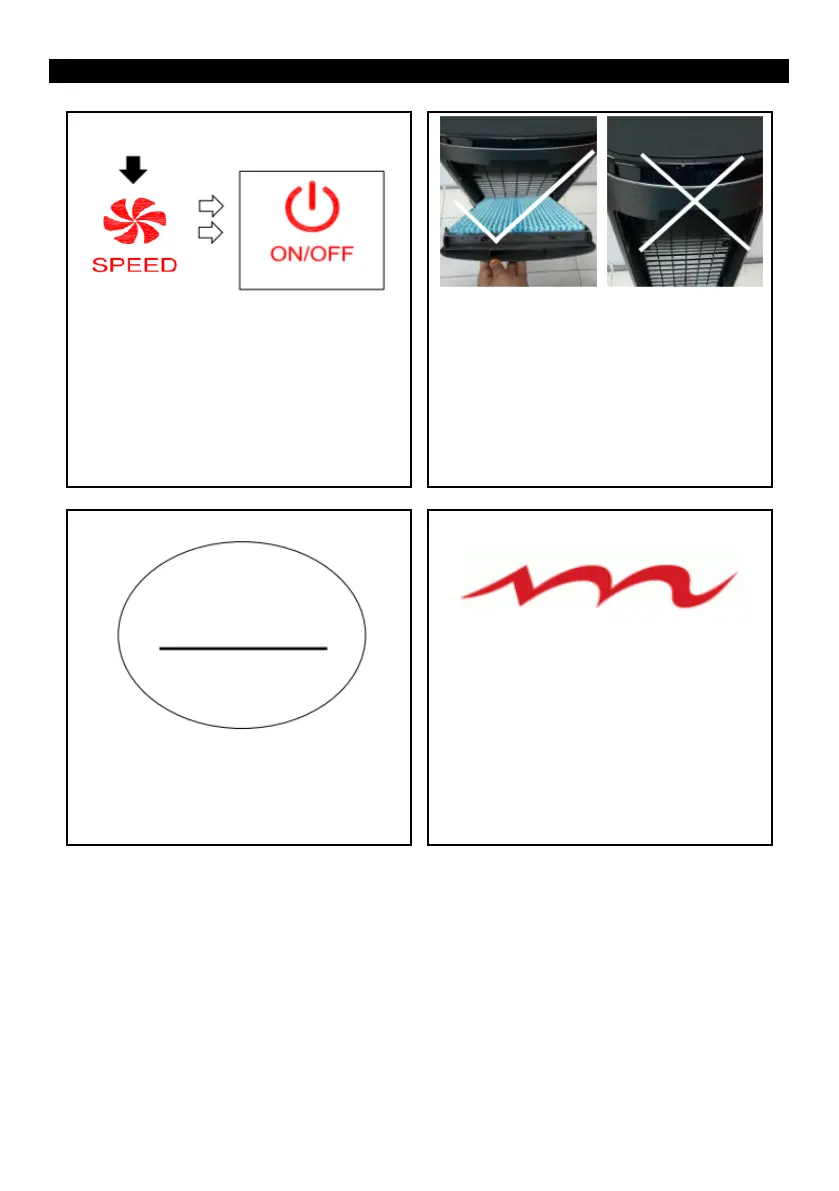
Long press the button to start sleep mode
9. When the air cooler is started , long press
speed button for above 3s, the air cooler will enter
into sleep mode automatically. In sleep mode,the
speed of air cooler will be gradually shifted into
sleep wind in lowest speed level. The “ON/OFF”
indicator light is in purple and other indicator
lights will be OFF.
10. The rear net of air cooler must be correctly
assembled on the main body ; otherwise all the
functions cannot work. If the rear net fails to be
installed, the air cooler will be in stand-by state.
“ON/OFF” light is in red.
Memory function
12. The air cooler has a memory function. If you
press “ON/OFF” button for shutdown and then
press “ON/OFF” button again for startup in the
case that there is no power off, the air cooler will
automatically memorize the functions you set last
time except for timer function and sleep function.
Purple light is ON


 To Next Page