Need help?
Do you have a question about the BingoFit FT905HR and is the answer not in the manual?
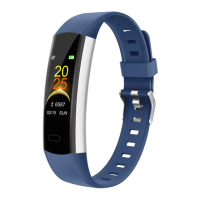
Introduces the device components like the screen, touch key, and straps.
Instructions on how to charge the device by connecting its USB to a computer or charger.
Steps to download the 'CC Band' application from Google Play or App Store.
Displays different screens representing the main interface of the fitness tracker.
Details on tracking steps, calories, distance, and accessing activity data.
Instructions for monitoring heart rate, including posture recommendations.
How to select and record various sports activities like running, cycling, and sit-ups.
Explains the modes for recording sports and displaying sports data.
Instructions on how to use the 'Find Phone' function to locate a connected mobile device.
Guide to changing the watch face or dial style on the device.
Information on checking device version and performing a factory reset.
Instructions on how to safely turn off the fitness tracker.
How to set up user profile, goals, and activate additional functions within the app.
How to view daily steps, distance, and calorie data, and check historical records.
How to start/stop heart rate tests, choose monitoring modes, and view history.
Guidance on setting sleep times and monitoring sleep status, deep sleep, and sleep quality.
Where to find solutions for frequently asked questions on the CC Band App.
Contact information for customer support via email or Amazon.
Encourages users to share feedback or product reviews.
 General
| Water Resistance | IP68 |
|---|---|
| Heart Rate Monitor | Yes |
| Step Counter | Yes |
| Sleep Tracking | Yes |
| Connectivity | Bluetooth 4.0 |
| Model | FT905HR |
| Category | Fitness Tracker |
| Compatibility | Android, iOS |
| Sensors | Accelerometer, Heart Rate Sensor |

 To Next Page