
 Need help?
Do you have a question about the BINNUNE BW02 and is the answer not in the manual?
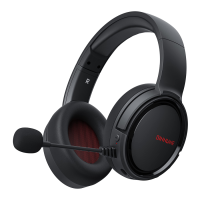
Description of the retractable headband component of the gaming headset.
Details on the soft memory protein ear cushions for comfort.
Information about the unidirectional microphone included with the headset.
Location and function of the microphone mute button.
Overview of the 2.4G wireless transmitter for connectivity.
Details on the included 3.5mm audio cable.
Information about the USB Type-C charging cable.
Description of the master volume control wheel.
Location and function of the power button.
Details on the 3.5mm audio port on the headset.
Information about the USB Type-C charging port.
Guide to connecting and using the headset wirelessly with PC or Mac.
Instructions for connecting the headset via wired mode to PS4/PS5 controllers.
Steps to establish a wireless connection with PS4/PS5 consoles.
Procedure for connecting the headset via wired mode to Xbox controllers.
Detailed steps for turning the headset power on and off.
Instructions on how to enable or disable the microphone.
Guidance on charging the headset, indicators, and operational notes.
Solutions for common issues related to 2.4GHz wireless connectivity.
Troubleshooting steps for when the microphone is not functioning.
Guidance to resolve no sound or intermittent sound problems.
Troubleshooting steps for when the headset cannot connect to devices.
Details on the compatibility of the headset with PC devices.
Information regarding headset compatibility with PS5/PS4 and Xbox consoles.
Support status for connecting with PS5/PS4 and Xbox controllers.
Compatibility details for Nintendo Switch, mobile phones, and tablets.

 To Next Page
 General