2
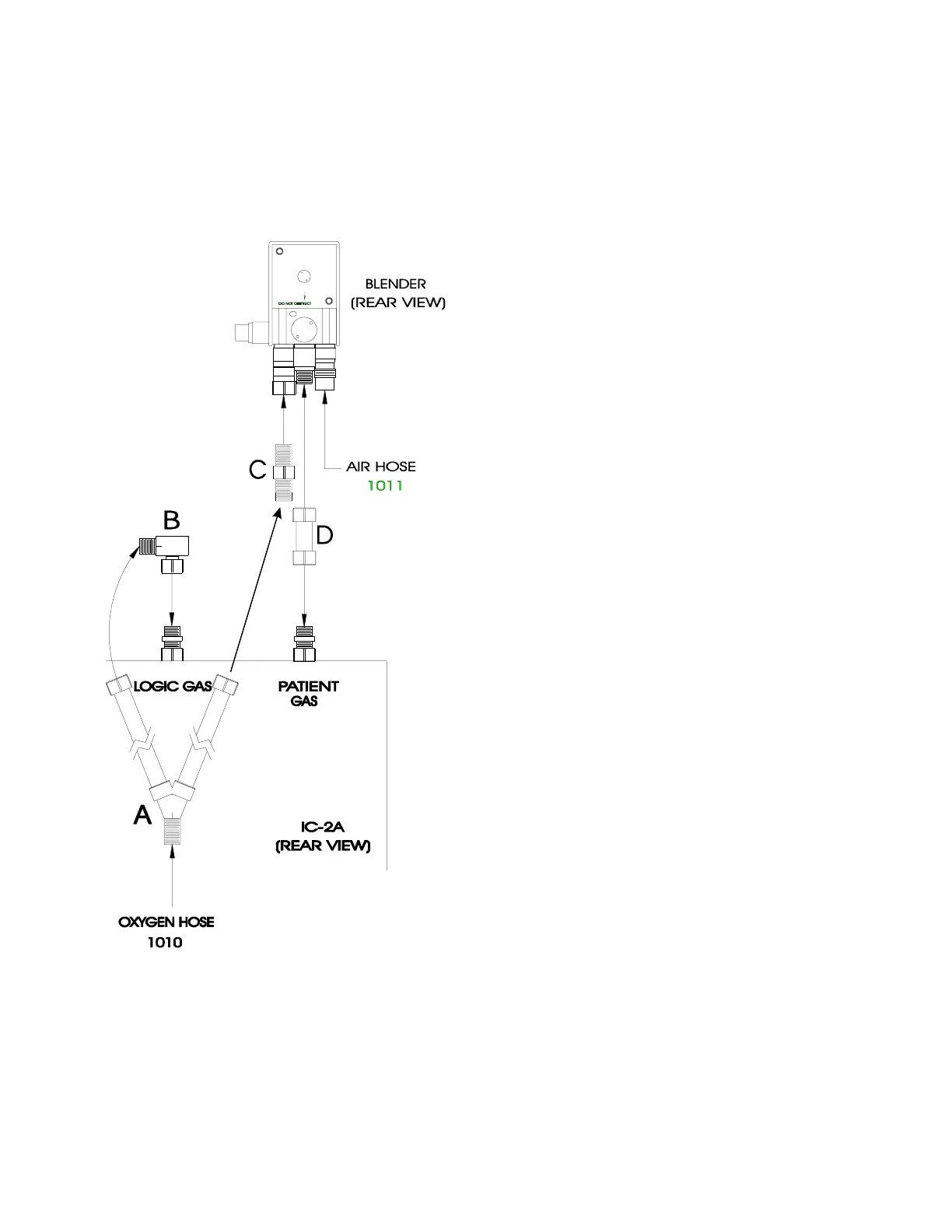
IC-2A WITH TOP MOUNTED BLENDER
The following instructions explain how to make the connections between your IC-2A
and blender using the Bio-Med Blender Hose Kit, catalog #2005IC.
1. Mount the blender to the IC-2A using the
nut to nut coupler (D) – (blender primary outlet
to IC-2A patient supply).
2. Connect the air supply hose (1011) to the
air supply fitting on the blender.
3. Connect the elbow fitting (B) to the leg of
the high pressure wye (A) and the other side of
the elbow to the logic supply fitting on the IC-
2A.
4. Using the coupler (C), connect the other leg
of the high pressure wye to the O
2
supply fitting
on the blender.
5. Connect the O
2
supply hose (1010) to the
wye.


 To Next Page