6
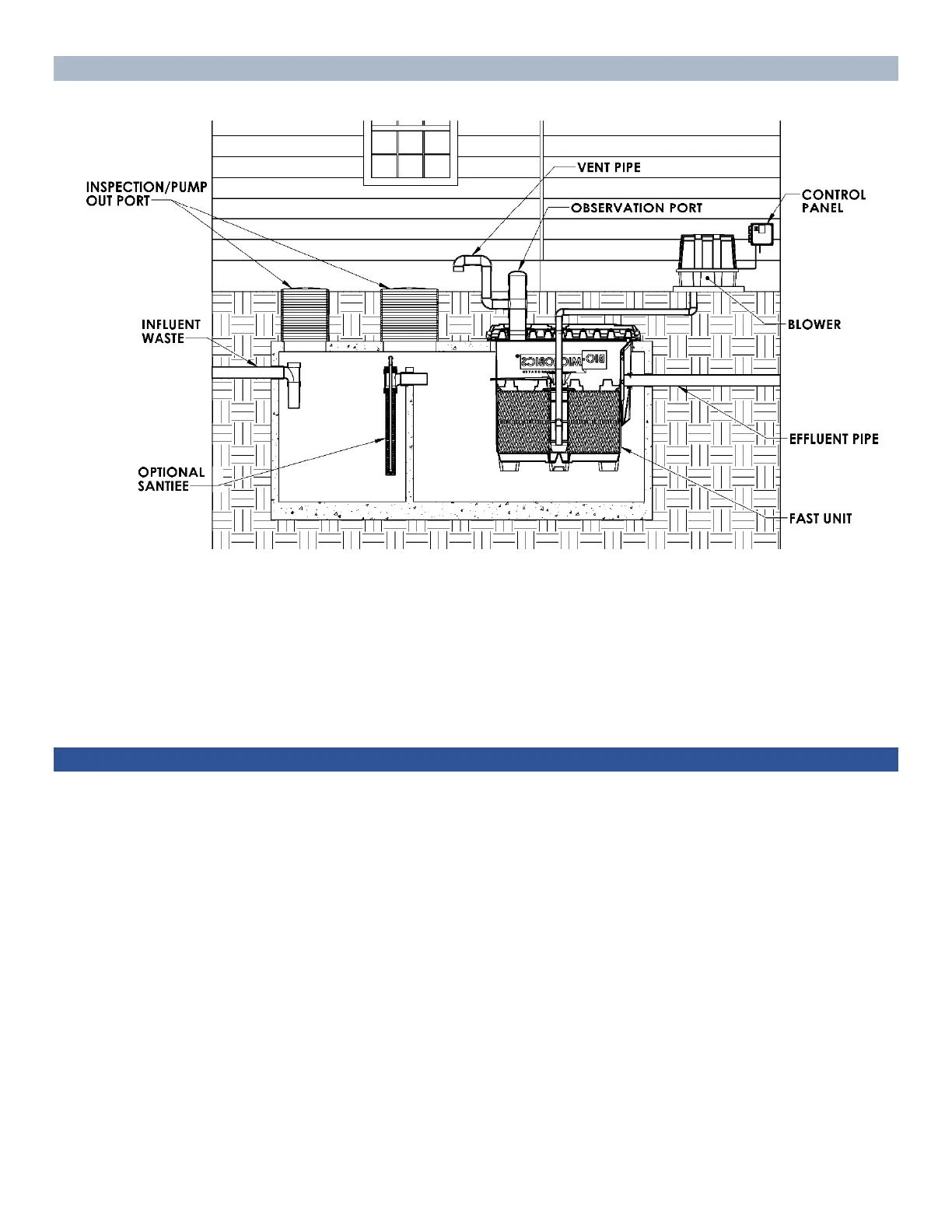
SYSTEM LAYOUT AND COMPONENTS
Shown: A MicroFAST unit installed with the lid option. Consult your Installation or Service Manual for
representations of other units covered by this Owner’s Manual.
NOTE: There may be ancillary equipment associated with your system: pump(s) (before and/or after the FAST®
unit), a distribution box, a disinfection system, an irrigation system, a remote alarm, or auto dialer, etc.
INTRODUCING SUBSTANCES INTO THE SYSTEM
While the FAST® wastewater treatment system will process most waste produced by the average household,
introducing certain substances into the system may reduce the efficiency of the system or stop the treatment
process by destroying the biomass. These substances can be grouped as: prohibited substances and limited-use
substances. Refer to the “Septic Dos and Don’ts” section below to learn how to maximize the system’s
efficiency, reduce the time period between septic tank pump-outs, and prevent costly repairs.
Prolong the life of your system:
1. Have the FAST® system inspected and tank pumped as necessary.
2. Keep track of the substances entering your system. Review the list of Dos & Don’ts below.
3. Keep the FAST® system operating: do NOT turn off the blower.
4. Care for your drain field or irrigation system (if incorporated into your FAST® System).
Note: If you have a question regarding the effect of a particular substance on the FAST® system, call a
BioMicrobics service technician.


 To Next Page