User's Manual • 3-7
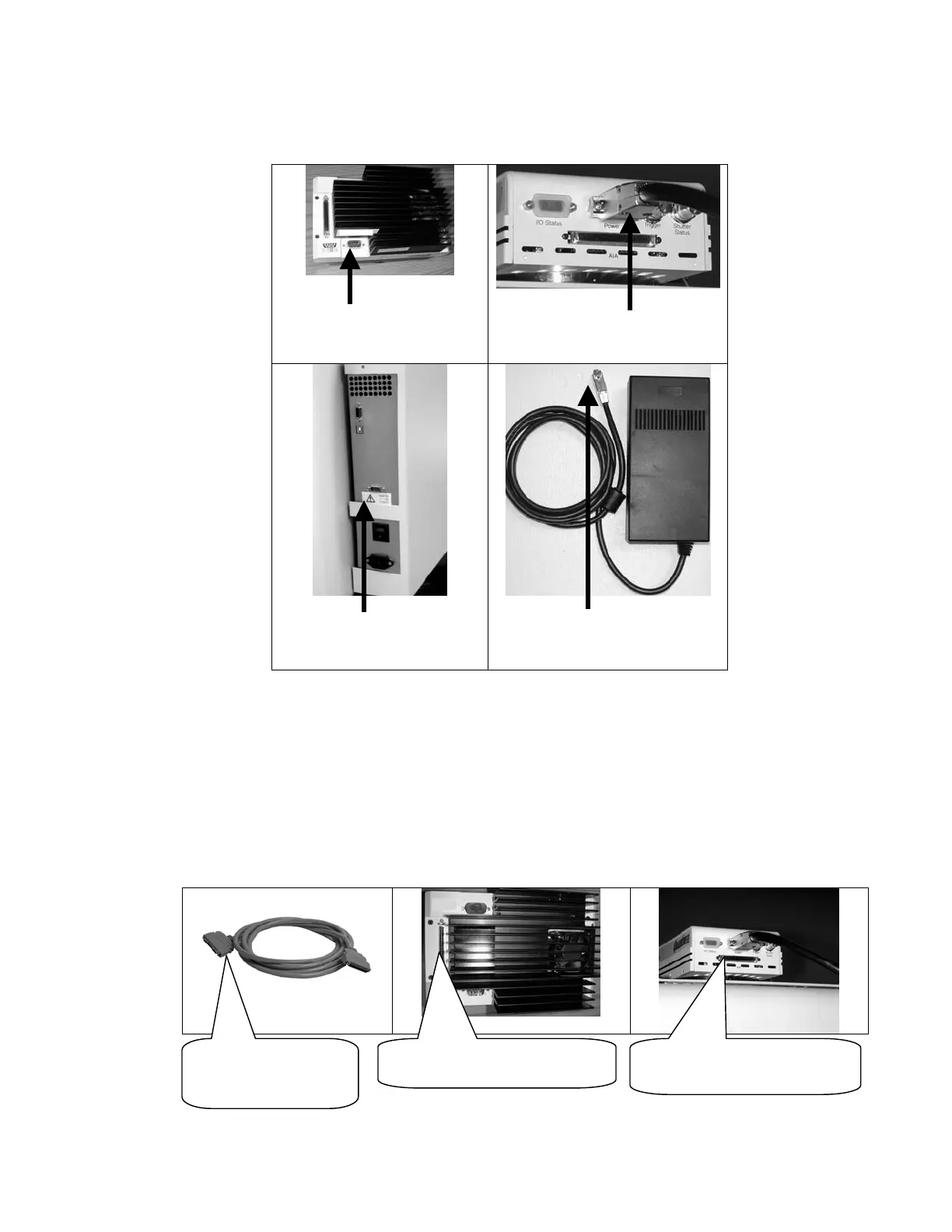
If your enclosure has a serial number above XXXBR300 then connection should be made
per pictures shown below:
VersaDoc 1000 and 4000
Camera Power Connector
VersaDoc 3000 Camera Power
connector
Camera Power connector on
top side of the rear panel
Camera Power connector on
the cable from camera power
supply
Figure 3.2
NOTE: The VersaDoc 4000 camera must be connected to the same power port as the
VersaDoc 1000
.
Connecting the AIA CABLE:
For VersaDoc 1000 and 3000 and 4000 only:
1. Connect the AIA cable (Part #800-0247) to the AIA port on the camera (See Figure 3.4).
Push the cable to the connector such that it clicks and snaps in place properly.
Figure 3.4
AIA CONNECTORS
ON EACH END OF
THE CABLE
VERSADOC 3000 CAMERA
AIA CONNECTOR
VERSADOC 1000, 4000
CAMERA AIA CONNECTOR


 To Next Page