User's Manual • 6-1
Section 6
Troubleshooting & Technical Information
6.1 Problem Solving Guide
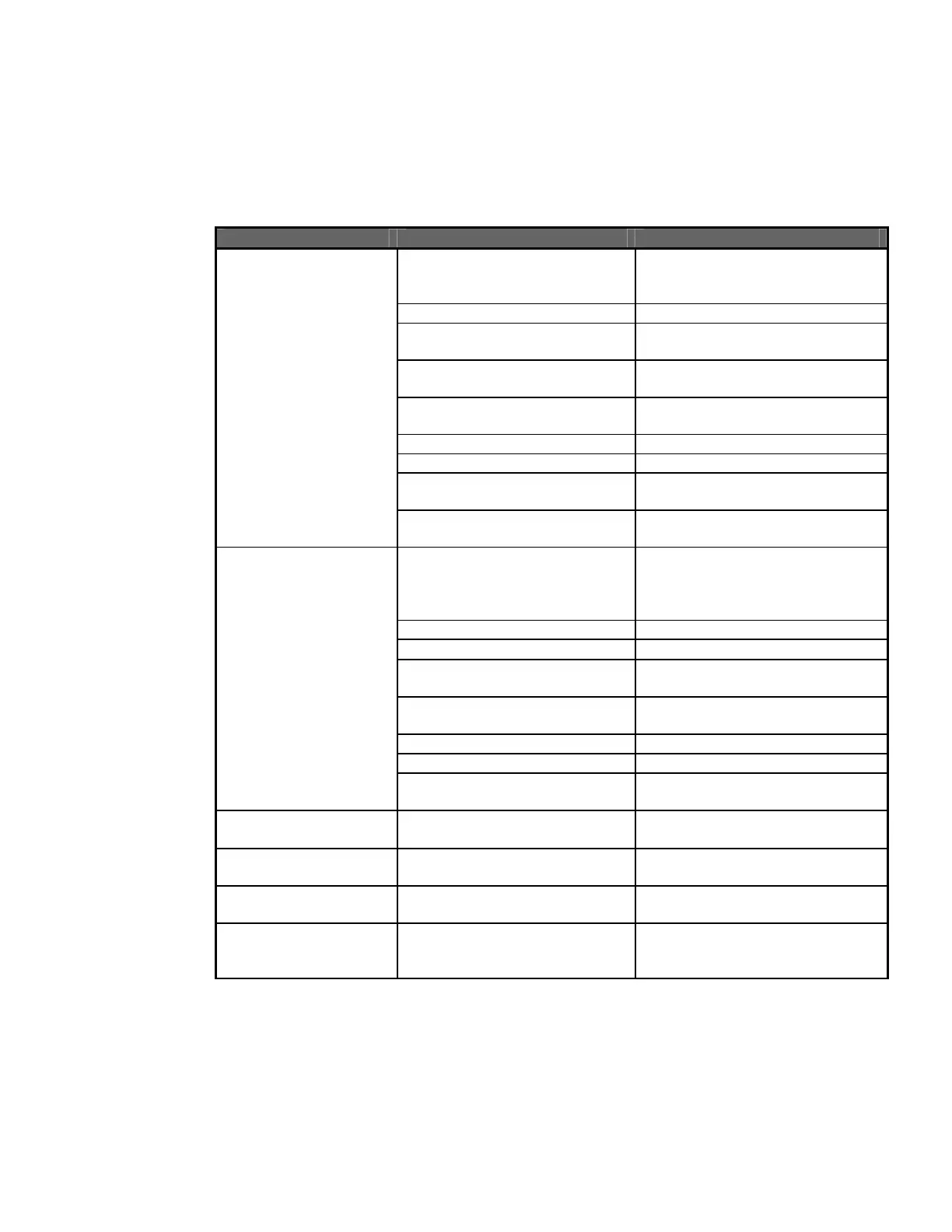
Problem Possible Cause Solution
VersaDoc is not
responding to host
computer
Power is not supplied or the
system is not switched on
Ensure power is supplied to the
system and that the switch is
turned on
VersaDoc Door is open Close Door
Serial/USB or AIA cable is not
connected properly
Reconnect Serial/USB/AIA cables
and ensure it is seated properly
Camera power cable is not
connected properly
Makes sure that the cables are
connected and seated properly
Conflict in the PC Change PCI slot to which the
digitizing card is connected
AIA cable is defective Replace AIA cable
Startup sequence is incorrect Turn off all components and
restart in opposite sequence
Computer has a conflicting
program or initiation (init.) file
Contact Bio-Rad for assistance
Image is not visible on
the monitor or only low
signal counts are
detected
The ‘Transform” function in the
software is set too high
Set to a lower maximum value
Lens cap is covering lens Remove lens cap
Insufficient integration time Integrate sample for a longer time
Chemi tray not removed when
imaging nonchemi sample
Remove chemi tray from sample
chamber
Wrong application selected Verify / reselect correct
application
Wrong imaging area selected Verify / reselect correct area
Bad lamp Replace lamp
Dirty optics Ensure that platen, filter and lens
are clean
Image intensity varies
across the image
Bad lamp Replace lamp
UV or Epiillumination
not working
Main door is open Ensure doors are closed properly
Fluorescent image has
spots
Dust or small particles on the
sample platen or optics
Clean the platen, lens and filters
White light Image has
vertical lines
Chemi/Sample tray was not
used
Use the Chemi/Sample tray on
the UV Filter platen and reacquire
the image


 To Next Page