1.0 Care of the Device
• Avoid exposing units to extreme temperatures or severe shock.
• Avoid contact with any corrosive materials such as perfume, alcohol or cleaning agents.
• Do not subject the units to excessive force, shock, dust, temperature or humidity. Any of these
conditions may shorten the life of the units.
• Do no tamper with any of the internal components of these units. This will invalidate the
warranty and may cause damage.
• Damage caused by failure to comply with this instruction manual will invalidate any warranty.
The manufacturer and supplier will not be held liable for any damages due to failure to comply
with this instruction manual.
• In case of harm or damage to a person or property caused by improper handling or failure to
comply with this instruction manual, the manufacturer and supplier cannot be held liable.
• This product is not to be used for medical purpose or for public information.
1.1 Correct Usage of Batteries
• Do not mix standard and rechargeable batteries.
• Do not mix new and old batteries.
• When the low battery symbol
appears on the display, replace all batteries with new ones.
• Do not leave discharged batteries in the device as these may corrode and release chemicals
that may damage the unit.
2.0 Setup Procedure
1. Remove the battery cover from the remote sensor.
2. Insert the adapter into an outlet then into the monitor.
3. Move the CH slide switch on the back of the remote sensor to channel 1. Next insert 2 x AA
batteries, according to the correct polarity into the remote sensor.
4. The transmission indication LED will
on the remote sensor indicating that the signal has
been sent to the monitor. Once the signal is received, the dashes (--.-°C) on the monitor for
channel 1 will change to the current outdoor temperature and humidity.
5. If after 3 minutes the screen does not change to show the outdoor temperature and humidity,
press the CH button on the monitor to select the channel you would like to reset, CH1, CH2 or
CH3 will flash.
6. Press and hold the CH button to select it. The monitor will now attempt to search for the signal
for another 3 minutes. Press the TX button on the back of the remote sensor to force the
sensor to send out another transmission signal to the monitor.
7. Position the monitor and remote sensor within effective transmission range, which in usual
circumstances is 30 metres (100 feet). The range is affected by the building materials and where
the monitor and remote sensor are positioned; try various locations for the best results.
NOTE: The remote sensor can be placed outdoors or inside your home in different r
ooms. The
remote sensor should be placed in a shaded area for accurate readings.
2.1 RF Reception Icon
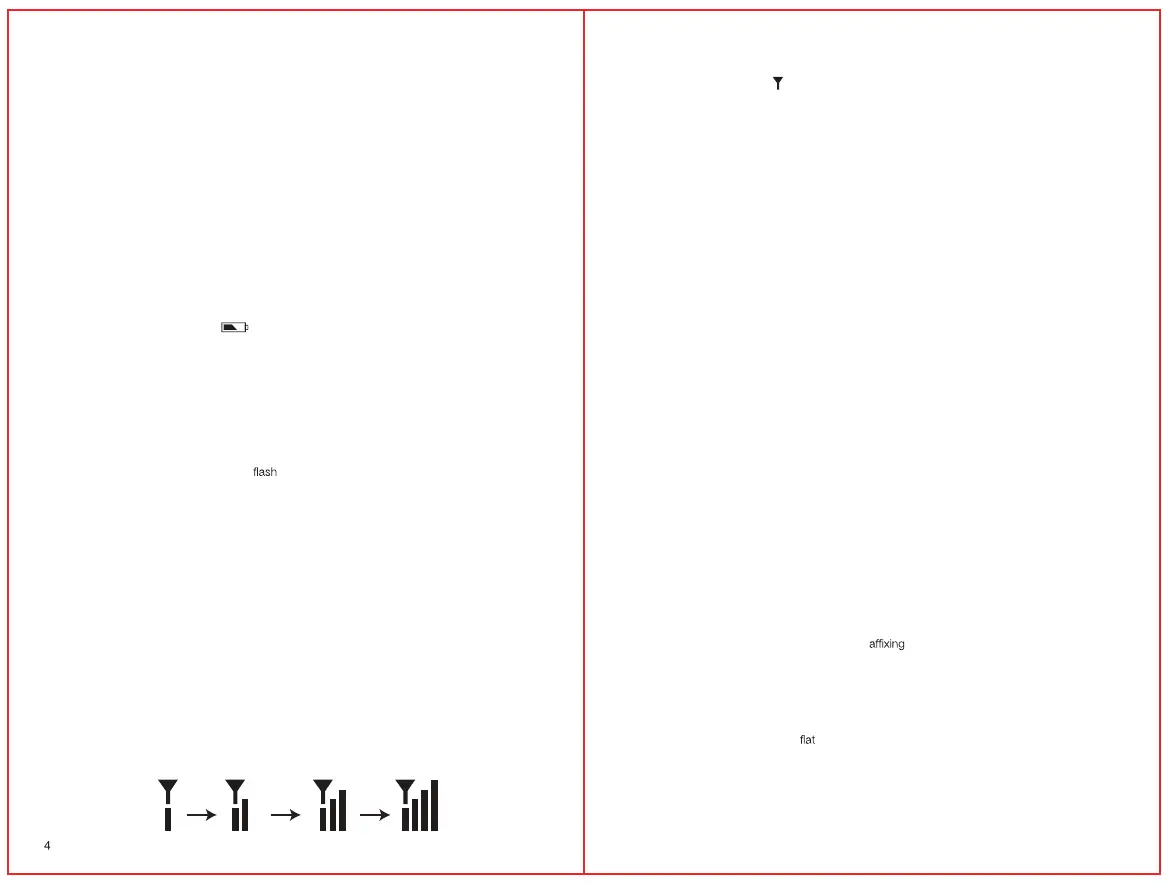
The RF icon is located next to OUTDOOR on the screen. While syncing the monitor and outdoor
sensor together, the RF icon will show the signal strength.
Lowest signal strength Highest signal strength
5
If communication between the outdoor sensor and monitor is successful the RF icon will show
maximum signal strength. If communication failed or signal is lost for more than 1 hour, the RF
icon will flash and display as “
”.
2.2 Displaying Different Channels
This unit has the capability of receiving measurements from multiple remote sensors. If you
have registered more than one remote sensor, press the CH button on the monitor to select the
outdoor sensor channel you want to display permanently. Press and hold the CH button if the
outdoor temperature and humidity needs to be reset. The outdoor temperature and humidity
of that particular channel will reset and display dashes (--.-°C and --%). After a few minutes the
outdoor sensor will send a transmission to the monitor, and then the current temperature and
humidity should once again be displayed on the monitor.
2.3 Troubleshooting
If the outdoor temperature cannot be received, check:
1. The distance between the monitor or remote sensor should be at least 1.2 metres (4 feet)
away from any interfering sources such as computer monitors or TV sets.
2. Avoid placing the monitor onto or in the immediate proximity of metal window frames.
3. Using other electrical products such as headphones or speakers operating on the same
frequency (433MHz) may prevent correct signal transmission and reception.
4. Neighbours using electrical devices operating on the 433MHz signal frequency can also
cause interference.
5. Signals fr
om other household devices, such as door bells and home security systems,
may temporarily interfere with the units and cause reception failure. The transmission and
reception of temperature reading will resume once the interference has stopped.
The maximum transmission range is 30 metres (100 feet) from the remote sensor to the monitor
(in open space). However, this depends on the surrounding environment and interference levels.
The temperature signal travels in a straight line from the remote sensor to the monitor. The signal
will not curve around an object. If no reception is possible despite the observation of these
factors, all units will have to be reset.
3.0 Mounting
CAUTION: Great care must be taken when mounting the components. The manufacturer/
supplier cannot be held liable for personal or property damage when setting up the
components. Please use caution when choosing a mounting point.
Prior to drilling mounting holes and permanently any of the units, please ensure the
following points are considered:
1. Signal from the remote sensor can be received by the monitor at mounting point.
2. Make sure the remote sensor is easily accessible. You will have to periodically replace batteries.
3.1 Monitor
The monitor can be placed on any indoor surface.
3.2 Installing the Remote Sensor
To prevent temperature interference, place the remote sensor away from direct sunlight, air
conditioning, and heater vents. The remote sensor is designed to be splash proof; never immerse
into water or expose to heavy rain.


 To Next Page
 Loading...