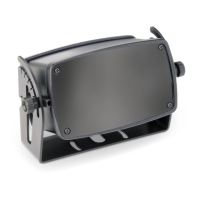
The width of the AIR field can be set using the click-in plastic cover in front of
the detector's lens.
1
PrimeTec B
Prime
Scan B
Consider the national and international regulations on door safety.
Only trained, qualified personnel may mount and start up the detector.
The unit may only be opened and repaired by Bircher Reglomat.
The unit may only be operated from a safety extra-low voltage (SELV) system with safe electrical separation.
Always consider the safety functions of your application as a whole, never just in relation to one individual section of the system.
The installer is responsible for carrying out a risk assessment and installing the detector and the door system correctly.
Avoid touching any electronic components.
The door drive and transom profile must be earthed correctly.
Start-up
2
Mounting
Translation of the original instructions
R
e
c
o
m
m
e
n
d
e
d
s
t
a
r
t
-
u
p
s
e
q
u
e
n
c
e
:
I
.
M
o
u
n
t
i
n
g
I
I
.
C
o
n
n
e
c
t
i
o
n
I
I
I
.
I
n
i
t
i
a
l
i
s
a
t
i
o
n
Mounting
I
General
Safety instructions
1
P
l
e
a
s
e
k
e
e
p
f
o
r
f
u
r
t
h
e
r
u
s
e
!
a
b
PrimeTec B
PrimeScan B
1. Remove cover hood 3. Lay and connect cable
2. Set AIR field width (see chapter 2.1) 4. Mount detector
*Factory setting
1. Slide
Detector without cover:
All light beams are active
Setting the AIR field width (PrimeTec / PrimeScan)
2.1
Field width:
2.3 m x 0.2 m
at 2.2 m
*
2. Push & click!
A
B
C
D
E
F
G
H
1.
2.
Combined detector AIR/Radar for opening and
protecting automatically controlled sliding doors
1. Position drill template
2. Drill the holes, remove drill template
3. Lay cable and mount detector
A, D covered A. C, D covered G, H covered
A, B, D covered A, B covered
Field width: 1 x 0.2 m
Field width: 1.2 x 0.2 m
Field width: 1.2 x 0.2 m
Field width: 0.5 x 0.2 m
Field width: 0.5 x 0.2 m
ENGLISH
A B C D A B C D E F G H A B C D A B C D
Mounting of the detector
2.2
abc d
abc d
a) IR-receiver c) red LED
b) IR-transmitter d) green LED
Hood
LED display
AIR light window
Cable bushing
Detector without hood
Mounting holes
Detector electronic
Optics-cover
LED AIR: red (left)
a Button Mode (red)
b Button Data (black)
LED radar: green (rig.)
AIR adjusting device
Radar module
LCD display
Possible settings (Dimensions at 2.2 m mounting hight):
267087E
10/13

 Need help?
 General

 To Next Page