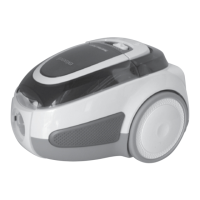
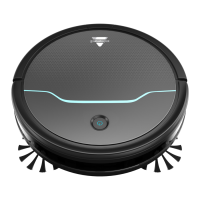
The BISSELL EV675 Robotic Vacuum (2503 Series) is an automated cleaning device designed to efficiently maintain floor cleanliness in residential settings. This user guide provides comprehensive instructions for its setup, operation, and maintenance, ensuring optimal performance and longevity of the product.
Function Description:
The EV675 Robotic Vacuum is engineered to autonomously navigate and clean various floor surfaces, including hard floors and low-pile carpets. It utilizes a combination of cleaning patterns—Auto Mode, Spiral Mode, Wall Mode, and Single Room Mode—to adapt to different cleaning needs and room configurations. The robot is equipped with a brush roll and edge cleaning brushes to effectively pick up dust, debris, and pet hair. Its intelligent design includes cliff sensors to prevent falls and a bumper to detect and navigate around obstacles. The vacuum can be controlled either directly via buttons on the unit or remotely using the provided remote control, offering flexibility in operation. For convenience, it features an automatic charging function, allowing the robot to return to its docking station when its battery is low.
Usage Features:
Setting up the EV675 involves placing the docking station against a wall with clear space around it (at least 40 inches to each side and in front) to ensure proper navigation for charging. The power adapter connects the docking station to a wall outlet, and the robot's power switch must be turned ON for the initial charge, which typically takes 4-5 hours.
The remote control is a key feature for managing the robot's operations. Before first use, batteries must be installed in the remote. Pairing the remote with the robot is a simple process: with the robot's power switch OFF, press and hold the play button on the remote for 5 seconds until the clock icon flashes, then continue holding the play button while turning the robot ON. The robot will beep three times to confirm successful pairing.
The remote control also allows users to set the clock and schedule cleaning sessions. To set the clock, press and hold the clock button until the icon flashes, then use the directional arrows to adjust the hour and minute, and press the clock button again to save. Similarly, to schedule a cleaning session, press and hold the schedule button until the icon flashes, use the directional arrows to set the desired start time, and press the schedule button again to save. Scheduled sessions can be canceled by pressing and holding the schedule button.
Operating the robot can be done with or without the remote control. With the remote, users can select from various cleaning modes:
- Auto Mode: The robot cleans in a straight path until it encounters an obstacle, then changes direction.
- Spiral Mode: Ideal for concentrated cleaning in a specific area.
- Wall Mode: Focuses on cleaning along walls and edges.
- Single Room Mode: Designed for cleaning a single room, with recommendations to close doors to contain the robot.
- Manual Mode: Allows users to direct the robot to a particular area using the remote's directional arrows.
- Return to Dock: Commands the robot to return to its docking station for charging.
Without the remote, users can simply press the Power Switch to the ON position and then press the Start/Stop Button on the robot to begin cleaning. To stop the robot, press the Start/Stop Button once. To send it back to the docking station, press the Start/Stop Button twice.
The robot provides status light and error notifications to keep users informed about its operational state. A breathing blue light indicates charging, while a solid blue light means it's cleaning. A flashing blue light signals that the robot is returning to the docking station. Flashing red lights or beeps indicate various errors, such as dirty cliff sensors, low battery, the robot being trapped, low suction, or stuck wheels, edge cleaning brushes, brush roll, or bumper. These notifications guide users in troubleshooting specific issues.
Maintenance Features:
Regular maintenance is crucial for the EV675 to ensure its continued efficiency and extend its lifespan. The user guide outlines several key maintenance tasks:
-
Cleaning the Dust Bin: The dust bin should be emptied regularly. To do this, press the release button on top of the dust bin and pull it out. Open the filter door by pulling both sides apart and empty the debris. The filter cover, foam filter, and pleated filter should then be removed. The cleaning tool can be used to brush off debris from the filter cover and filters; however, the filters themselves should not be washed. The dust bin can be rinsed with tap water, but it must be completely dry before re-installation. It is not necessary to wash the dust bin every time it is emptied, and it should not be machine washed. Once clean and dry, reinstall the filters and filter cover, then push the dust bin back into the unit.
-
Cleaning the Brush Roll: The brush roll can accumulate hair and debris, affecting cleaning performance. To clean it, pinch the tabs on the brush guard inward and pull to remove it. Lift the brush roll out. Use the provided cleaning tool to remove any tangled hair or debris. When replacing, ensure the square-shaped end piece of the brush roll is inserted into the corresponding square-shaped port, then reattach the brush guard.
-
Cleaning the Sensors: Over time, debris can build up on the robot's sensors, reducing its working efficiency. To maintain optimal performance, the sensors should be cleaned periodically by brushing off any debris. Before cleaning the sensors, ensure the robot's Power Switch is in the OFF (0) position.
-
Replacing the Battery: The EV675 uses a rechargeable Li-Ion battery. When replacement is needed, turn the Power Switch to the OFF position. Use a Phillips-head screwdriver to remove the two screws and the battery cover. Disconnect and remove the old battery. Connect the new battery and install it into the battery compartment, then replace the battery cover and secure it with screws. It is important not to remove the plastic shrink sleeve from the battery pack. For proper disposal of the old battery, users are advised to contact RBRC (Rechargeable Battery Recycling Corporation) or visit www.Call2Recycle.org.
-
Replacing the Edge Cleaning Brushes: The edge cleaning brushes can wear out or become less effective over time. To replace them, use a Phillips-head screwdriver to remove the screw holding the brush, then pull up on the base of the brush to remove it. Push the new brush directly onto the holder and replace the screw. After prolonged use, the edge cleaning brushes can be rinsed or soaked in water to improve their effectiveness, but they must be completely dry before re-installation.
All maintenance procedures require the Power Switch to be OFF and the robot disconnected from the electrical outlet to prevent electric shock. The user guide emphasizes the importance of following these instructions to ensure safe and effective operation and maintenance of the BISSELL EV675 Robotic Vacuum.


 To Next Page
 General