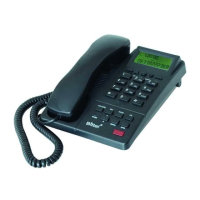
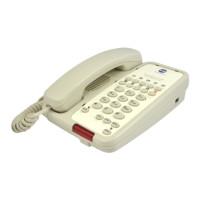
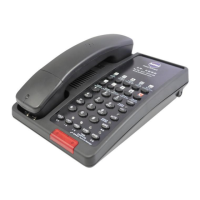
This document is a user manual for the Bittel 38 Series Phone, covering models HA9888 (38) TSD-A-S and HA9888 (38) TS-A-S. The manual provides instructions for installation, operation, and maintenance of the telephone.
Function Description:
The Bittel 38 Series Phone is designed for hotel applications, intended for use behind a registered PBX system. It offers standard telephone functionalities along with specific features tailored for hotel environments. Key functions include making and receiving calls, speakerphone operation, call holding, redialing, and programmable memory keys for speed dialing. It also features a message waiting light and a data port for connecting auxiliary devices.
Important Technical Specifications:
- Models Covered: HA9888 (38) TSD-A-S, HA9888 (38) TS-A-S
- Connectivity: RJ11C USOC standard modular jacks for telephone line and handset.
- Message Waiting Light: Compatible with high voltage neon/90V systems.
- Flash Key: Enters a 600ms hook switch flash.
- Pause Key: Inserts a 3.6-second pause in stored numbers.
- Volume Levels: Three adjustable handset/speaker volume levels (Normal, Medium, High).
- Ringer Volume: Adjustable to LOW or HI.
- Data Port: Provides access to the telephone line for connection of modem, fax, or answering machine.
- Data Switch: Adjusts data for Line 1 or Line 2, allowing for two-line phone functionality.
- FCC Compliance: Complies with Part 68 of FCC rules.
- CE Approval: Complies with CE approval.
- Hearing Aid Compatibility: Yes.
- Mute Function: Standard, with an indicator light.
- Warranty: 5 years from the date of purchase against faulty materials or workmanship, under specific conditions.
Usage Features:
Unpacking and Installation:
The package includes the 38 Series base unit, faceplates, handset, coiled handset cord, straight line cord, and the manual.
Installation steps:
- Insert one end of the coiled handset cord into the modular jack on the left side of the phone.
- Insert the other end of the coiled handset cord into the handset.
- Insert one end of the line cord into the "TO TEL" jack on the back panel of the telephone.
- Insert the other end of the line cord into a telephone wall jack.
- Place the paper faceplate over the keys, securing it with the plastic overlay tabs.
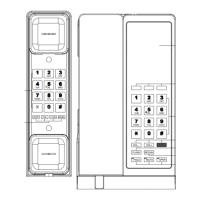
Controls and Connections:
- (1) Handset Wall Mount Clip: For holding the handset when wall-mounted.
- (2) Hook Switch.
- (3) Insert hole for placard.
- (4) Data Port: For connecting modems, faxes, or answering machines.
- (5) Tel. Jack: Modular jack for the telephone line cord.
- (6) Data Switch: To adjust data for Line 1 or Line 2.
- (7) Ring Volume: Adjusts ringer volume (LOW/HI).
- (8)/(9) Plastic and paper faceplate.
- (10) Memory Keys: Programmable for special features or one-touch dialing.
- (11) Dial Keys: Oversized keypad.
- (12) [Pause] key: Inserts a 3.6-second pause.
- (13) SPKR Key: Activates speakerphone.
- (14) Redial Key: Redials the last number dialed.
- (15) MIC. Of Speaker.
- (16) Flash Key: Enters a 600ms hook switch flash.
- (17) Message Waiting Light: Indicates ringing or a message, responds to Neon/90V signals.
- (18) Store Key: For storing numbers to Memory.
- (19) Hold Key: Places a call on hold.
- (20) VOL key: Adjusts handset/speaker volume levels.
How to Use the Telephone:
- OFF-HOOK: Lift handset or press [SPKR].
- ON-HOOK: Put down handset or press [SPKR].
- Placing a Call (Handset): Lift handset, listen for dial tone, dial number or press [REDIAL]. Hang up to end call.
- Placing a Call (Speakerphone): Press [SPKR], wait for dial tone, dial number, press [SPKR] to end call.
- Receiving a Call (Handset): When phone rings (MWL flashes), lift handset. Hang up to end call.
- Receiving a Call (Speakerphone): When phone rings (MWL flashes), press [SPKR]. Speakerphone activates automatically. Press [SPKR] to end call.
- Adjusting Handset and Speaker Volume: Press [VOL] key during a conversation to cycle through Normal, Medium, and High levels. Handset volume resets to normal after hanging up, but speaker volume retains the adjusted level.
- Speakerphone Tips:
- Activate handset from speakerphone: Lift handset.
- Activate speakerphone from handset: Press [SPKR], hang up handset.
- Redial Function: Off-hook and press [REDIAL] to dial the last number. The last dialed number disappears after 5 minutes on-hook.
- Using the [HOLD] Key: Press [HOLD] to place a call on hold. The [Hold] key indicator turns red.
- Removing a Call from Hold: In handset mode, press [HOLD]; in speakerphone mode, press [SPKR].
- Changing Phones After Placing a Call on Hold:
- Place call on hold by pressing [HOLD].
- Put handset in cradle (or just press [HOLD] for speakerphone).
- Pick up the call at another telephone. The Bittel phone will detect and remove the hold condition.
- Adjusting Ring Volume: Slide the RINGER LOW/HI switch on the back of the telephone.
- Programming Memory Keys:
- Lift handset or press [SPKR].
- Press [STORE].
- Dial the desired number (including [PAUSE] and [FLASH] if needed), then press [STORE] again.
- Press a Memory key (including [MWL]) to finish.
- Off-hook and press the memory key to dial the stored number.
- Deleting Memory Number: Press [STORE] twice, then press the desired memory key (including [MWL]).
- Message Waiting Light: Indicates a voice message. If a voice mail access number is stored, lift handset or press [SPKR], then press [MWL] to play messages. Also functions as a ringing indicator.
- Data Port: For connecting auxiliary devices like modems or fax machines.
- Data Port Switch: Allows selection between Line 1 and Line 2 for two-line phone functionality.
Maintenance Features:
- Mute Function (Standard): Press [MUTE] to mute the microphone; the indicator light illuminates. Press [MUTE] again to reactivate the microphone.
- Warranty: A 5-year warranty covers faulty materials or workmanship, provided the product has been used normally, not subjected to unauthorized repair or modifications, harsh/corrosive environments, or transit damage. This warranty is valid for merchandise purchased directly from Bittel or authorized dealers/distributors.
- FCC Warning: The device complies with Part 15 of FCC Rules, ensuring it does not cause harmful interference and accepts any interference received.

 Need help?

 To Next Page
 General