NV Image Tool
Rev. 2.03
- 8 -
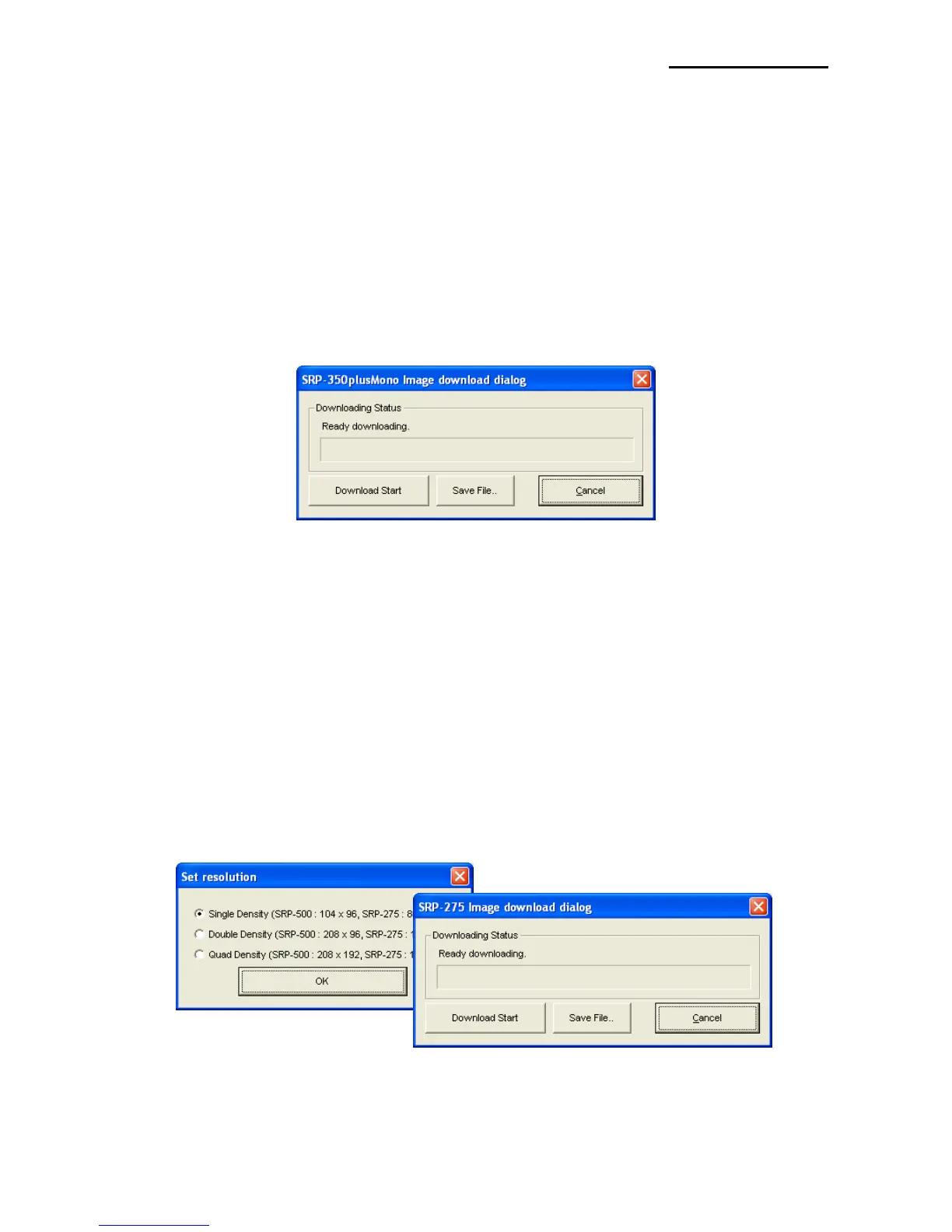
4-5-1 Download the mono image in thermal printer
* In the printer selection section of paragraph 4.2, when selecting between the STP-103,
STP-131, SRP-350, SRP-350N, SRP-350plus Mono, SRP-350plusF Mono, SRP-
352plus Mono, SRP-370 Mono, SRP-372 Mono, the Mono image download mode is
entered.
* Mono image download command uses the macro command “FS q”.
For further details, please refer to the commands manual of the corresponding model.
After all images stored on the corresponding printer are deleted, the image matching the
selected resolution level is downloaded. The image is assigned a number according to
the image list displayed on the screen.
4-5-2 Download the image in dot printer
* In the printer selection section of paragraph 4.2, when selecting between the SRP-275
and SRP-500, the Dot Printer image download mode is entered.
* The Dot Printer image download command uses the macro command “ESC g” and the
bit image command “ESC *”. For further details, please refer to the commands manual of
the corresponding model.
After all images stored on the corresponding printer are deleted, the image matching the
selected resolution level is downloaded. The image is assigned a number according to
the image list displayed on the screen.



 To Next Page