NO
FASTENERS
NO
AEROSOL CANS
NOT
A TOY
NO LOOSE
CLOTHING
NO FINGERS
OR HANDS
NO
HAIR
SKU #BD-680A
®
SKU #BD-680A
®
SKU #BD-680A
Customer Service
Black & Decker has a toll-free help line for customers living in the United States and Canada.
Our customer service phone number is 1-800-297-5028 or visit our website at
www.blackanddeckershredders.com.
Troubleshooting
If you have a problem with your shredder, check the symptoms and remedies below.
If you cannot solve the problem this way, contact Black & Decker paper shredders
Customer Service. Do not open shredder head to attempt repair: It could
expose you to electric shock and will void your warranty.
Symptom Remedy
a) Make sure that the unit is plugged in and that the outlet it is
plugged into is in good working order.
b) Be sure to not tilt open the cover completely
beyond the preset position, otherwise the
ShredSafe™ power cut off feature will be
activated and the shredder will be inoperable.
c) In the event that the shredder is runing continuously for
too long and the motor overheats, a thermal overload
switch will automatically shut the power off. If this happens,
move the switch to the off position for 20 minutes or more
before continuing.
The shredder will not start running until paper, CD/DVD, or
credit card is inserted into the appropriate feed slot. It is normal
for the motor to run for a moment after the shredder is powered
on but it should stop until paper is inserted. The trigger that
activates the shredder is located directly in the center of the feed
slot. If the paper you are inserting is narrow, it may not be
hitting the switch. It is possible that the trigger, which activates
the shredder, has become blocked with paper. Insert an index
card, directly in the center of the feed slot, and apply force.
This will usually clear any paper blocking the switch or force
the switch closed.
Shredder does not work at all.
Shredder runs in "Rev" mode
but not in "Auto" mode.
Thank you for buying a Black & Decker paper shredder. Black & Decker
paper shredders have become the benchmark for innovation, performance
and quality to protect against identity theft. We have taken great care in
designing and engineering a product to meet and exceed your needs.
To ensure years of safe, efficient performance, please read
these important product usage and safety instructions.
If you have any questions regarding the product, please feel free to
call toll-free 1-800-297-5028.
WA R N I N G
ALWAYS KEEP OUT OF REACH OF CHILDREN
WARNING ICONS:
The icons on top of the shredder warn the user of the potential dangers if the shredder
is used improperly.
W A R N I N G
WARNING: Hazardous moving parts. Keep fingers and other body parts away.
WARNING: To reduce risk of fire, electrical shock or injury:
NEVER allow children to operate a paper shredder, even under adult supervision.
A paper shredder is NOT a toy.
DO NOT use flammable synthetic oil, petroleum-based products or aerosols of any kind
on or near product at any time.
DO NOT operate any electrical product with a damaged cord.
ALWAYS keep the power cord clear of the shredder opening.
AVOID getting jewelry, hair or loose clothing too close to feed slot as serious injury can occur.
DO NOT handle plug or product with wet hands.
ALWAYS keep children and pets away from the shredder.
ALWAYS unplug shredder when not in use.
DO NOT attempt to feed more sheets of paper than specified on the feeder.
DO NOT attempt to shred materials other than paper, credit cards and CD’s.
DO NOT hold CD or DVD with finger through the center ring while feeding into shredder.
ALWAYS empty the wastebasket prior to becoming full.
DO NOT place shredder near heat or water source.
DO NOT open shredder head to attempt repair: It could expose you to electric shock and
will void your warranty.
The socket-outlet shall be installed near the equipment and shall be easily accessible.
The Following are Important Safety Instructions.
Read All Instructions Before Using.
Limited Warranty
HoMedics warrants the cutting cylinders of the machine against defects of
workmanship and material for a period of 5 years from the original purchase
date to the original consumer. HoMedics warrants all other parts of the machine
against defects of workmanship and material for a period of 1 year from the
original purchase date to the original consumer.
Should there be a defect or malfunction of this product, HoMedics will replace the
product free of charge. Customer is responsible for all shipping charges to return the
defective product to HoMedics. A copy of the proof of purchase showing original
purchase date is required. This warranty is void if the product has been subject to
damage, unreasonable use, improper service, or other causes not arising from
defects in original material or workmanship. This warranty is void if factory seal is
broken or removed from the product. This warranty does not include adjustments,
parts or repairs required by circumstances beyond the control of HoMedics.
There are no expressed warranties other than those stated herein.
Any expressed or implied warranties, including but not limited to merchantibility and
fitness for a particular purpose are limited to the above warranty period. HoMedics
shall not be liable for any incidental or consequential cost, expenses or damages
resulting from any failure defect or malfunction of this product.
Some states do not allow the exclusion of limitations of implied warranties or
consequintial damages, therefore, the above limitations may not apply to you.
This warranty grants you specific legal rights, and you may also have other
rights that vary from state to state.
Please contact us with any questions.
HoMedics, Inc.
3000 Pontiac Trail
Commerce Township, MI
48390
Black & Decker and the Black & Decker logo
are trademarks of The Black & Decker Corporation
and are used under license. All rights reserved.
®
Distributed by
SKU #BD-680A
®
SKU #BD-680A
Please read these instructions before use
®
SKU #BD-680A
Maintenance
It is important to empty the waste bin regularly to ensure the smooth operation of the
cutting cylinders. The shredder will not operate when the bin is full. Regular oiling is a
lso necessary for proper performance. It is recommended to use the shredder oil
every few weeks
.
FIGURE 2 FIGURE 3
FIGURE 1
FIGURE 5
FIGURE 4
Cleaning
Installation
• ALWAYS UNPLUG THE SHREDDER BEFORE CLEANING!
• Only clean the shredder by carefully wiping the unit with a dry soft cloth or towel.
• Do not clean or immerse shredder in water. Having the unit wet may result in
damage or malfunction to the electrical components. If the shredder happens to
get wet, be sure to completely dry the unit immediately with a cloth or towel.
• Never use anything flammable to clean the shredder. This may result in serious
injury or damage to the product.
When shredding is completed, you can press the designated “push close” area on the
cover to tilt shut the paper feed slot (FIGURE 5). It is recommended to have the paper
feed slot closed when shredder is not in use. This will prevent any objects from getting
into the feed slot and accidentally shredded.
*Be sure to not tilt open the cover completely beyond the preset position,
otherwise the ShredSafe™ power cut off feature will be activated and
the shredder will be inoperable.
Operation
ShredSafe™ technology is an added safety feature incorporated in this particular
model. It is a new technology where the shredder is able to detect forced entry and
automatically cuts the power off, preventing further shredding.
To begin shredding, locate the switch on the unit and select the “Auto” mode (FIGURE 2).
The Green LED light indicates the shredder is “On” and ready to use. Press the designated
“push open” area on cover to tilt open and expose the paper feed slot (FIGURE 3).
The cover will click into a preset position for safe shredding.*
Paper feeds from both left and right sides. With the feed slot now open, you can shred
sheets of paper or 1 credit card per pass (FIGURE 4).
Auto: This setting allows the shredder to be automatically started by inserting
paper into the shred opening. Always feed the paper in as straight as possible.
Paper feeds from both left and right sides. When the paper has passed through,
the shredder will automatically stop. (FIGURE 2)
Off: This setting turns off all features of the shredder. For safety reasons,
we recommend that you leave the shredder in the "Off" position whenever
the shredder is unattended or not in use. (FIGURE 2)
Rev: In the unlikely event of a paper jam, the reverse setting can be used to
help clear the cutters of paper that has not passed through. Never attempt to
clear a jam by using the reverse function until you have emptied the wastebasket.
(FIGURE 2)
I
R
O
Never shred plastic (except credit cards), any hard materials, continuous
forms, newsprint, or anything with adhesives including labels and envelopes.
While this shredder will shred staples, it is recommended that you remove them whenever
possible in order to extend the life of your shredder.
Only shred credit cards by feeding them vertically within the
designated area. Never feed more than one credit card at a time.
Sheet Capacity
Credit Card Capacity 1 at a time
6 sheets of
20lb. bond paper
Voltage 120V-60Hz 3.0A
Paper Shred Size
1/8” x 11/32” pieces
3.3 mm x 9 mm pieces
The BD-680A SERIES can shred up to 6 sheets of 20 lb. bond paper in widths up to 8.5"
ONE FOLDED SHEET OF PAPER EQUATES TO 2 SHEETS OF PAPER
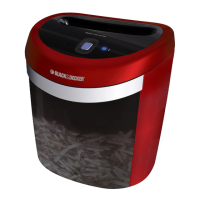
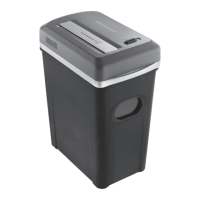
Mount the shredder securely to the rim of the waste basket. (FIGURE 1) A socket-outlet
should be near the equipment and be easily accessible. Connect the power cord to any
standard 120 volt AC outlet.
This shredder includes a built-in safety mechanism that requires the
shredder to be correctly mounted on the supplied wastebasket. It is not
designed to operate with any other wastebaskets. An activation switch located on the
head unit automatically shuts off the shredder when it is lifted or removed. The supplied
wastebasket activates this switch, which allows the shredder to be operable. Lining the
wastebasket with a plastic bag will interfere and may keep the shredder from functioning.
Caution: MicroShred shredders have very sharp exposed blades on the underside.
Use care when mounting the shredder on the wastebasket.

 Need help?
 General



 To Next Page