Page 5
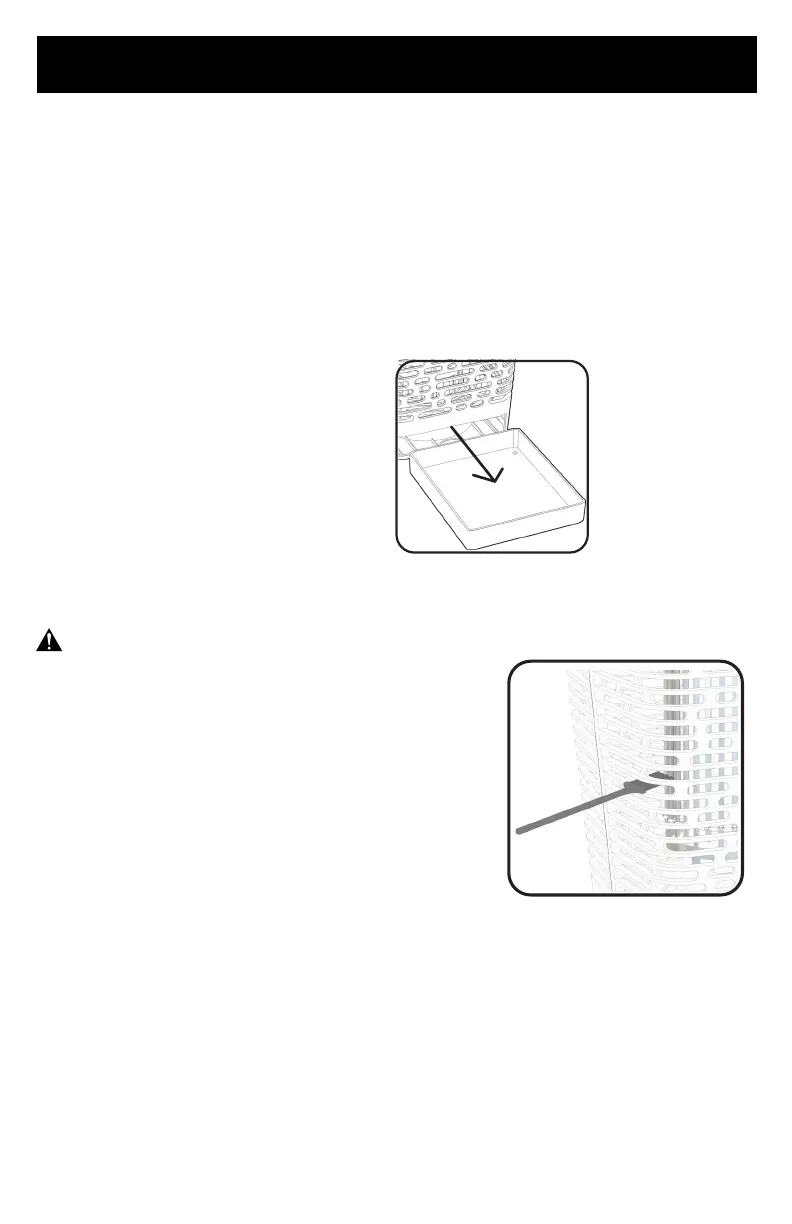
REMOVING & CLEANING BOTTOM TRAY:
MAINTENANCE
Removal of bottom tray when unit is placed in yard eliminates the need to empty bottom
tray for insect removal.
If bottom tray is intended to contain dead insects from falling to ground, tray should be
emptied frequently. Use caution and use gloves when opening tray as some dead insects
potentially may fall out of tray upon removal.
The BDPC912 Electronic Bug Zapper exterior housing does not require cleaning. Periodic
rainfall will clean the exterior. Do not attempt to clean the housing with water or spray or
any other liquids.
• In areas with large insect populations, electric
grid may begin to accumulate dead insects on
the grid that can affect the function of the device.
To ensure effective use of this device periodic
cleaning of electric grid with included brush may
be necessary.
• Rate of cleaning depends on insect population in
your area.
1. Unplug the device and remove unit from hanging position and allow it to sit for three
hours to allow all electricity in unit to disperse.
2. Access grid through the open slots in grill as shown using included cleaning brush and
gently brush away dead insects so they fall down into the lower tray for removal.
3. Never use water to clean the unit as this can cause damage to the electronics.
4. Use care and make sure not to move the metal electric grid.
5. Return unit to hanging position and plug back in
ELECTRIC GRID CLEANING:
WARNING:
Always unplug your Bug Zapper before cleaning to
avoid electric shock. When cleaning electric grid, only
use included cleaning brush to avoid any risk of shock
or injury. Ignoring this warning may result in death or
injury.
To remove tray:
Slide out as shown



 To Next Page