EasyManua.ls Logo

Black & Decker FSMH1621S - User Manual

Black & Decker FSMH1621S
12 pages
Print Icon
To Next Page IconTo Next Page
Loading...
FSMH1621S

Questions and Answers

  • C
    christydominguezJul 26, 2025
    How to fix Black & Decker Steam Cleaner not turning on?
    • R
      Ronald NunezJul 26, 2025
      If your Black & Decker Steam Cleaner isn't turning on, there are a few things you can check: * Make sure the unit is properly plugged into the wall socket. * Ensure the unit is switched on using the power switch. * Check the fuse in the plug.
  • J
    Jonathan BrownJul 31, 2025
    What to do if Black & Decker FSMH1621S Steam Cleaner is not producing steam?
    • K
      karen05Jul 31, 2025
      If your Black & Decker Steam Cleaner is not producing steam, please check the following: * Ensure that the handle is pulled back from the upright position, as steam is only produced in this position. * Verify that the water tank is full. Note that it may take up to 45 seconds for steam to be produced when first filled or after running dry. * Make sure the steam head is firmly docked into the steam mop body.
  • J
    Justin RileyAug 4, 2025
    Why is my Black & Decker Steam Cleaner producing too much steam?
    • M
      Matthew BrockAug 4, 2025
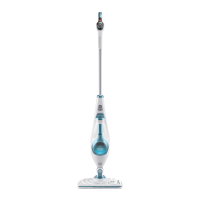
      If your Black & Decker Steam Cleaner is producing too much steam, it could be due to the selected steam setting or the steam burst button. The steam mop has 3 settings, so try pressing the autoselect button to reduce the amount of steam being produced. Also, check that the steam burst button has not been pressed.
  • W
    wmcfarlandAug 8, 2025
    What to do if Black & Decker Steam Cleaner digital controls do not light up?
    • W
      William MartinezAug 8, 2025
      If the digital controls on your Black & Decker Steam Cleaner do not light up, ensure that: * The handle of the steam mop is pushed firmly into the steam mop body and that the arrow on the handle is flush with the top of the steam mop body. * The hand held steam cleaner is firmly docked into the steam mop body.
  • D
    Deborah FernandezAug 12, 2025
    Why is my Black & Decker FSMH1621S Steam Cleaner producing too little steam?
    • K
      Kelly Graham MDAug 12, 2025
      If your Black & Decker Steam Cleaner is producing too little steam, try the following: The steam mop has 3 settings. Press the autoselect button to increase the amount of steam being produced. You can also press the steam burst button to temporarily increase the amount of steam.
  • H
    Haley KlineAug 17, 2025
    How to detach hand held steam cleaner from Black & Decker Steam Cleaner?
    • F
      fieldskayleeAug 17, 2025
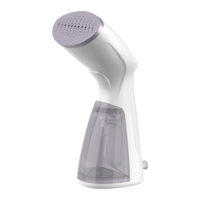
      To detach the hand held steam cleaner from the Black & Decker Steam Cleaner, firmly press the hand held steam cleaner release button down, then pull the hand held steam cleaner from the steam mop body.
  • S
    Samantha WilliamsonAug 20, 2025
    Why no steam from Black & Decker hand held steam cleaner?
    • C
      Cheryl RiveraAug 20, 2025
      If no steam is being produced from the hand held steam cleaner when the trigger is pulled, the hand held steam cleaner has a lock off feature. Lift the lock off switch and pull the trigger switch. After a few seconds steam will be produced.

Summary

Black & Decker Steam Mop: Overview and Assembly

Intended Use and Features

Overview of the product's purpose and included features.

Main Unit Assembly

Guides for connecting the handle, steam head, and handheld unit.

Pad and Water Tank Preparation

Steps for attaching cleaning pads and filling the water tank.

Steam Mop Accessories and Basic Operation

Carpet Glider and Scent Pack Usage

Instructions for using carpet glider and fitting scent packs.

Hose and Accessory Attachment

Guides for connecting the hose and various accessories.

Detaching Hoses and Accessories

Steps for safely detaching the hose and accessories.

Powering the Steam Mop On;Off

Procedure for powering the steam mop on and off.

Advanced Steam Mop Functions

Autoselect Technology and Steam Burst

Using Autoselect modes and steam burst for specific cleaning needs.

Handheld Unit Operation Guide

Instructions for switching the handheld steam cleaner on and off.

Tips for Optimal Steam Mop Performance

Advice for effective cleaning and general usage.

Specialized Cleaning and Storage

Carpet Refreshing Procedure

Guide on using the steam mop to refresh carpets.

Post-Use Shutdown and Storage

Steps for shutting down, cooling, and storing the appliance.

Handheld Steam Cleaning Operations

How to operate the handheld unit with accessories.

Product Support and Troubleshooting

Accessories, Technical Data, and Troubleshooting Intro

Info on accessories, specs, and initial troubleshooting steps.

Troubleshooting: Power and Steam Generation Issues

Solutions for power-on failures and steam production problems.

Troubleshooting: Controls and Steam Flow Adjustments

Resolving issues with digital controls and steam output.

Advanced Troubleshooting and Resources

Troubleshooting: Accessory Fit and Steam Leaks

Solutions for accessories falling off and steam leaks.

Finding More Information and Accessories

Where to find additional help and purchase accessories.

Black & Decker FSMH1621S Specifications

General IconGeneral
TypeSteam mop
Capacity0.35 L
Cord length5 m
Product colorBlue, White
Steam pressure- bar
On/off switchYes

Related product manuals