7
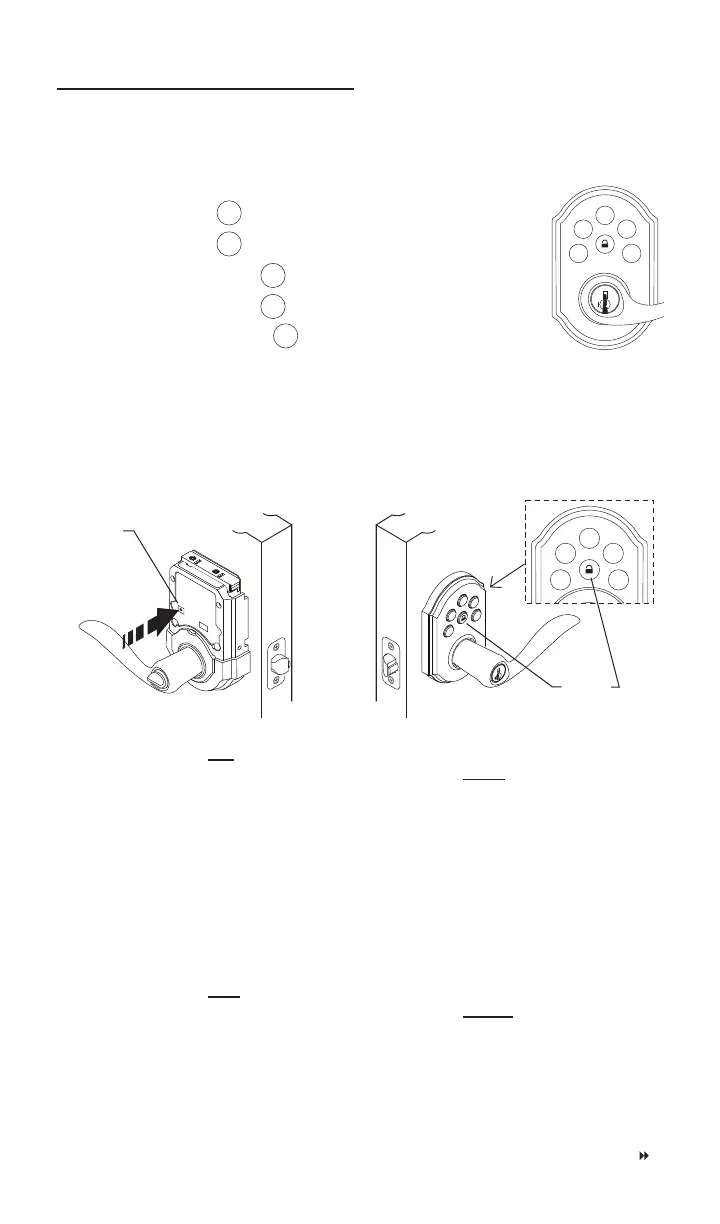
Howthekeypadworks:
Eachbuttonrepresentstwonumbers(i.e.1and2fortherstbutton).You
onlyneedtopushthebuttononcetogeteither1or2.Forexample:If
yourcodeis1-2-5-6-8,
■Pressthe
buttononcetogetnumber1.
■Pressthe
buttononcetogetnumber2.
■Thenpressthe
buttononcetogetnumber5.
■Thenpressthe
buttononcetogetnumber6.
■Finallypressthe
buttononcetogetnumber8.
10.ProgrammingaUserCode.
● A programmed code can be from four (4) to eight (8) digits long.
●For maximum security an 8 digit code is recommended.
●Up to 4 user codes can be entered.
●Excess delay in the programming steps once started will cause unit to
beep twice and will require you to restart from step (10a).
Note: Programming instructions can also be found on interior of lock.
a.Presstheprogrambuttonontheinteriorunitonce.
b.
Enterin4to8digitcodeontothekeypad.
c.Pressthe“LOCK”buttontosavecode.
d.
a.Presstheprogrambuttonontheinteriorunittwice.
b.
Enterin4to8digitcodeontothekeypad.
c.Pressthe“LOCK”buttontosavecode.
d.
Pressthe“LOCK”buttonandre-enterthecodetotest.Unitshouldgo
totheunlockedpositionallowingexteriorlevertoretractthelatch.Ifit
doesnotgototheunlockposition,repeatsteps(a)through(c).
Pressthe“LOCK”buttonandre-enterthecodetotest.Unitshouldgo
totheunlockedpositionallowingexteriorlevertoretractthelatch.Ifit
doesnotgototheunlockposition,repeatsteps(a)through(c).
Programmingthe1stusercode.
Programmingthe2ndusercode.
Program
Button
LOCK
Button
Continued



 To Next Page