Page 28
724-746-5500 | blackbox.com
Chapter 4: Configuration
AP Mode
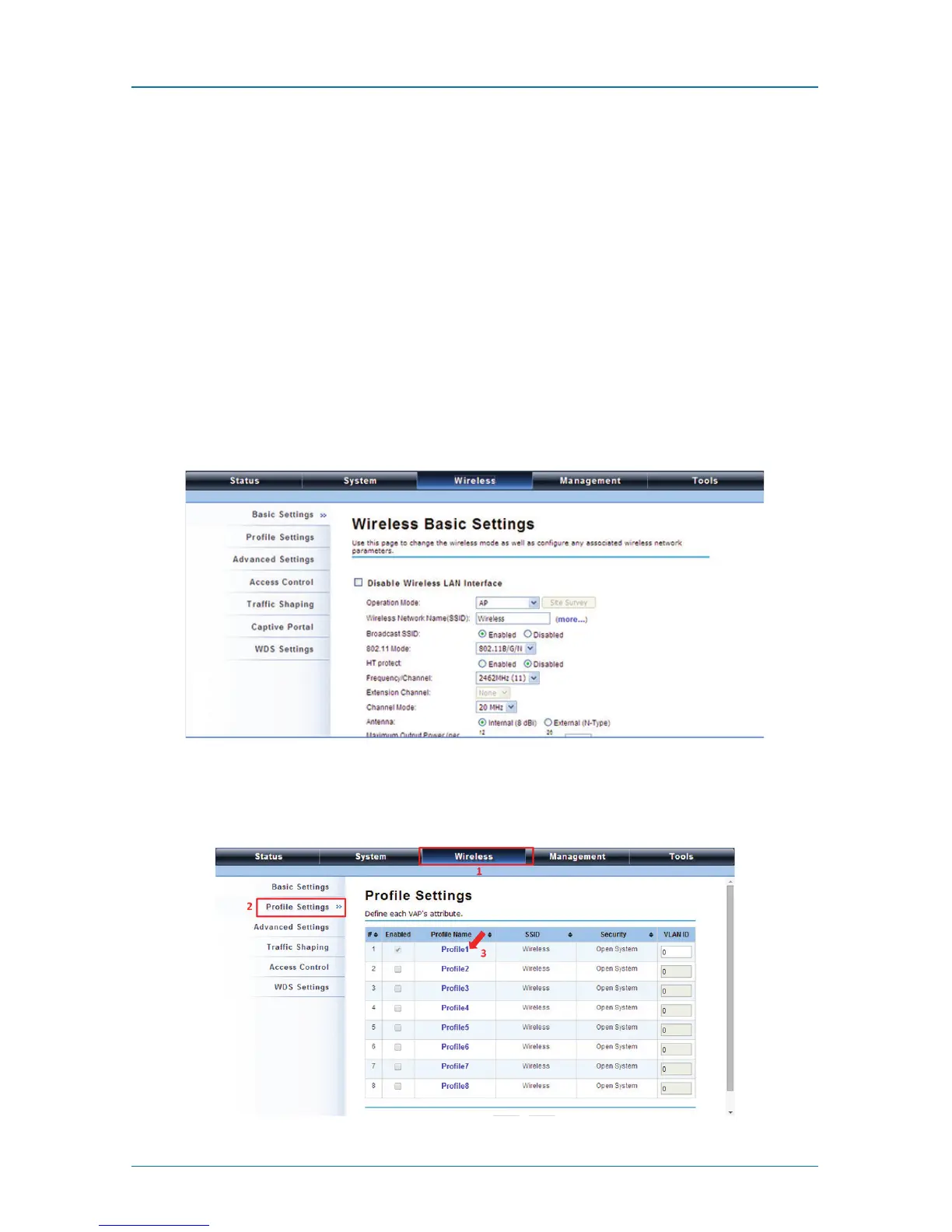
1. Choose Wireless —> Basic Settings. The default is AP mode already. Here, you
can set the parameters to optimize your application, or you can leave them as
the default. Click “Apply” to save the parameters.
NOTE: In the example here, we only change the “Wireless Network Name (SSID)”
as “Join_me”, and later, we will show you if AP mode works correctly. In
addition, for better coverage of the AP, you may also use an external
antenna; if so, remember to set the antenna setting from “Internal (8 dBi)”
to “External (N-Type)” after your external antenna is successfully installed.
You are able to choose “External (N-Type)” only when you have installed the
external antenna; otherwise, it might cause damage to the Wireless Ethernet
Extender itself.
Figure 4-21. Wireless Basic Settings screen.
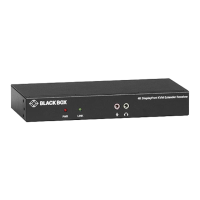
2. If security is required, open Wireless —> Profile Setting and enter “VAP Profile
1 Settings” as below.
Figure 4-22. Profile Settings screen.











 To Next Page