EasyManua.ls Logo

BLACK DECKER CM2046 - Getting to Know Your Control Panel; Control Panel Buttons and Displays Overview

BLACK DECKER CM2046
48 pages
Print Icon
To Next Page IconTo Next Page
To Previous Page IconTo Previous Page
Loading...
6
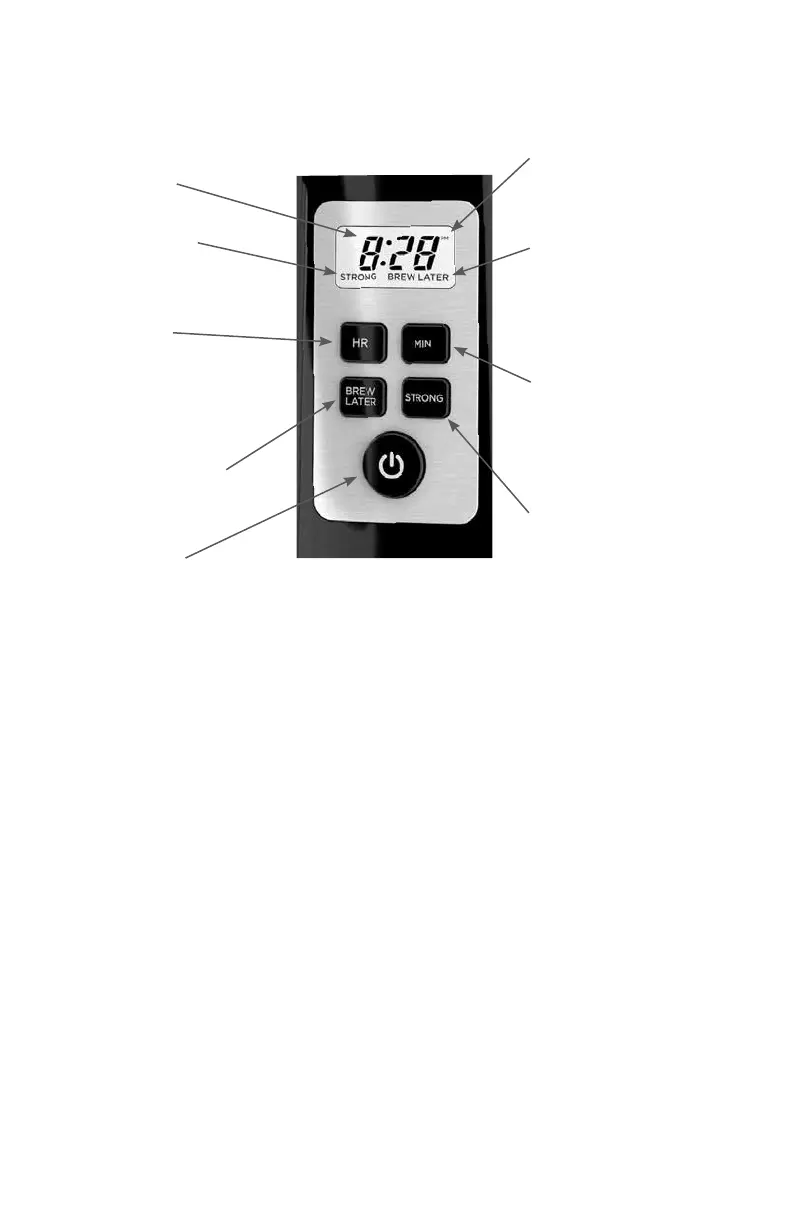
GETTING TO KNOW YOUR CONTROL PANEL
Digital Clock with
LCD Display
Strong display
When showing,
indicates that the
strong mode is set.
Hour Button
Use to program the
clock
(see “Programming”
section)
Brew Later Button
Use to program
(see “Programming”
section)
Power Button
Lighted button turns
the unit ON or OFF.
PM indicator
Shows when the clock
is set past noon.
Brew Later display
When showing,
indicates that the
Brew Later function
is set.
Minute Button
Use to program the
clock
(see “Programming”
section)
Strong button
Use to program
(see “Programming”
section)

Related product manuals