5
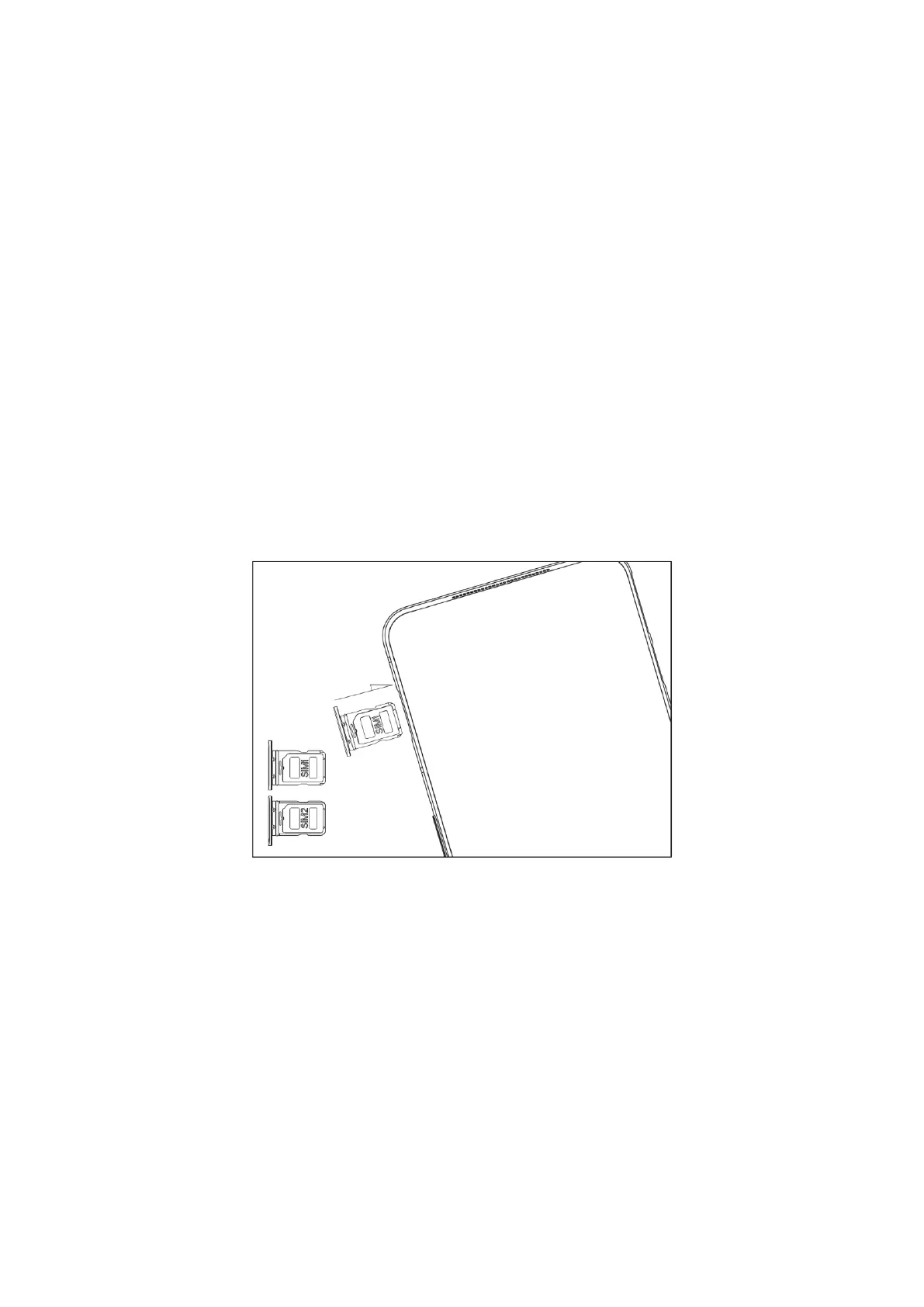
Installation of SIM card
• Be careful not to scratch your device or hurt yourself when using the ejector.
• Store the SIM ejector out of the reach of children to prevent accidental
swallowing or injury.
• The SIM card cannot be bent, scratched, electrified, or wetted.
1. Power off your device before installing the SIM card.
2. Insert the SIM ejector into the small hole on the SIM card tray. Press the ejector
firmly into the hole to push the SIM card tray out.
3. Place the SIM card correctly according to the label on the card tray and use the
standard Nano SIM card in card slots 1 and 2. Non-standard cards may not be
recognized and could damage the card tray.
4. Install the SIM card tray back into your device.
Dual SIM Card Management
The Black Shark phone supports Dual SIM Dual Standby single-call. You can select the
default mobile data card or calling card as needed in Settings.
The SIM card in slot 1 or slot 2 supports 5G NR / TD LTE / FDD LTE / WCDMA / EVDO /
CDMA / GSM. If your phone has two SIM cards, only the mobile data card can support
5G and CDMA service.
Note: Network support depends on the situations of carrier’s network and related
services deployment.



 To Next Page