BLACKSTONEPRODUCTS.COM/SUPPORT
ENGLISH
| OWNER’S MANUALUSING YOUR BLACKSTONE
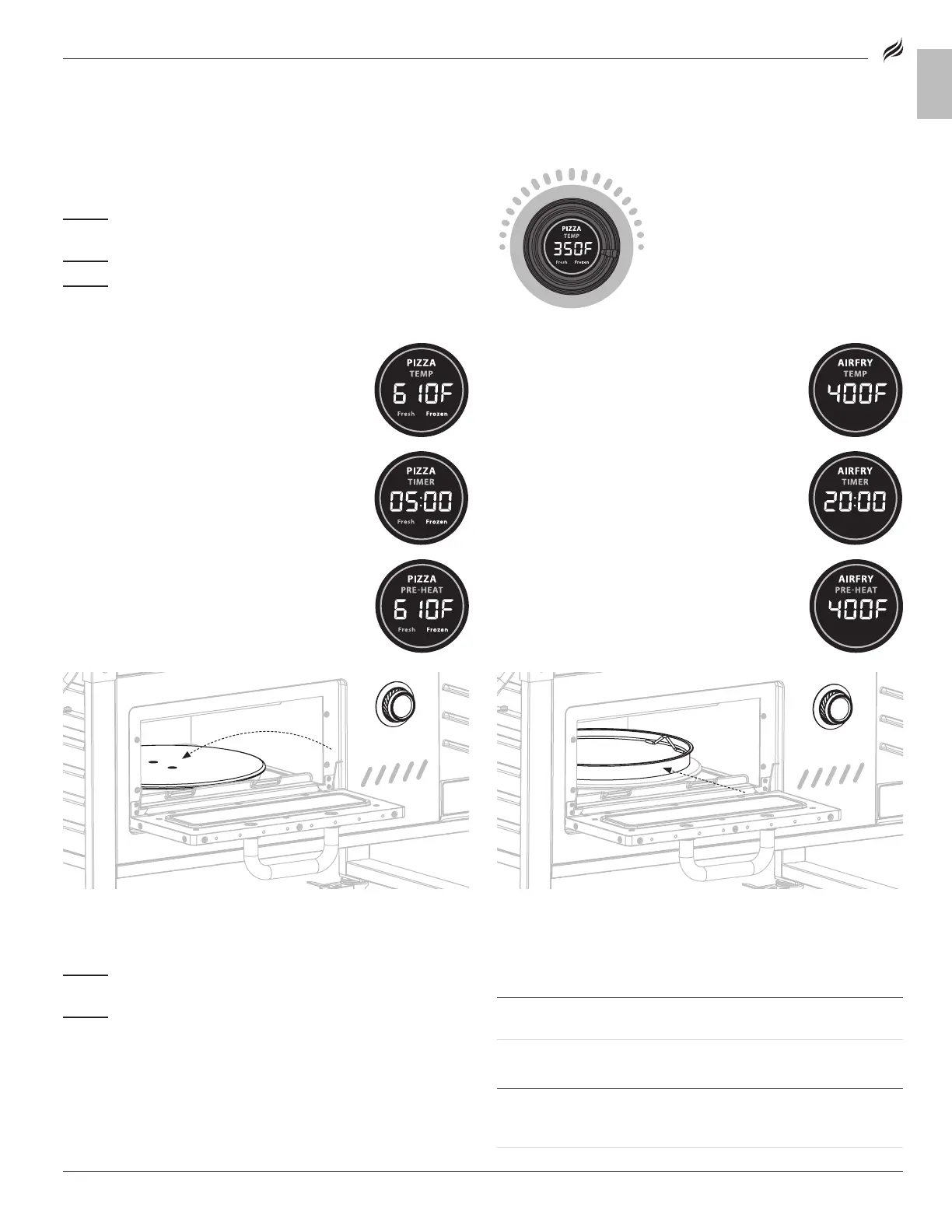
OVEN IGNITION INSTRUCTIONS
(Ensure that the cord is plugged into an outlet.)
TURN ON/ STANDBY MODE:
STEP 01
Press the control knob to enter STANDBY MODE.
(Press and hold for 3 seconds if oven is already on.)
(Press and hold for 3 seconds if oven is already on.)
STEP 02
Turn the knob to select PIZZA or AIRFRY.
STEP 03
Press the knob to confirm.
TO TURN THE OVEN OFF:
STEP 01
Press and hold the control knob for 3 seconds to enter
STANDBY MODE.
STEP 02
Press and hold the control knob for 3 seconds to enter
sleep mode.
PIZZA:
01.
From STANDBY MODE, confirm PIZZA.
02.
Turn the knob to select FRESH or FROZEN.
03.
Press the knob to confirm.
04.
Default temperature and time will display.
FRESH – 610°F, 5 MINUTES
FROZEN – 390°F, 10 MINUTES
05.
Press the knob to confirm.
06.
PRE-HEAT will display until set temperature or
set time is reached. Buzzer will sound three (3)
times and timer will be displayed.
07.
Open the door and insert pizza directly on the
steel turntable.
08.
Buzzer will sound three (3) times when job is
done.
AIR FRYER:
01.
From STANDBY MODE, confirm AIRFRY.
02.
Default temperature will display.
03.
Rotate then press the knob to confirm.
Temperature range is 180-450°F.
Temperature range is 180-450°F.
04.
Press the knob to confirm.
05.
TIMER will display.
06.
Rotate then press the knob to confirm.
Fast rotation will increase by 25°F, slow rotation will
Fast rotation will increase by 25°F, slow rotation will
increase by 5°F.
07.
PRE-HEAT will display until set temperature or
set time is reached. Buzzer will sound three (3)
times and timer will be displayed.
08.
Open the door and insert food. (Pan can be
used by itself as a cookie sheet, etc. Trivet
MUST be used when air frying.)
09.
Buzzer will sound three (3) times when job is
done.
OVEN TROUBLESHOOTING:
ErH Alarm Prompt
ErP Alarm Prompt
CAUSE SOLUTION
High temperature alarm.
Temperature is over 760°F.
CAUSE SOLUTION
Temperature
sensor is short circuited, open
circuit, or damaged
.
.
Contact customer support.
MODEL: 2295


 To Next Page